
Script Fonts: 12 Best Script Fonts for Every Style, From Formal to Brush
Script fonts imitate joined handwriting, from engraved copperplate and pointed-pen calligraphy to brush lettering, signatures and retro sign-painter scripts. This guide covers every branch of the family, how to reach the alternates that make a script look written, how to pair it, and the legibility rules that keep it readable.
Our top three are ED Drayton, a classic invitation script with more than 120 stylistic sets and ligatures; Letters from Madelyn, a modern calligraphy script in three weights; and Pearlside, a variable script that runs from Thin to Black. Every font on the main list is a commercial Creative Market font, none repeated from our style-specific roundups. Six free script fonts for commercial use are further down.
Browse script fonts on Creative Market Commercial fonts: regular one-seat Desktop prices, checked October 2026
What is a script font?
A script font is a typeface whose letters are based on the fluid strokes of handwriting, usually slanted and often joined from one letter to the next. Script fonts range from formal copperplate to casual brush lettering. They are display type: made for names, headings and logos, not for long paragraphs of body text.
Wikipedia splits script typefaces into two groups. Formal scripts are “highly regular formal types similar to cursive writing,” based on the 17th- and 18th-century writing masters; typefaces modelled on George Bickham, George Shelley and Charles Snell appeared in the late 18th and early 19th centuries. Casual scripts show “a less formal, more active hand,” often brush-made rather than pen-made, and arrived in the early 20th century.
The formal line runs through copperplate, named after copybooks printed from engraved copper plates such as Bickham’s The Universal Penman (1733–1741), according to Wikipedia. In America it gave way to Spencerian script, developed by Platt Rogers Spencer around 1840; the Ford logo is still written in it. Our guides to Bickham Script Pro and Burgues Script cover two famous digital descendants of these hands.
The casual line took off with faces such as Brush Script, drawn by Robert E. Smith for American Type Founders in 1942. Casual scripts multiplied once phototypesetting arrived in the 1950s, because film made overlapping, joined letters easy where metal type had struggled. OpenType took the next step: contextual alternates swap in matching letter shapes automatically, so repeated letters can vary without manual picking.
Types of script fonts
“Script” is an umbrella. These are the branches you’ll meet when shopping, and where we cover each in depth. Shops also say “script lettering font” for fonts that copy drawn hand lettering rather than written handwriting; the brush and retro styles below mostly fit that label.
Formal script fonts
Copperplate and Spencerian descendants: regular slant, hairlines against shaded downstrokes, looping capitals. They dominate invitations, certificates and luxury labels; see our wedding fonts list.
Calligraphic and modern calligraphy scripts
Pointed pen or brush pen, but looser than copperplate, with bouncing baselines and long entry and exit strokes. Our calligraphy fonts roundup covers both.
Brush script fonts
Heavier, faster and often textured, for packaging, posters and social graphics. See our brush script fonts guide.
Casual script fonts
Everyday joined handwriting with an even pen stroke. For school-style joined letters, see our cursive fonts roundup.
Signature scripts
Fast, narrow and sharply slanted, imitating an autograph, for personal brands and watermarks. More in our signature fonts list.
Monoline scripts
One stroke weight throughout, like a gel pen or neon tube. They survive small sizes, embroidery and vinyl cutting better than high-contrast scripts.
Retro and sign-painter scripts
Bold scripts from mid-century advertising, diner signs and jerseys, often with a tail swash. Our sign painter fonts roundup covers the hand-painted end.
Connected vs non-connected scripts
In a connected script each lowercase letter joins the next, so a word reads as one ribbon. In a non-connected script letters stand apart; Wikipedia’s example is Freestyle Script. Connected scripts look more like real handwriting but need ligatures and careful spacing to avoid gaps; non-connected ones tolerate awkward software better.
The best script fonts at a glance
| Font | Best for | Styles | Desktop price* |
|---|---|---|---|
| ED Drayton | Formal invitations, certificates | 1 script, 535 glyphs | $15 |
| Letters from Madelyn | Modern calligraphy names and quotes | 3 weights | $23 |
| Mr Christo | Calligraphic logos, multilingual work | 1 script, 1,031 glyphs | $32 |
| Slight | Expressive headline lockups | 1 script, 1,000+ glyphs | $32 |
| Cocktails and Company | Brush script for menus and social | 1 script | $25 |
| Gerald and Margaret | Friendly casual branding | 1 script | $23 |
| Nedalin | Signature logos and watermarks | 1 script with swashes | $17 |
| Jinglers | Monoline logos and badges | 1 script | $18 |
| Thistails Font Duo | Ready-made script and sans pairing | 4 plus swashes | $17 |
| Dreamies Retro Script | Retro packaging and logos | 1 script | $19 |
| Pearlside | Brands that need several weights | Variable, 9 weights | $27 |
| Bloomingdale | Stylistic-set power users | 1 script, 600+ glyphs | $21 |
*One-seat desktop licence on Creative Market, checked October 2026.
How we chose these fonts
As a hub page, the goal was coverage: at least one strong font for each script family above, with no pick repeated from our calligraphy, brush, cursive, signature, wedding or sign-painter roundups. We started from tantype’s reviews of Creative Market fonts and checked every listing live in late October 2026 for availability, the regular one-seat Desktop price, styles, glyph counts, OpenType features and languages. We favoured fonts with documented alternates and say where a listing is thin. We did not print or cut every font.
Best script fonts on Creative Market
Prices are regular one-seat Desktop licences, checked October 2026. Sales are frequent; see each listing for current pricing.
1. ED Drayton: the formal script
Emyself Design’s ED Drayton is a classic connected script with round bowls and looping ascenders, the hand you expect on an invitation or diploma. The value is depth: 535 glyphs, more than 120 stylistic sets and ligatures, and contextual alternates that vary consecutive similar letters automatically. Our review found the default setting a little plain until you open those sets. OTF, TTF and WOFF, multilingual, one weight. Desktop licence: $15.
See ED Drayton on Creative Market · Read our ED Drayton review
2. Letters from Madelyn: modern calligraphy in three weights
PeachCreme’s Letters from Madelyn is a pointed-pen modern calligraphy script with a wandering baseline. Unusually, it has three weights: Regular is fine and delicate, while Bold holds up as a short headline or a foil-printed name. Every lowercase letter has at least two alternates and some have up to ten, backed by 82 ligatures, so a long name rarely repeats a shape. OTF, TTF, WOFF and WOFF2, plus vector illustrations. Desktop licence: $23.
See Letters from Madelyn on Creative Market · Read our Letters from Madelyn review
3. Mr Christo: calligraphy with wide language support
Up Up Creative’s Mr Christo is a brush-pen calligraphy script with visible pressure changes and a disciplined baseline, so words read before they flourish. The listing counts 1,031 glyphs, 95 of them ligatures, and support for 200 languages, rare for a decorative script. Stylistic sets, character variants and initial and final forms add swashes to the first and last letters of a word. Strong for logotypes and beauty packaging. Desktop licence: $32.
See Mr Christo on Creative Market · Read our Mr Christo review
4. Slight: an expressive, heavily slanted script
Slight, also from Up Up Creative, leans hard right and moves like fast calligraphy. Its trick is several versions of ascending and descending letters, so a word’s silhouette changes with your choices. The listing counts over 1,000 glyphs, with contextual and stylistic alternates, initial and final forms, ligatures and six ampersands. It ships as one OTF, and full character-map access needs a special file from the seller, so it suits Illustrator users more than Canva users. Desktop licence: $32.
See Slight on Creative Market · Read our Slight review
5. Cocktails and Company: a loose brush script
Nicky Laatz’s Cocktails and Company keeps its brush imperfections: dry-brush breakup at stroke ends, uneven joins and a wandering baseline. The letter skeletons stay plain enough to read on a menu board or an Instagram quote. The listing calls it “ligature based” and “PUA encoded”: the handwritten effect depends on OpenType ligatures, and PUA codes let you reach the extras in apps without OpenType support. Desktop licence: $25.
See Cocktails and Company on Creative Market · Read our Cocktails and Company review
6. Gerald and Margaret: a warm casual script
PeachCreme’s Gerald and Margaret has a felt-tip look: even stroke weight, a generous x-height and a slightly wobbly baseline. That x-height makes it one of the more readable scripts here at small sizes, good for packaging copy, cards and friendly brand lines. It includes alternates and ligatures, but the listing says not every letter has an alternate, so check the previews for words with repeated letters. Desktop licence: $23.
See Gerald and Margaret on Creative Market · Read our Gerald and Margaret review
7. Nedalin: a bold signature script
Nedalin, sold by Lemonthe, is heavier than most signature fonts, so it doesn’t vanish as a small watermark or embroidered logo. It has ligatures, numerals and multilingual support, and a swash shortcut: type two underscores after a lowercase letter (a__ to z__) for the tailed version, no glyphs panel needed. The extras are PUA encoded too. Use it for personal brands, photography marks and short headlines. Desktop licence: $17.
See Nedalin on Creative Market · Read our Nedalin review
8. Jinglers: a monoline connected script
Arendxstudio’s Jinglers is drawn with one stroke weight, open loops and a gently rising and dipping baseline. With no thick-thin contrast, it reads more like routed wood or painted shop lettering than a pen. Monoline is the practical choice for vinyl, embroidery and engraving because no hairline gets too thin to cut or stitch. The listing only says it “may include” alternates and ligatures, so check the previews. Desktop licence: $18.
See Jinglers on Creative Market · Read our Jinglers review
9. Thistails Font Duo: script and sans together
Panatype Studio’s Thistails solves pairing for you: a casual monoline script and a slightly condensed sans, each in a clean and a rough cut, plus a swashes file. The rough cuts add a light printed grain without hurting legibility. It has ligatures, a stylistic set and a long language list, from Western and Central European to Baltic, Turkish and Pan-African Latin. OTF and TTF. A sensible buy for product labels and small shops. Desktop licence: $17.
See Thistails Font Duo on Creative Market · Read our Thistails review
10. Dreamies Retro Script: bold mid-century lettering
Typeparties’ Dreamies Retro Script is thick-nibbed and mid-century: heavy strokes with tight connections, closer to soda logos and diner menus than to wedding calligraphy. Pressure changes are irregular and repeated letters don’t look identical, so it never feels vector-perfect. Give it room on logos, labels, merch and posters. The listing describes the style but doesn’t list glyphs or OpenType features. Desktop licence: $19.
See Dreamies Retro Script on Creative Market · Read our Dreamies Retro Script review
11. Pearlside: a variable script from Thin to Black
Get Studio’s Pearlside is one of few variable scripts on Creative Market: a variable TTF plus nine static OTF weights from Thin to Black, with WOFF and WOFF2 files. A light weight for an elegant label and a heavy one for a sticker can come from the same design. The hand-drawn letters have smooth curves and a slight lean, and the listing says contextual alternates and swashes “activate naturally within words.” It doesn’t name the variable axes. Desktop licence: $27.
See Pearlside on Creative Market · Read our Pearlside review
12. Bloomingdale: a script for stylistic-set users
JamalCreativeStudio’s Bloomingdale is a relaxed connecting script with two styles of capitals and big looping swashes. Its listing is unusually complete: 600+ glyphs, stylistic sets 1 to 18, stylistic and contextual alternates, a swash feature, PUA coding and international language support, in OTF and TTF. That makes it a good font to learn OpenType on. Use swash capitals on one initial, not a whole line. Desktop licence: $21.
See Bloomingdale on Creative Market · Read our Bloomingdale review
How to choose a script font
Match the family to the job
- Invitations and luxury labels: a formal or calligraphic script such as ED Drayton or Letters from Madelyn.
- Packaging, menus, social posts: a brush or casual script such as Cocktails and Company.
- Personal brands: a signature script such as Nedalin.
- Vinyl, embroidery, engraving: a monoline script such as Jinglers.
- Retro logos and merch: a bold script such as Dreamies.
Legibility rules for script fonts
- Never use all caps. MyFonts’ tips for scripts: “Never set all-cap copy in a script typeface.” Script capitals are drawn to lead into lowercase and tangle in a row. One script capital as an initial is fine.
- Set it large. The same guide says “scripts should also be set large.” Our rule of thumb: formal and calligraphic scripts at 18 pt or more in print and about 24 px or more on screen; casual scripts with a big x-height can go a little smaller.
- Don’t letter-space a connected script. Tracking breaks the joins.
- Keep it short and use one script per layout. A name, heading or single line; MyFonts compares mixing two scripts to “herding cats.”
Pairing script fonts with serifs and sans serifs
Pair by contrast: the script carries personality, the second font carries information. A high-contrast formal script sits well with a classic serif such as Cormorant Garamond. A casual or brush script looks cleaner beside a plain sans such as Montserrat. A bold retro script suits a condensed sans or slab serif. Match the weight and keep a clear size difference so the two don’t compete, or buy a duo such as Thistails.
Using alternates and ligatures in Word, Canva and Cricut
- Word: open the Font dialog, Advanced tab. Microsoft’s Font Advanced settings page lists Ligatures (None to All), Stylistic sets for “alternate characters,” and Use Contextual Alternates, which it says is mainly useful for script fonts.
- Canva: uploading fonts needs a paid plan such as Pro or Teams, per Canva’s help, and a font you’re licensed to use. Creative Market can’t guarantee online tools support every OpenType feature, so for swashes choose a PUA-encoded script (Nedalin, Bloomingdale) and paste glyphs from Character Map or Font Book.
- Cricut Design Space: installed fonts appear as system fonts, per Cricut’s fonts article. Paste PUA swashes the same way, close up the letter spacing and weld the word so a connected script cuts as one piece.
Free script fonts
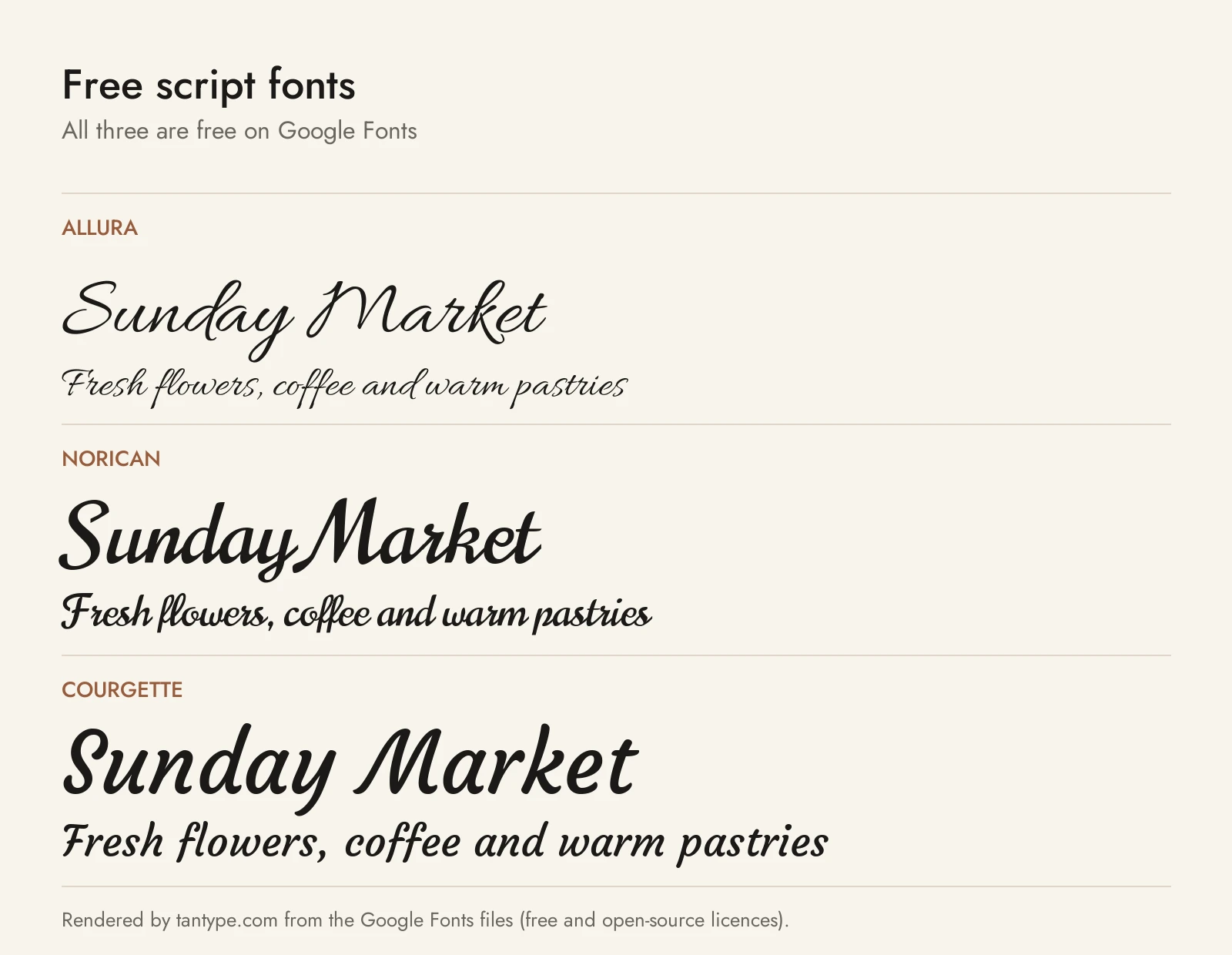
All six are on Google Fonts and free for commercial use. They have fewer alternates than the paid picks, and some are very widely used.
- Allura: Robert Leuschke’s formal-leaning script, “simple, clean and very legible.” The closest free match to ED Drayton.
- Norican: Vernon Adams’ display script, based partly on Stephenson Blake’s 1920s ‘Glenmoy’. Heavier and more retro, a free stand-in for Dreamies.
- Courgette: Karolina Lach’s “medium low contrast brushy italic script” that also works “in smaller sizes.” The most readable free script here.
- Tangerine: Toshi Omagari’s calligraphic face inspired by 16th- and 17th-century italic chancery hands. Its lowercase is tiny, so use it large.
- Satisfy: a casual brush script from Sideshow, closer to a sign painter’s hand than a pen.
- Pinyon Script: Nicole Fally’s “romantic round hand script,” the free choice for a copperplate look.
| Font | Source | Licence | Commercial use |
|---|---|---|---|
| Allura | Google Fonts | SIL Open Font License | Yes |
| Norican | Google Fonts | SIL Open Font License | Yes |
| Courgette | Google Fonts | SIL Open Font License | Yes |
| Tangerine | Google Fonts | SIL Open Font License | Yes |
| Satisfy | Google Fonts | Apache License 2.0 | Yes |
| Pinyon Script | Google Fonts | SIL Open Font License | Yes |
Each licence is in the family’s folder on the google/fonts repository. “Free for personal use” scripts on download sites are demos: fine for a home-made card, not for anything you sell.
Licensing: personal vs commercial use
Creative Market’s font licence page offers Desktop, Webfont, App and E-pub licences. Desktop covers print, images, logos and other end products, one seat per user; live text on a website needs a Webfont licence. The font FAQ allows selling “an unlimited number of copies of unlimited End Products,” but no font licence permits embedding a font “in a theme or template that I sell,” or making Cricut templates from a font to sell. For editable templates, use an OFL font. This is a summary, not legal advice.
Script font FAQ
What is the most popular script font?
There’s no public sales ranking, but a few names are everywhere: Brush Script and Edwardian Script among pre-installed fonts, Bickham Script among formal digital scripts, and Lobster, Pacifico and Great Vibes among free ones. Their familiarity is a reason to pick something less common for a logo.
What is the difference between script and cursive fonts?
Cursive is one kind of script. Script covers all handwriting-based typefaces, formal or casual, joined or not; cursive usually means everyday joined handwriting of the kind taught in school.
Are handwritten fonts and script fonts the same?
Not quite. Script fonts are usually slanted, joined and polished. Handwritten fonts imitate everyday writing, often printed rather than joined, and look less deliberate. They overlap in casual scripts.
What is a pretty script font in Word?
Microsoft lists Edwardian Script ITC, Kunstler Script and Brush Script MT as available within Office, and Segoe Script and Gabriola ship with Windows. For something less familiar, install an OpenType script and turn on its alternates in the Font dialog.
What is the best script font for Cricut?
A connected script with even strokes, such as a monoline or heavier casual script, because it welds into one piece and has no hairlines to tear. Reduce letter spacing until letters touch, weld, and avoid tiny loops in vinyl.
Can you use a script font in all caps?
No. Script capitals are designed to lead into lowercase letters and collide in a row. Use mixed case, or set a capitals line in a serif or sans.
Are there free script fonts for commercial use?
Yes. Google Fonts scripts such as Allura, Courgette and Pinyon Script use the SIL Open Font License or Apache License, both of which allow commercial use.
Are “script font generator” sites real fonts?
No. Copy-and-paste generators swap your letters for look-alike Unicode symbols, mostly from the Mathematical Alphanumeric Symbols block. They work in a social bio but can’t be installed, may show as boxes, and confuse screen readers. For print, logos or Cricut, use a real font.
