
Wedding Fonts: 10 Best Fonts for Invitations, Signs and Save the Dates
Wedding fonts do two jobs: a script that makes the couple’s names feel special, and a plain serif or sans that guests can read at a glance for the date, venue and RSVP. Good stationery uses one of each, sized so the names lead and the details stay legible.
Our top three are Gathering Calligraphy Wedding Script, a pointed-pen script for names; Aqualim Signature, a serif and script duo that covers a whole suite; and Monogramica, which turns any two initials into a monogram. Every font on the main list is a commercial Creative Market font. Six free options and ready-made pairings are further down.
Browse wedding fonts on Creative Market Commercial fonts: regular one-seat Desktop prices, checked October 2026
What is a wedding font?
A wedding font is any typeface used on wedding stationery: invitations, save the dates, menus, place cards and signs. In practice it usually means a romantic script for the couple’s names, paired with a calm serif or sans serif for the details. “Wedding font” describes a use, not a formal type classification.
The look is old: Wikipedia’s wedding invitation article describes engraved invitations covered with tissue paper, “a tradition that remains to this day,” and thermography, raised type nicknamed “poor man’s engraving,” which made formal invitations affordable after the Second World War. The script on those cards descends from copperplate, which Wikipedia traces to copybooks printed from engraved copper plates, such as George Bickham’s The Universal Penman (1733–1741). Most wedding scripts still imitate that pointed-pen stroke.
We cover the neighbouring styles separately: calligraphy fonts, elegant fonts, cursive fonts, signature fonts and floral fonts. None of their picks is repeated here.
The best wedding fonts at a glance
| Font | Best for | Styles | Desktop price* |
|---|---|---|---|
| Gathering Calligraphy Wedding Script | Names on formal invitations | 1 script plus swash and ending-alternate sets | $22 |
| Parisian Vintage Calligraphy Script | Vintage suites; swashes that paste into Canva | 1 script plus beginning and ending swash sets | $19 |
| Rose Orchard Garden | Garden weddings and foil | 2 (regular and a bolder weight) | $19 |
| Aqualim Signature | A complete invitation suite | 2 (serif, script) | $25 |
| Simple Serenity Serif & Script | Minimal suites and initials | 2 (script, capitals-only serif) | $29 |
| Brown Carolina | Modern suites and signs | 2 (script, sans) | $25 |
| La Dolce | Details, or names without a script | 4 (Regular, Italic, Bold, Bold Italic) | $34 |
| Beverly Hills | Glamorous names and headings | 3 (Regular, Italic, Calligraphy) | $29 |
| Monogramica | Ready-made two-letter monograms | 1 script with 676 monograms and 135 frames | $29 |
| Wedding Monograms | Engraved-style crest monograms | Wide and Narrow capital sets (color font), plus SVG | $28 |
*One-seat desktop licence on Creative Market, checked October 2026.
How we chose these fonts
We started from tantype’s reviews of Creative Market fonts made for weddings and invitations, and kept fonts that solve a stationery problem: a script with alternates so repeated letters don’t look stamped, a serif or sans that can carry the small print, or a monogram tool. We checked each listing live on October 22, 2026 for availability, the regular Desktop price, styles, alternates and language notes, and left out fonts from our other script roundups. Descriptions come from the listings and our reviews; we did not print every font.
Best wedding fonts on Creative Market
Prices are regular one-seat Desktop licences, checked October 2026. Sales are frequent; see each listing for current pricing.
Wedding script fonts for names. Use these for names, a heading or a one-line greeting, not for the details.
1. Gathering Calligraphy Wedding Script
The most convincing pointed-pen script here: strokes taper to a fine point and swell on the downstroke, and the baseline wavers just enough to look written. Mila Garret adds beginning swashes for capitals and lowercase, three full sets of ending lowercase alternates, and extra ligatures, so a name like Hannah won’t repeat the same a. The swashes are PUA-encoded, so they work without special software, and accented Latin letters are included. Legibility drops quickly past a phrase, so keep it for names. Desktop licence: $22.
See Gathering Calligraphy Wedding Script on Creative Market · Read our Gathering Calligraphy Wedding Script review
2. Parisian Vintage Calligraphy Script
A steeply slanted, swash-heavy script with a vintage feel. Its useful trick is a separate set of beginning swashes for capitals and ending swashes for lowercase letters, so a name can open and close with a flourish. Every extra glyph is PUA-encoded, which means you can paste the swashes in Canva, Cricut Design Space or Word without OpenType support. Many accented Latin letters are included. It is busy at small sizes, so treat it as a names-and-headings font only. Desktop licence: $19.
See Parisian Vintage Calligraphy Script on Creative Market · Read our Parisian Vintage Calligraphy Script review
3. Rose Orchard Garden
PeachCreme’s Rose Orchard Garden is looser and warmer than the two calligraphy scripts: long entry and exit strokes, gentle contrast and small irregularities that read as a real pen. With no fragile hairlines, it holds up in foil. It also includes a slightly bolder second weight, useful for small captions and place cards, plus alternate capitals and lowercase letters to break up repeats. Desktop licence: $19.
See Rose Orchard Garden on Creative Market · Read our Rose Orchard Garden review
Serif and script duos. A duo solves the pairing problem for you, which is why most DIY invitation suites start with one.
4. Aqualim Signature
Aqualim Signature pairs a calm, slightly compressed serif with a formal connecting script. Unlike many duos, both halves have full upper and lowercase, numerals and punctuation, so the serif can carry a whole invitation’s details, the menu and the RSVP card while the script handles names. The script includes alternates and ligatures to vary repeated letters, and files come in OTF, TTF and WOFF with a character map PDF. The script clots at small sizes, so give it room. Desktop licence: $25.
See Aqualim Signature on Creative Market · Read our Aqualim Signature review
5. Simple Serenity Serif & Script
Sam Parrett’s duo is the quietest here: a fine-line script with an even, pen-like stroke, matched to a plain, slightly condensed capital serif. The script has 50 ligatures, nine flourished alternates for letters such as d, g, h and y, and entry and exit swashes on every lowercase letter. The serif is capitals only, with 14 ligatures and ten alternates; the listing names 18 supported languages. Right for names, initials and a date line; add a lowercase serif for menus. Desktop licence: $29.
See Simple Serenity Serif & Script on Creative Market · Read our Simple Serenity Serif & Script review
6. Brown Carolina
Brown Carolina pairs a relaxed, monoline connecting script with a plain geometric sans, the modern alternative to a serif-and-script suite. Common letter pairs join through automatic ligatures, and eight numbered swash glyphs let you finish a name with a tail of your choice. The sans is calm enough for addresses, menus and signs. The script resembles many casual wedding scripts, but the swashes and matching sans make a full suite easy. Desktop licence: $25.
See Brown Carolina on Creative Market · Read our Brown Carolina review
Serifs for details and headings. A serif with some personality can carry names on its own, or sit under a script.
7. La Dolce
La Dolce is a soft modern serif with moderate contrast and rounded finials, in four styles: Regular, Italic, Bold and Bold Italic. The italic has a handwritten swing that can stand in for a script in a minimal suite, and the Bold is reliable for names and monograms. Nine hand-drawn shapes are included for small dividers and accents. The listing doesn’t mention ligatures or alternates, so expect a straightforward serif. It suits a couple who want warmth without a script. Desktop licence: $34.
See La Dolce on Creative Market · Read our La Dolce review
8. Beverly Hills
Beverly Hills is a high-contrast serif in three versions: a restrained Regular, an Italic and a Calligraphy version whose swashes spill past the baseline. Its 56 ligatures are built for word endings rather than the usual fi and fl, and they are PUA-encoded, so you can reach them by keystroke in apps that ignore OpenType. Use the Regular for details and the Calligraphy version for the names only. Desktop licence: $29.
See Beverly Hills on Creative Market · Read our Beverly Hills review
Monogram fonts for weddings. For wax seals, napkins, signs and the top of every card.
9. Monogramica
Monogramica includes 676 pre-drawn monograms, one for every two-letter combination from AA to ZZ. Type two capitals and the interlaced pair appears through automatic ligatures; no manual kerning. There are also 135 decorative frames for crests and seals, and 1,060 glyphs covering 67 languages (Adobe Latin-1). Rounded stroke ends keep the marks clean in embroidery, engraving and foil. It doesn’t do three-letter monograms without manual work. Desktop licence: $29.
See Monogramica on Creative Market · Read our Monogramica review
10. Wedding Monograms
A more traditional route: engraved-style capitals based on an 1887 women’s needlework course, in Wide and Narrow sets; you place the Narrow initial over the Wide one by eye. It looks more like a family crest than a script monogram. It is a color font, so the listing says it needs Photoshop CC 2017+, Illustrator CC 2018+ or InDesign CC 2019+, not Word or Canva; the included SVG files cover everything else, including embroidery and foil. Desktop licence: $28.
See Wedding Monograms on Creative Market · Read our Wedding Monograms review
How to choose a wedding font
Pick the details font first, because it carries most of the words, then find a script that suits it. Two fonts are enough for a whole suite.
Wedding font pairings that work
The reliable formula is contrast: one expressive script, one quiet serif or sans. Paperlust’s invitation fonts guide warns that two fonts from the same category “will feel redundant.” Six pairings:
- Gathering Calligraphy Wedding Script + La Dolce: classic and formal. La Dolce Regular for details, its Italic for “together with their families.”
- Parisian Vintage Calligraphy Script + Beverly Hills Regular: vintage glamour for an evening wedding. Leave Beverly Hills’ calligraphy version out; one showpiece per card.
- Rose Orchard Garden + General Sans: garden or barn weddings. The free sans keeps a hand-drawn script from looking homemade.
- Simple Serenity + Cormorant Garamond: the duo’s serif is capitals only, so add a free lowercase serif for directions and menus.
- Alex Brush + Cormorant Garamond (both free): traditional and readable; a sound DIY default.
- Petit Formal Script + Playfair Display (both free): black tie. Playfair’s high contrast echoes the script’s thick and thin strokes.
Setting names vs details: size, contrast and line spacing
Hierarchy comes from size, weight and spacing, not from more fonts. Starting points for a 5 x 7 inch invitation:
- Names: the largest element, typically 30 to 48 pt in a script. Script lowercase runs small, so a script often needs about twice the serif’s point size to look as big.
- Details: 10 to 12 pt, the range Practical Typography recommends for printed body text. Keep the RSVP and small print at 9 pt or more.
- Contrast: make names at least three times the size of the details, or nothing leads.
- Line spacing: Matthew Butterick puts the optimum at “between 120% and 145% of the point size.” Stacked script names need more, so descenders clear the loops below; put a colliding ampersand on its own line.
- Capitals: spaced capitals in the serif mark a level without a new font; Butterick suggests “5–12% extra letterspacing” for caps. Never set a script in all caps.
Wedding invitation fonts and wording hierarchy
Paperlust’s formal wording guide gives the traditional order: “hosting line, request line, couple’s names, date, time, venue, city.” Only the names get the script; the date and venue sit a step above the reception and RSVP lines. The guide notes “request the honour of your presence” is traditional for religious ceremonies and “the pleasure of your company” for secular ones, and that on formal invitations “all numbers, date, year, time, are spelled out in full.” Those long lines need a details font that reads well in a full sentence.
Save the date fonts
A save the date is the one piece where the script can dominate: names, date, city. Use the boldest script in your suite, set the date in large serif or sans numerals, and match the invitation that follows. Many are shared as phone images, so check hairlines at screen size.
Wedding sign fonts: legibility at a distance
Signs.com’s letter height guide says “for every 10 feet of viewing distance away from your sign, you will want to increase the letter height by 1 inch,” and warns that script and decorative fonts need extra height. On a seating chart, set guest names in the serif or sans and save the script for the header. Use dark letters on a light board, or the reverse, and avoid thin scripts on mirrors and acrylic, where reflections swallow hairlines.
Printing tips: foil, letterpress and digital
- Foil: Boxcar Press’s foil stamping guide asks for lines of 0.25 point (0.003 inch) or thicker, “No hairlines,” a “minimum font size: 8 pt for most fonts” and 10 pt for reversed type; its prepress staff “may need to add a small stroke” to intricate scripts. 4OVER4’s foil guidance is stricter: “fonts at 10pt or larger and line strokes at least 1pt thick.”
- Letterpress: Boxcar’s plate checklist wants lines of 0.25 pt or thicker on its KF95 and 94-series plates, 0.35 pt on thicker plates, and dots of 1 to 1.25 pt.
- Digital and white ink: the most forgiving, but test thin scripts at actual size on your real card stock.
A font with a bolder weight, such as Rose Orchard Garden, lets you switch for foil without changing the look.
DIY wedding fonts in Canva, Word and Cricut
Canva: the Brand Kit help page says uploads need a paid plan such as Pro or Teams, accept OTF, TTF and WOFF, and must be fonts you’re licensed to use. Creative Market can’t guarantee Canva supports every OpenType feature, so PUA-coded swashes (Parisian Vintage, Beverly Hills) are easier: paste them from a character map.
Word: Microsoft’s Add a font page says to extract the zip, right-click the fonts and choose Install. If someone else will open the file, tick “Embed fonts in the file” under File > Options > Save (not every font can be embedded), or send a PDF.
Cricut: fonts installed on your computer appear in Design Space as system fonts, which you can sort separately, according to Cricut’s fonts article. Weld a script name so it cuts as one piece. Cricut says the machine “cuts mathematically simple files better,” so avoid tiny loops in vinyl, and for pen-written place cards it recommends a Cricut font “that specifically has a writing style.”
Free wedding fonts
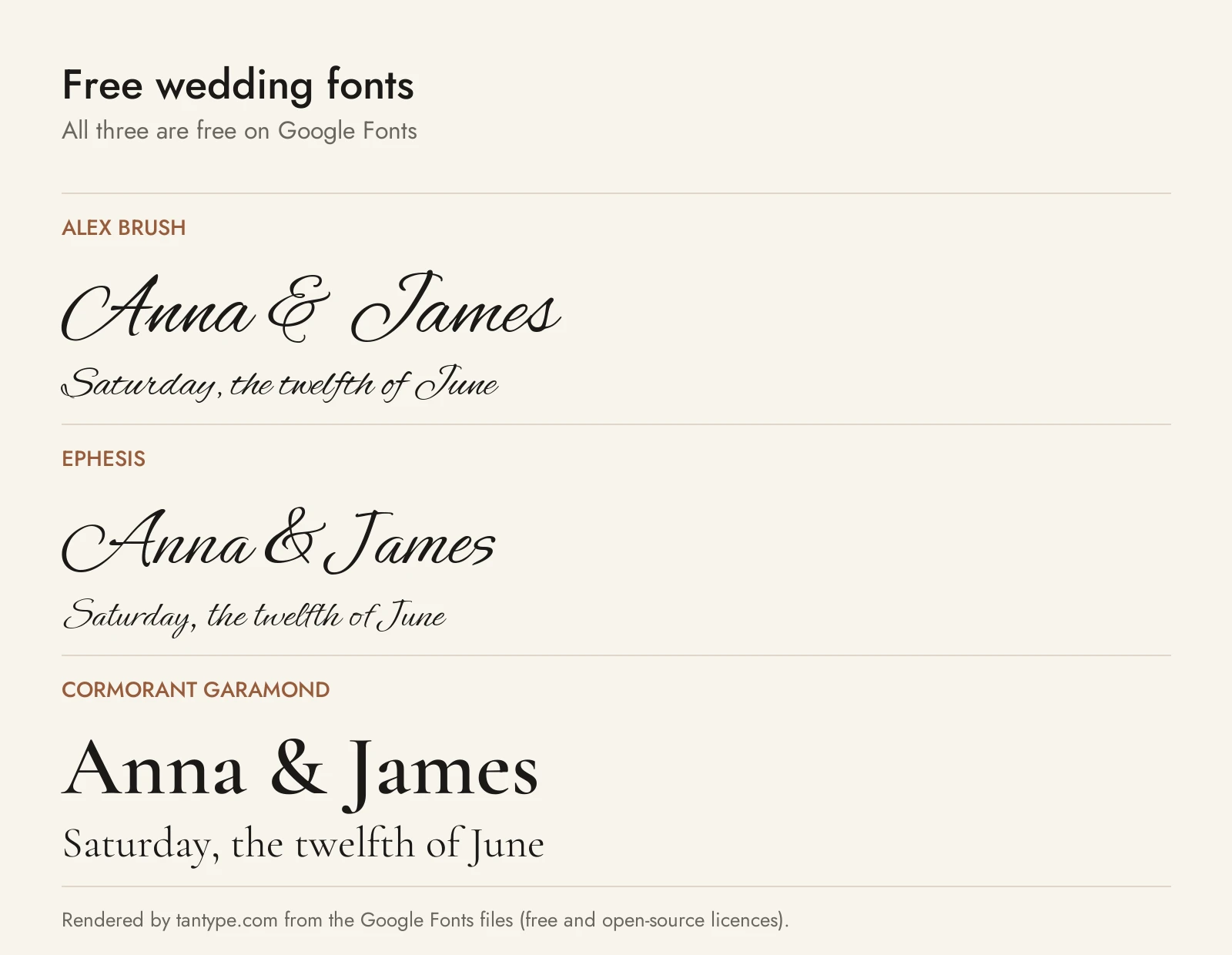
All six are free for commercial use, from official sources.
- Alex Brush (Google Fonts): Robert Leuschke’s flowing brush script with “short ascenders and descenders” for legibility.
- Ephesis (Google Fonts): a lighter contemporary script, also by Leuschke, “great for casual invitations, cards.” Pair it with a sans.
- Cormorant Garamond (Google Fonts): Christian Thalmann’s Garamond-inspired serif, five weights with italics. A free equivalent of La Dolce for details.
- Petit Formal Script (Google Fonts): Impallari Type’s formal script, made to “survive being set even as small as 13px.” The best free script for small lines and screens.
- Playfair Display (Google Fonts): Claus Eggers Sørensen’s high-contrast display serif, with small caps and ligatures in the download.
- General Sans (Fontshare): a “rationalist sans serif” in twelve weights, Extralight to Bold with italics. A clean free sans for details, signs and menus.
| Font | Source | Licence | Commercial use |
|---|---|---|---|
| Alex Brush | Google Fonts | SIL Open Font License | Yes |
| Ephesis | Google Fonts | SIL Open Font License | Yes |
| Cormorant Garamond | Google Fonts | SIL Open Font License | Yes |
| Petit Formal Script | Google Fonts | SIL Open Font License | Yes |
| Playfair Display | Google Fonts | SIL Open Font License | Yes |
| General Sans | Fontshare (ITF) | ITF Free Font License | Yes; no modifying or redistributing the files |
The Google Fonts licences are in each family’s google/fonts folder; Fontshare’s licence page calls its fonts “100% free for personal and commercial use.”
Licensing: personal vs commercial use
Creative Market’s font licence page offers Desktop (print and other end products, one seat per user), Webfont, App and E-pub licences. For printed invitations you need Desktop, and the font FAQ says it allows selling “an unlimited number of copies of unlimited End Products,” which covers a stationer selling finished suites. A wedding website using the font as live text needs a Webfont licence.
Selling wedding templates on Etsy
Editable templates are where sellers get caught. The FAQ says all three of these are “not permitted in any of our Font Licenses”:
- a “design-on-demand app or site that my customers use to make their own printable cards, invitations”;
- embedding a font “in a theme or template that I sell,” which “would be considered redistributing the font”;
- creating “Cricut templates from a font that I will sell.”
Creative Market’s article on selling digital products (updated October 2026) adds that “creating a template is not permitted” and rules out “print on demand,” “made to order” and “download on-demand” uses. A finished design you personalise for a buyer is a different case. OFL fonts such as Alex Brush avoid the issue. This is a summary, not legal advice.
Wedding font FAQ
What is the most popular font for wedding invitations?
No sales data names one winner, but the free script Great Vibes appears in most wedding font guides, often with Cormorant Garamond. Because it is so familiar, a less common script makes names look less like a template.
How many fonts should I use on a wedding invitation?
Two: a script for the names and a serif or sans for the details. Use size, capitals and italics for the other levels.
What size should the font be on a wedding invitation?
On a 5 x 7 card, names usually sit at 30 to 48 pt in a script and details at 10 to 12 pt, with nothing below 9 pt. Print a test at actual size; scripts look smaller than their point size suggests.
Can I use free fonts for my wedding invitations?
Yes, if the licence allows it. Google Fonts and Fontshare fonts are free for commercial use, including printed invitations. “Free for personal use” fonts from download sites may cover your own invitations, but never stationery you sell.
Can I use Creative Market fonts in Canva templates I sell on Etsy?
No. Creative Market’s font FAQ says embedding a font “in a theme or template that I sell” is not permitted under any of its font licences. Use OFL fonts, or a font whose own licence explicitly allows templates.
Are wedding “font generator” sites real fonts?
No. Copy-and-paste generators swap your letters for look-alike Unicode symbols, mostly from the Mathematical Alphanumeric Symbols block. They work in a caption but can’t be installed, may show as boxes on some devices, and are useless for print.
