
Signature Fonts: 11 Best Signature Fonts for Logos, Branding and Sign-Offs
A signature font makes typed text look like a name signed quickly with a pen: one fast, slanted line, loose joins, a big first capital and often a stroke underneath. Designers use signature fonts for logos, photo watermarks, email sign-offs and packaging, anywhere a brand should feel personal.
Our top three picks are Brittany Signature Script, the widely copied classic; Paradine, with more than 240 ligatures and alternates for a less repetitive look; and Active, a fast autograph with built-in underline strokes. All eleven picks are commercial fonts sold on Creative Market. Six free signature fonts, Word fonts that look like a signature and a note on e-signatures follow.
Browse signature fonts on Creative Market Commercial fonts: prices below are regular one-seat Desktop prices, checked October 17, 2026
What is a signature font?
A signature font is a script typeface drawn to look like a handwritten autograph: fast, slanted strokes, letters that join loosely, an uneven baseline and a large first capital, often finished with a swash or underline. It is made for short text such as names and logos, not for sentences or body copy.
Wikipedia describes a signature as a depiction of a name that a person writes “as a proof of identity and intent”, and notes that it can be confused with an autograph, “which is chiefly an artistic signature”. Signature fonts copy the look of an autograph, not its proof.
The idea is older than digital type. Google Fonts’ notes on the Charles Bluemlein script collection, revived by Alejandro Paul at Sudtipos, say the scripts were made “by collecting different signatures and then building complete alphabets from them”. Because the results looked nothing like the original signatures, Bluemlein gave them invented names, such as Herr Von Muellerhoff.
What makes a font look like a signature
- Speed. Long entry and exit strokes, a strong slant and letters that shrink towards the end of the word.
- Mostly monoline strokes. Most imitate a ballpoint, fineliner or marker, so the line keeps an even width.
- Irregular rhythm. Creative Market’s signature category advises looking for uneven baselines, varied letter sizes and natural ink texture.
- Underlines and swashes. Many include a stroke that runs under the whole name.
Signature vs cursive vs calligraphy fonts
A cursive font joins the letters in a neat, readable school or everyday hand; a signature font is faster, looser and less legible on purpose. A calligraphy font copies a pointed or broad-nib pen, with strong thick-and-thin contrast; a signature font usually keeps one stroke width. Brush scripts are heavier still; see our brush script fonts guide.
The best signature fonts at a glance
| Font | Best for | Styles | Desktop price* |
|---|---|---|---|
| Brittany Signature Script | Classic signature logos | 1 | $150 |
| Paradine | Realistic handwriting, labels | Script + alternate version | $19 |
| Active | Fast autograph with underline | 1 | $19 |
| Cielline | Executive-style scribble logos | 1 + stylistic set | $17 |
| Milkshake | Monoline logos, small business | 1 | $19 |
| Lourdes Signature | Inky, textured sign-offs | 1 | $19 |
| Mandalla Signature | Tall, elegant fashion branding | 1 | $19 |
| CS Dallas | Boutique brands, three slants | 3 | $20 |
| Ypsilanti Signature | Bold monoline, readable at size | 1 | $19 |
| Signaturae | Thin, minimal photo watermarks | 1 | $16 |
| Almonde | Dry-brush signature headlines | 1 | $23 |
*One-seat desktop licence on Creative Market, checked October 2026.
How we chose these fonts
We started from tantype’s own signature-script reviews and Creative Market’s signature category, then opened every listing on 16–17 October 2026 to confirm it was live and to read the regular Desktop price. We looked at each font’s preview images to check that it really reads as a signature rather than a neat cursive or wedding calligraphy, and we left out fonts already featured in our logo fonts and cursive tattoo fonts roundups. We then weighed ligatures and alternates, multilingual support, PUA encoding, buyer ratings where shown, and price.
Best signature fonts on Creative Market
Prices are regular one-seat Desktop licences as listed on October 17, 2026; check the listing before you buy.
1. Brittany Signature Script: the classic signature look
Creatype Studio’s Brittany Signature Script is the font many people picture when they hear “signature font”: tall, thin loops, a fast slant and what the listing calls “an elegant inky flow”. It is one script style with ligatures, multilingual glyphs and PUA-encoded extras, in OTF, TTF and WOFF, and the designer lists Microsoft Word among supported apps. It is also the dearest pick by far: buy it for this exact look, or see Mandalla and CS Dallas for less. Desktop licence: $150.
See Brittany Signature Script on Creative Market · Read our Brittany Signature review
2. Paradine: handwriting with hundreds of ligatures
Sarid Ezra calls Paradine “a handwritten script font with alternate version and a lot of ligatures”, and the cover promises more than 240 ligatures, alternates and underlines. Ligatures swap common letter pairs for joined versions, so repeated letters don’t look stamped. An alternate version gives a calmer mood for headlines. Use it for product labels, handwritten quotes and personal brand logos. Desktop licence: $19.
See Paradine on Creative Market · Read our Paradine review
3. Active: a fast autograph with built-in underline
Asarphi Sunny Tudu describes Active as “a nice handwritten signature font”. It looks dashed off: a hard forward slant, long cross-strokes and loose joins. The listing counts 257 glyphs including ligatures, stylistic alternates and swashes. Underline strokes are typed as an underscore plus a letter (for example “_a”) with ligatures switched on; other alternates are reached in Adobe apps, Character Map or Font Book. It ships as OTF and TTF. Use it for sign-off logos and merchandise. Desktop licence: $19.
See Active on Creative Market · Read our Active review
4. Cielline: the executive scribble
Cielline, from Dwi Ahidian’s Lemonthe studio, is the closest pick to a busy executive’s signature: a “quick and modern stroke style” with “long, slim, and consistent” letters that overlap, and a long finishing stroke on the cover. It includes stylistic alternates, a stylistic set, multilingual support and PUA encoding; add two underscores after a lowercase letter to get its alternate. It is less legible than most picks, so keep it to names in logos, business cards and packaging. Desktop licence: $17.
See Cielline on Creative Market · Read our Cielline review
5. Milkshake: monoline signature with swashes
Mila Garret’s Milkshake is “a modern handwritten font loaded with ligatures for that handwriting look”, drawn with an even, fineliner-like line. There are 99 handwritten ligatures plus sets of beginning-swash lowercase, ending-swash lowercase and beginning-swash capitals, so a name can start or finish with a long tail. Glyphs are PUA encoded. The even stroke holds up small, on business cards and stamps. The designer suggests feminine or organic logos, small business branding and packaging. Desktop licence: $19.
See Milkshake on Creative Market · Read our Milkshake review
6. Lourdes Signature: inky and textured
Also from Mila Garret, Lourdes Signature is “a new inky script font, with a natural handwritten and textured look”. Slightly rough edges, like a pen on absorbent paper, help it pass for real writing in photos. The listing mentions over 160 ligatures in one place and 168 in another, PUA encoding and accented Latin characters. The designer warns the rough edges may not suit cutting machines. Use it for minimal logos and quotes. Desktop licence: $19.
See Lourdes Signature on Creative Market
7. Mandalla Signature: tall and elegant
Mandalla Signature, by Yadi Setiawan of Typeline Studio, has tall ascenders, a big looping capital M and a steady slant, more polished than the scribbly picks. The listing promises ligatures, multilingual glyphs, PUA encoding and use in Adobe apps and “even Microsoft Word”, with OTF, TTF and WOFF files. Use it for fashion and beauty branding, wedding names and product packaging. Desktop licence: $19.
See Mandalla Signature on Creative Market
8. CS Dallas: three slants for one signature
CS Dallas, from Craft Supply Co., is “designed to reflect the personal and unique nature of handwritten signatures”. A fine line and oversized, looping capitals give it a boutique feel. It is the only pick with three styles: Regular, Italic and Reverse Italic, so you can match the angle of a real signature or lean the name back against a slanted photo. It includes multilingual accents and PUA encoding. The designer aims it at fashion, beauty, boutique businesses and luxury invitations. Desktop licence: $20.
See CS Dallas on Creative Market · Read our CS Dallas review
9. Ypsilanti Signature: bold monoline
Grezline Studio’s Ypsilanti is “a modern monoline signature script font” with a heavier, marker-like stroke than most picks. That weight is its advantage: it stays readable on signs, social graphics and small labels where hairline signatures break up. The listing mentions alternates, ligatures, multilingual characters and support in Illustrator, Photoshop, InDesign and Microsoft Word. The designer aims it at fashion, invitations and packaging. Desktop licence: $19.
See Ypsilanti Signature on Creative Market · Read our Ypsilanti review
10. Signaturae: thin and minimal
Signaturae, from Forberas Club, is the lightest pick: a hairline, monoline signature with long, flat connecting strokes and a large swooping capital. Forberas lists logos, branding and signatures among its uses. Files come as OTF, TTF and WOFF, with multilingual accents. The thin line suits photography watermarks and minimal logos laid over images, but use it large. Desktop licence: $16, the lowest here.
See Signaturae on Creative Market
11. Almonde: a dry-brush signature
Graphicfresh’s Almonde, designed by Muhammad Husni Haikal, has a dry-pen texture and a bolder, brushier stroke than the other picks, so it reads well in headlines and on merchandise. The listing names international language support and PUA encoding, with TTF and OTF files and a help file. The designer suggests branding, business cards, posters and T-shirts. Desktop licence: $23.
See Almonde on Creative Market
How to choose a signature font
- Logos and branding. Test the actual name, not the specimen word: signature fonts look best with names that have tall letters and a strong capital. Check it at favicon and business-card size; thin, scribbly fonts (Cielline, Signaturae) blur when small, while monoline picks (Milkshake, Ypsilanti) hold up. Pair it with a plain sans or serif. More options are in our best logo fonts guide.
- Photography watermarks. Choose a light, even stroke and set it in white at low opacity. Adobe’s Lightroom Classic watermark help offers Text and Graphic watermarks, and a Graphic watermark accepts a PNG or JPEG. Setting your name in a design app and exporting a transparent PNG keeps the ligatures and swashes that a plain text field may not show.
- Use the ligatures and alternates. Much of the hand-signed look lives in OpenType features. Microsoft’s Word help says “Use Contextual Alternates” is “especially useful for script fonts”. Where an app can’t reach them, PUA-encoded fonts let you paste extras from Character Map or Font Book.
- Leave the tracking at zero. Letters in a signature font are drawn to touch; extra letter spacing breaks the joins.
- Cricut and vinyl. Cricut’s guide to working with fonts in Design Space shows lowering letter spacing so letters overlap, then welding them into one piece. Choose a smooth, even-weight font; textured ones such as Lourdes cut poorly.
- Never copy a real person’s signature. Pick a font for its style; don’t use one to imitate someone else’s handwriting or signature on anything.
Fonts in Word that look like a signature
Many lists present Google Fonts such as Great Vibes as Word fonts. They aren’t; you have to install them. These are the signature-like fonts Microsoft itself documents.
Installed with Windows 11 and 10. Microsoft’s Windows 11 font list includes Segoe Script, the closest Windows font to a quick handwritten signature, and Ink Free, which looks like marker handwriting.
Microsoft 365 cloud fonts. Microsoft’s Cloud fonts in Office list includes several scripts that aren’t in Windows 11: Vladimir Script (the most signature-like), Rage Italic, Freestyle Script, Kunstler Script, Edwardian Script ITC, Lucida Handwriting and Brush Script MT. Microsoft says cloud fonts “are available to Microsoft 365 subscribers”; on Windows they need Optional connected experiences turned on (File > Account > Manage Settings), and on a Mac, Word build 16.17 or later. Bickley Script, BriemScript, Andy and Fine Hand, named in some lists, are on neither list.
Adding a signature to a Word document. Microsoft’s Insert a signature page suggests scanning your handwritten signature and inserting it as a picture (.bmp, .jpg or .png), or using Insert > Signature Line > Microsoft Office Signature Line. If you type your name in a font you installed yourself, turn on File > Options > Save > “Embed fonts in the file”, as Microsoft’s font embedding page explains, or save as PDF, so other people see the signature font rather than a fallback. Not every font’s licence allows embedding.
Google Docs. Docs can’t use fonts installed on your computer. Its help page explains adding fonts from a “More fonts” list, which you can search by type, such as “script”.
Can a signature font make a legal e-signature?
In the United States a typed name can be a legal electronic signature, but the font has nothing to do with it. The federal ESIGN Act defines an electronic signature as “an electronic sound, symbol, or process, attached to or logically associated with a contract or other record and executed or adopted by a person with the intent to sign the record” (15 U.S.C. § 7006), and says a signature may not be denied legal effect “solely because it is in electronic form” (§ 7001). The Uniform Electronic Transactions Act (UETA), adopted in nearly every US state, uses almost the same definition but applies only where the parties have agreed to deal electronically. Its official comment says even “the mere inclusion of one’s name as a part of an e-mail message” can qualify, “so long as” the signer meant to sign.
What makes a typed signature hold up is intent, agreement and records, not looks. UETA says a signature is attributable to a person “if it was the act of the person”, which can be shown in any manner, including security procedures, and ESIGN expects records that can be “accurately reproduced for later reference”. A script font only changes the appearance, and anyone can type a name in one, so never type someone else’s name as a signature. Some documents are excluded from ESIGN, including wills, family-law matters and court papers (§ 7003), and the EU (eIDAS) and UK (Electronic Communications Act 2000, s 7) have their own rules. This is general information, not legal advice.
Free signature fonts
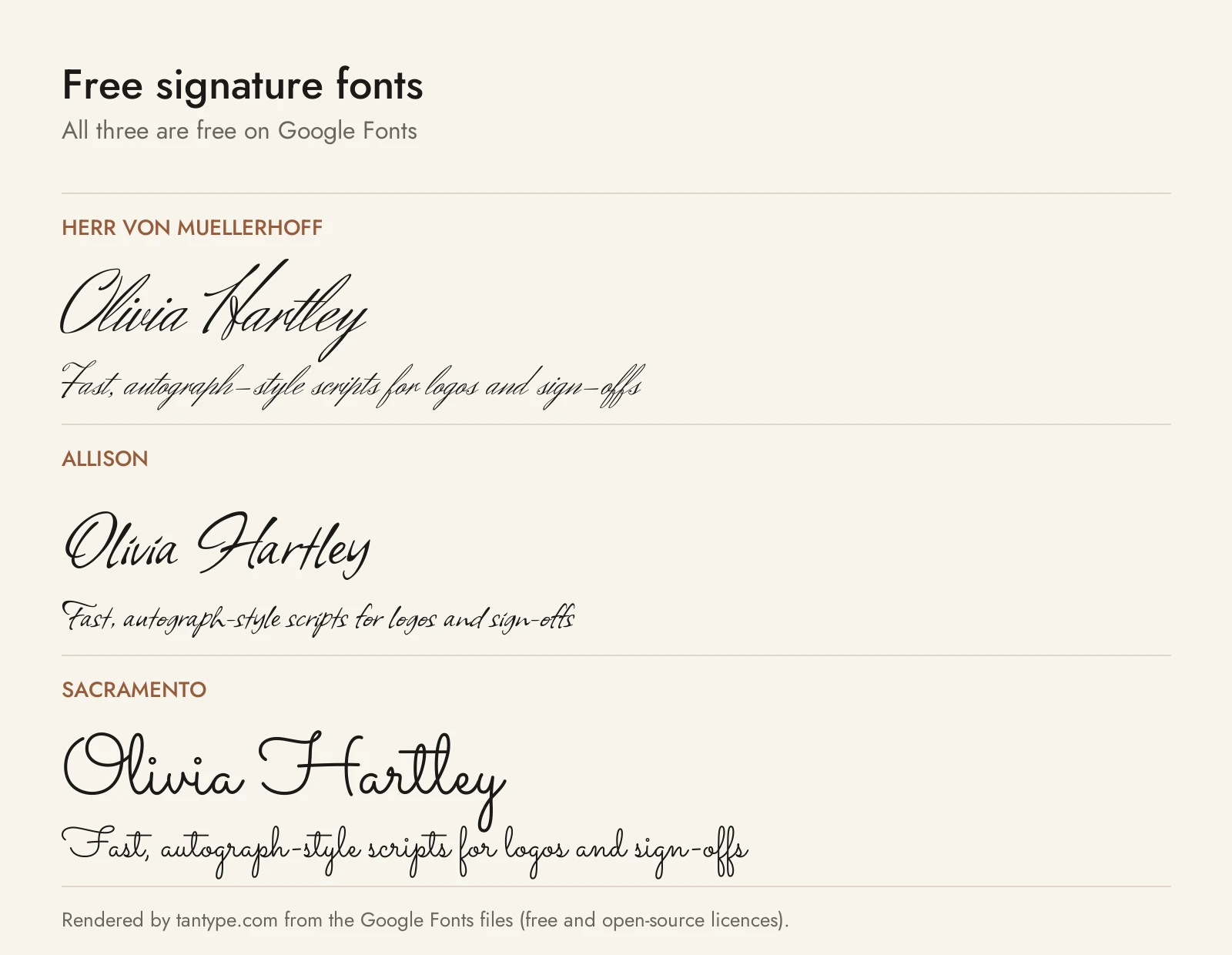
The first five come from Google Fonts under the SIL Open Font License, which allows commercial use; League Script comes from The League of Moveable Type under the same licence. None has the alternates of the paid picks, so repeated letters look identical.
- Herr Von Muellerhoff: Sudtipos’ revival of a Bluemlein script built from collected signatures. Fast and steeply slanted; the closest free match to Brittany and Mandalla.
- Allison: Robert Leuschke’s “casual handwriting script”, with flat-pen lowercase and brushier capitals. It looks like a relaxed everyday signature.
- Sacramento: Astigmatic’s “monoline, semi-connected script” inspired by 1950s and 1960s lettering. The free option nearest to Milkshake, though rounder and less hurried.
- Mrs Saint Delafield: another Bluemlein revival, with big looping capitals and a formal, old-fashioned signature look.
- Whisper: Leuschke’s “contemporary calligraphic script” with angular strokes; see our Whisper font guide.
- League Script: Haley Fiege’s hairline script, “a modern, coquettish script font” with ligatures. It looks like a fine pen and suits light watermarks.
| Font | Source | Licence | Commercial use |
|---|---|---|---|
| Herr Von Muellerhoff | Google Fonts | SIL OFL 1.1 | Yes |
| Allison | Google Fonts | SIL OFL 1.1 | Yes |
| Sacramento | Google Fonts | SIL OFL 1.1 | Yes |
| Mrs Saint Delafield | Google Fonts | SIL OFL 1.1 | Yes |
| Whisper | Google Fonts | SIL OFL 1.1 | Yes |
| League Script | The League of Moveable Type | SIL OFL 1.1 | Yes |
Licensing: personal vs commercial use
Creative Market sells fonts under four licences, set out on its font licensing page:
- Desktop: use the font in “unlimited commercial and personal projects”, including products you sell. Buy one seat per user.
- Webfont: embed the font in websites you own or control, up to the pageview limit chosen at checkout.
- E-pub: embed the font in one e-book or digital publication.
- App: embed the font in one app or game.
Print-on-demand use “is forbidden whenever the end user is not the Licensee”, which rules out shops where customers type their own name in the font, a common idea with signature fonts. For logos, Creative Market says a font can be part of a logo if it is modified and isn’t the dominant element, and you must disclaim the font when registering a trademark. A signature wordmark is usually the whole logo, so ask the designer first. This is a summary of published terms, not legal advice.
Signature font FAQ
What font looks like a signature?
Fonts with a fast slant, loose joins and an uneven baseline: Brittany Signature Script, Active and Cielline among paid fonts, and Herr Von Muellerhoff or Allison among free ones. In Word, Vladimir Script and Segoe Script come closest.
What is a good signature font?
A good signature font is legible at the size you need and matches the tone of the brand. For logos, Paradine, Milkshake and Ypsilanti stay readable; for luxury or fashion, Mandalla or CS Dallas; for a hurried executive look, Cielline.
What is a good signature font in Word?
Segoe Script is the best signature-like font that ships with Windows. With Microsoft 365, Vladimir Script, Rage Italic and Freestyle Script are available as cloud fonts. Any font you install also appears in Word.
Is a cursive signature generator the same as a font?
No. Most cursive signature generators either render your name as an image in a script font or swap your letters for Unicode look-alike characters you can copy and paste. Neither gives you a font licence, and Unicode “fancy text” can show as empty boxes on some devices. For a logo or watermark, use a properly licensed font.
Can I use a signature font for my logo?
Yes, with a commercial licence, but check the logo terms. Creative Market allows fonts in logos with conditions, so for a name-only wordmark ask the designer or commission custom lettering.
Are there free signature fonts for commercial use?
Yes. Herr Von Muellerhoff, Allison, Sacramento, Mrs Saint Delafield and Whisper on Google Fonts, and League Script, all use the SIL Open Font License, which allows commercial use. Many “free” signature fonts on download sites are personal-use demos.
Is a typed signature in a signature font legally binding?
It can be. Under the US ESIGN Act and UETA, a typed name counts as an electronic signature when you adopt it with the intent to sign and, under UETA, the parties have agreed to deal electronically. The font makes no legal difference. Some documents, such as wills, are excluded; this is not legal advice.
