
Block Letter Font: 12 Best Block Fonts for Signs, Shirts, Posters and Cricut
A block letter font gives you heavy capitals with strokes of even thickness that read from across a room, which is why it turns up on signs, posters, team shirts, school projects and Cricut decals. Our top three picks are Heavitas, a classic all-caps heavy block; Lock Block, with matching Extrude and Shadow styles for instant 3D letters; and College Block, a vintage varsity block with jersey numbers.
All twelve picks are commercial Creative Market fonts. Six free block fonts that allow commercial use are further down, with steps for 3D and shadow letters in Word, Canva and Cricut.
Browse block fonts on Creative Market Commercial fonts: check each listing for current pricing
What is a block letter font?
A block letter font is a typeface made of plain, heavy capitals with strokes of even thickness and square or near-square ends, built to be read quickly at large sizes. Most are sans serif, but slab serifs, varsity letters, 3D extruded letters and rounded blocks all belong to the family.
Two meanings of “block letters”
- In handwriting, block letters are separate capitals. The Cambridge Dictionary defines block capitals (“also mainly US block letters”) as writing each letter of a word separately and clearly in capitals, as in “Please print your name and address in block capitals.” Wikipedia notes that forms ask for print because cursive is harder to read and doesn’t fit separate boxes.
- In design, block letters are heavy, square capitals. Merriam-Webster defines a block letter as “an often hand-drawn simple capital letter composed of strokes of uniform thickness,” first used in 1849. Block fonts make that thick and bold for signs, shirts and posters.
Where block letters came from
Heavy capitals of even thickness began on London shop fronts. Type historian James Mosley, quoted on Wikipedia’s sans-serif page, writes that “in 1805 Egyptian letters were happening in the streets of London, being plastered over shops and on walls by signwriters.” Around 1816 William Caslon IV issued the first sans serif printing type in England, a capitals-only face, and in the early 1830s Thorowgood’s bold, condensed “grotesque” took the style onto posters.
Slab serifs arrived at the same time. According to Wikipedia, the first known slab serif letterform is woodblock lettering on an 1810 London lottery advertisement, and the style is defined by “thick, block-like serifs.” Poster printers cut both styles in wood type, in widths “from condensed to ultra-wide.” Varsity letters came from American team uniforms: Wikipedia traces them to the Harvard baseball team’s embroidered “H” of 1865.
Types of block letter fonts
- Heavy sans blocks: thick capitals with no serifs; the classic block font and the most legible from a distance.
- Slab blocks: the same weight with square serifs, as on Western posters. Our Rockwell guide covers the best-known slab.
- Varsity or collegiate blocks: slab capitals with clipped corners, often with outline layers for two-colour jerseys.
- 3D or extruded blocks: block letters with depth or a drop shadow, usually as layer fonts you stack.
- Rounded blocks: heavy letters with softened corners, one step from bubble letters.
The best block letter fonts at a glance
| Font | Best for | Styles | Desktop price* |
|---|---|---|---|
| Heavitas | Classic heavy block capitals for signs and logos | 1 | $15 |
| Lock Block | 3D and shadow block letters | 3 (Regular, Extrude, Shadow) | $25 |
| College Block | Varsity shirts and team wear | 2 (Regular, Stencil) + numbers | $16 |
| Inlanders | Bold sans blocks with a slanted style | 2 (Regular, Italic) | $14 |
| GW Grack | Square, brutalist logos and packaging | Variable width | $24 |
| Collidge | Loud logos, with rounded and outline cuts | 4 | $79 |
| BLOCKTYPE | Slab block headlines | 3 weights | $15 |
| Woodblock Collection | Menus, bar and barber signs | Sans and slab, clean, rough and aged | $15 |
| Gridiron Block | Football and athletic lettering | 5 weights | $27 |
| Parts & Labor | Layered, multi-colour 3D lettering | 4 layers (Display, 3D, Shade, Shadow) | $39 |
| Korge | Retro slab logos with depth | 3 (Regular, Rounded, Extruded) | $24 |
| Chunko Bold | Rounded blocks for packaging and kids’ projects | 1 | $22 |
*One-seat desktop licence on Creative Market, checked October 2026.
How we chose these fonts
We started from Creative Market’s block font category and from fonts we’ve already reviewed on tantype, then kept only fonts that are true block letters: heavy, even strokes and plain, square-shouldered capitals. We wanted at least one strong pick for each type (heavy sans, slab, varsity, 3D and rounded) and left out fonts already featured in our sports, stencil and poster roundups. We checked every listing live on 22 October 2026 and compared styles, extras such as extrude and shadow layers, glyph and language coverage, licence terms, buyer reviews where shown and value. Details come from the designers’ listings.
Best block letter fonts on Creative Market
Regular one-seat desktop prices on Creative Market, 22 October 2026. Check the listing for current pricing.
1. Heavitas: the classic heavy block font
Graphite Studios describes Heavitas as an all-caps geometric sans serif, and it’s close to the block letters people draw by hand: plain, heavy capitals with even strokes and, in the designer’s words, “soft edges.” With no lowercase to choose from, every word sets in neat block capitals, which suits signs, banners, logos and shirt prints. The designer also sells Heavitas Neue, a newer family with more weights, if you need lighter subheads. Desktop licence: $15.
See Heavitas on Creative Market
2. Lock Block: 3D block letters in three styles
Sronstudio’s Lock Block is a bold block display font sold as three fonts: Regular, Extrude and Shadow. Set the same word in Regular and in Extrude or Shadow, stack the two in different colours, and you get 3D block letters without drawing anything. Each style can be cut or printed as its own layer, which makes it easy for Cricut, vinyl and screen printing. Files come as OTF, TTF and WOFF with multilingual support. Use it for party banners, shirt graphics and YouTube thumbnails. Desktop licence: $25.
See Lock Block on Creative Market
3. College Block: a vintage varsity block font
College Block, from the Millieangelo shop on Creative Market, is a vintage athletic block font in the spirit of old letterman jackets and team uniforms. It comes in two styles, College Block Regular and College Block Stencil, plus a full number set for jerseys. The stencil style suits spray-painted gym signs. Use it for team shirts, school spirit wear, reunion invitations and sports club logos. Add a thick outline in a second colour for the classic varsity look. Desktop licence: $16.
See College Block on Creative Market
4. Inlanders: a heavy block sans with an italic
Luxima sells Inlanders as a “heavy block font”: a thick sans serif display face in Regular and Italic. The lowercase keys hold small capitals rather than true lowercase, so mixed-case typing gives you big and small block capitals, a classic sign-painter trick for making one word stand out. The italic adds speed for sports, gaming and sale graphics. Each style has 741 characters, and files come as OTF, TTF and WOFF. Use it for posters, merch and social headers. Desktop licence: $14.
See Inlanders on Creative Market
5. GW Grack: a squared, ultrabold block
Goodwheel Studio’s GW Grack is the squarest font here. Its counters are boxed rather than rounded and its corners held tight, so letters read almost like pixels or cut blocks. A variable width axis narrows the letters from the ultrabold setting down to a regular width, so one file fits a wide banner or a tight badge. The listing claims about 70 languages. Use it for streetwear, tech and packaging logos. Desktop licence: $24.
See GW Grack on Creative Market · Read our GW Grack review
6. Collidge: four block styles in one family
Silver Stag’s Collidge is an ultra-bold sans with chunky strokes and tight counters, sold in four styles: Regular, Regular Outlined, Rounded and Rounded Outlined. That covers a hard-edged block, a softer rounded block and two outline layers for two-colour lettering in one purchase. The designer lists more than 150 ligatures and alternates and support for more than 90 languages. Use it for sports branding, posters and one-word logos; keep it at display sizes. Desktop licence: $79.
See Collidge on Creative Market · Read our Collidge review
7. BLOCKTYPE: a slab block in three weights
Hybridbee Design’s BLOCKTYPE is a bold display font that Creative Market files under slab serifs: heavy stems with square, block-like serifs. Unlike most block display fonts it comes in three weights, Regular, Semi Bold and Bold, each with uppercase, lowercase, numerals and some punctuation, in TTF, OTF and WOFF. That lets you build a headline and a subhead from one family. Use it for posters, book covers, Western or industrial branding and menu boards. Desktop licence: $15.
See BLOCKTYPE on Creative Market
8. Woodblock Collection: sans and slab blocks for signs
Hustle Supply Co.’s Woodblock Collection, by Jeremy Vessey and Colin Whitlock, pairs an all-caps block sans with a matching slab serif, each in Clean, Rough and Aged versions: six OTF files in all. The designer aims it at menus, signage, pubs, bars and barber shops: slab for the business name, sans for the details. The Rough and Aged versions add a printed, worn texture for shirts and posters; cut vinyl from the Clean styles only. Desktop licence: $15.
See Woodblock Collection on Creative Market
9. Gridiron Block: an athletic block in five weights
VarsityType’s Gridiron Block is a rugged athletic block inspired by the history of football. The designer points to its “unorthodox crossbars,” which give it a looser feel than rigid athletic blocks. It comes in five weights, from ExtraLight to Black, so you can set a heavy team name and a lighter line of player names or dates in the same design. It suits football and team merchandise, jersey lettering, game-day posters and sports bar signs. For more varsity and jersey fonts, see our sports fonts roundup. Desktop licence: $27.
See Gridiron Block on Creative Market
10. Parts & Labor: a layered type system for 3D lettering
Union Type & Texture built Parts & Labor as a layered type system rather than a single font. It’s inspired by mid-20th-century newspaper headlines, propaganda posters and sign painting, and has four layer fonts: Display, a fully extruded 3D layer, Shade for lighting detail and a drop Shadow. Each layer can take its own colour, so you can build vintage sign-style 3D block lettering in Illustrator, Affinity or Photoshop. It’s the most flexible 3D pick, but takes more setup than Lock Block. Files come as OTF and TTF. Desktop licence: $39.
See Parts & Labor on Creative Market
11. Korge: a retro slab with an extruded version
Ardana Creative’s Korge is a bold retro slab serif for logos, sold in Regular, Rounded and Extruded versions with uppercase, numbers, punctuation and alternates (237 glyphs). The extruded style gives slab block letters built-in depth, and the rounded style softens the corners for food and drink brands. Together they cover two of the block types in this guide, slab and 3D, in one family. Use it for diner and brewery logos, retro packaging, shirt prints and badges. Desktop licence: $24.
12. Chunko Bold: a rounded block font
Zarmatype’s Chunko Bold is a chunky sans with thick, even strokes and softened corners, so the alphabet reads as rounded blocks. It’s friendlier than the square picks and still clear from a distance, which suits classroom displays, birthday banners, snack packaging and youth brands. It’s a single bold weight with stylistic alternates and ligatures. Give it generous letter spacing, because round letters set tight start to merge. For rounder, puffier letters, see our bubble letter fonts. Desktop licence: $22.
See Chunko Bold on Creative Market · Read our Chunko Bold review
How to choose a block letter font
Match the type to the job
- Signs and banners: a heavy sans block with open counters and no texture.
- T-shirts and team wear: a varsity block with outline layers for two colours. Our sports fonts roundup adds jersey numbers and scripts.
- Posters and covers: a slab or condensed block; see our best poster fonts and our Knockout font guide.
- School projects, classroom displays and kids’ parties: a rounded block reads friendly and clear. See also our kids fonts and bubble letter fonts roundups.
- Army or industrial looks: see our stencil fonts roundup.
Legibility for signs
- Size by distance. Signs.com’s letter height guide gives the usual rule of thumb: one inch of letter height for every 10 feet of viewing distance, so text read from 150 feet needs letters at least 15 inches tall.
- Don’t go too heavy for accessible signs. For visual characters on signs, the ADA standards (section 703.5) require the stroke of the uppercase I to be 10 to 30 percent of the letter height and ask for strong light-on-dark or dark-on-light contrast with a non-glare finish. Some ultra-heavy block fonts exceed 30 percent, so check before using one on room or directional signs in a US public building.
- Loosen the spacing. Heavy letters set tight merge into a dark bar from a distance, so add tracking.
How to make 3D and shadow block letters in Word
Following Microsoft’s WordArt effects guide, type your words in a heavy block font, select them, go to the Shape Format tab (Drawing Tools in older versions) and click the arrow next to Text Effects. Point to Shadow for a drop shadow, 3-D Rotation to tilt the letters, or Bevel and then 3-D Options to give them depth. To use a downloaded font, install it (right-click and Install on Windows, or Font Book on a Mac) and restart Word.
How to make 3D block letters in Canva
Canva’s text effects help says to select the text, click Effects on the toolbar, choose an effect and adjust its intensity, colour, direction and transparency. For block letters, use Drop for a shadow, Echo for a stepped 3D look, and Splice or Outline for a second-colour edge. Paid plans can also upload fonts you’re licensed to embed.
How to make shadow block letters on a Cricut
Fonts installed on your computer appear in Design Space as system fonts. Cricut’s Offset guide says to select the text, choose Effects > Offset, set the size and corner style, and apply. Keep Weld Offsets on so the shadow cuts as one piece, then shift it down and to one side. Offsets max out at 1 inch, and the new layer isn’t grouped with the text. A font with its own shadow layer, such as Lock Block, skips these steps. See our Cricut fonts and outline fonts for more cut-friendly picks.
How to write block letters by hand
- Rule two light pencil lines for the top and bottom of the capitals.
- Write the word in plain single-stroke capitals, leaving a gap of about one letter width between letters.
- Draw a box-like outline an even distance around each stroke, keeping corners square.
- Erase the inner skeleton and the guidelines, then fill the letters in.
- For 3D, draw short diagonal lines from each corner in the same direction and join their ends to make the sides.
Free block letter fonts
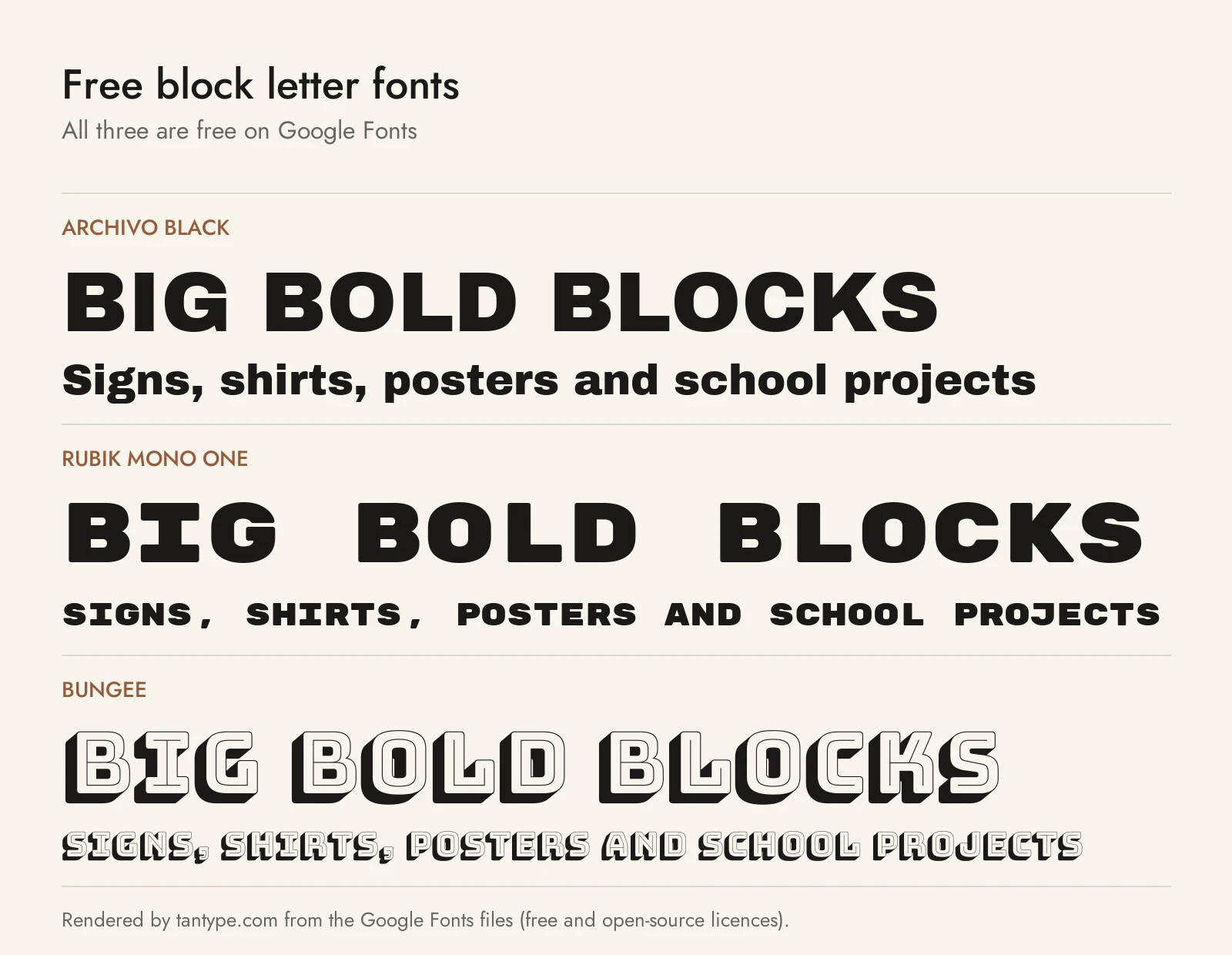
The first five are on Google Fonts under the SIL Open Font License, which allows commercial use. The sixth is on Fontshare under its own free licence.
- Archivo Black (Omnibus-Type): the black weight of a grotesque family “reminiscent of late nineteenth century American typefaces.” The closest free match to a classic heavy sans block, and unlike most paid picks it has a lowercase.
- Rubik Mono One (Hubert & Fischer): a monospaced sister of Rubik Black with slightly rounded corners. Every letter is the same width, which gives a chunky, square, video-game look. Covers Latin, Cyrillic and Hebrew.
- Bungee (David Jonathan Ross): made for “urban signs that stack the Latin alphabet, one letter on top of the other.” Round letters like O are straight-sided, so it stays blocky, and it sets vertically too.
- Bungee Shade (David Jonathan Ross): Bungee with a built-in 3D shade, the quickest free way to get 3D block letters.
- Alfa Slab One (JM Solé): a slab block based on Robert Thorne’s Six-lines Pica Egyptian for the Thorowgood foundry, redrawn “with an extreme stem weight, big serifs.” The free pick for Western and wood-type looks.
- Panchang (Indian Type Foundry, on Fontshare): a wide sans with letters “so wide that they are almost panoramic,” from Extralight to Extrabold plus a variable font. The heavy weights give a flat, industrial block look.
| Font | Source | Licence | Commercial use |
|---|---|---|---|
| Archivo Black | Google Fonts | SIL Open Font License 1.1 | Yes |
| Rubik Mono One | Google Fonts | SIL Open Font License 1.1 | Yes |
| Bungee | Google Fonts | SIL Open Font License 1.1 | Yes |
| Bungee Shade | Google Fonts | SIL Open Font License 1.1 | Yes |
| Alfa Slab One | Google Fonts | SIL Open Font License 1.1 | Yes |
| Panchang | Fontshare | ITF Free Font License | Yes, but no modifying or redistributing the files |
Many block fonts on free download sites are free for personal use only, so selling shirts, signs or cut files made with them needs a paid licence.
Licensing: personal vs commercial use
Creative Market sells fonts under Desktop, Webfont, E-pub and App licences. Its font licence page says a Desktop licence covers “unlimited commercial and personal projects,” including physical end products, packaging, social media and paid ads, and asks you to buy as many seats as there are users.
For block letters, three points matter. Print-on-demand shirts and mugs are allowed only when you, the licence holder, create the finished product. For a logo, the font must be modified and not the dominant element, and you must disclaim it in a trademark filing. The page doesn’t mention SVG cut files or letter templates and forbids sharing the font itself, so ask the designer before selling the lettering on its own. This is a summary, not legal advice.
Block letter font FAQ
What does “print in block letters” mean?
It means write each letter as a separate capital, not in joined-up handwriting. Forms ask for it because separate capitals are easier to read and fit the boxes.
What is the best block letter font in Word?
Arial Black and Impact are the heavy block fonts already on most Windows PCs; Microsoft’s font list shows both shipping with Windows 10 and 11. For a slab block, Rockwell Extra Bold comes with Office (see our Rockwell guide). Install any other font from this list and it appears in Word after a restart.
What font is used for varsity block letters?
There’s no single official one. Varsity letters are slab capitals with clipped corners, usually set in two colours with an outline. College Block and Gridiron Block on this list are built for it, and our sports fonts roundup has more jersey styles.
How do you make 3D block letters?
Use a font with an extrude or shadow layer, such as Lock Block or the free Bungee Shade, or add depth yourself: Text Effects in Word, Echo or Drop in Canva, or an Offset layer on a Cricut.
Are block letter generators real fonts?
No. Most online block letter generators either show an image of your text in a font or swap your letters for Unicode look-alike symbols. Neither installs or cuts cleanly, so use a real font for anything you’ll print or sell.
Are there free block letter fonts for commercial use?
Yes. Archivo Black, Rubik Mono One, Bungee, Bungee Shade and Alfa Slab One are free on Google Fonts under the Open Font License, and Panchang is free on Fontshare.
What is the difference between block letters and bubble letters?
Block letters have flat sides and square corners; bubble letters are puffed out with round corners, as if inflated. Rounded block fonts like Chunko Bold sit between the two, and our bubble letter fonts cover the full round style.
