
Cricut Fonts: 10 Best Fonts for Cricut Vinyl, Iron-On, Pens and Monograms
The best Cricut fonts cut, weed and draw cleanly: connected scripts that weld into one piece, thick strokes for vinyl and iron-on, and single-line fonts for Cricut pens. Any font you install on your computer shows up in Cricut Design Space, so you aren’t limited to the fonts Cricut sells.
Our top three picks are Homebody, a connected script with sturdy strokes; Very Tired, a chunky block font whose swash capitals you reach by typing; and Single Line Font Bundle Vol. 2, eight writing fonts for pens and foil. All ten picks are commercial fonts sold on Creative Market; three free Google Fonts options are further down.
See Creative Market’s cursive Cricut fonts guide Commercial fonts: Desktop prices below were checked on October 16, 2026
Cricut, Design Space and Cricut Access are trademarks of Cricut, Inc. tantype.com is an independent font review site, not affiliated with or endorsed by Cricut.
What makes a good Cricut font?
A font that looks good on screen can still be a pain to cut. These traits matter most.
Connected scripts that weld cleanly
Script letters are separate shapes inside a font, even when they look joined. Cricut’s Weld guide says Weld joins shapes “into a single-layer object” and “only the exterior cut path will remain”, but the shapes must overlap. A script whose letters only touch cuts as loose letters. Design Space helps: its Working with Text article says touching letters in kerned fonts “weld automatically on the project preview screen”, and most installed fonts are kerned. Weld is permanent: the Design Space FAQ says there is no unweld.
Stroke thickness for vinyl and iron-on
Hairlines tear or lift with the waste when you weed. Cricut’s Glitter Vinyl instructions tell you to peel transfer tape slowly so “your intricate lines do not tear”. Thick materials are stricter: 3D Iron-On “is not intended for intricate designs”, and for Glitter Iron-On Mesh Cricut recommends cutting images at 3 in (7.6 cm) or larger.
Single-line writing fonts for Cricut pens
Cricut’s engraving guide explains that cutting artwork is traced “along the cut paths”, giving “an outline or ‘bubble’ version of the design”, and a pen set to Draw follows the same paths. For handwriting, Cricut says to “use the Writing Style filter in the font list”. Installed fonts rarely have one, so buy fonts sold as single-line.
Installing fonts so Design Space sees them
Design Space reads the fonts on your computer: Cricut’s offline feature article calls them system fonts, “fonts that are installed on your computer”. Unzip the download, then install the OTF or TTF with Font Book on a Mac, or right-click it and choose Install on Windows, as Microsoft’s font guide explains. If it doesn’t appear, close and reopen Design Space.
Reaching glyphs and alternates
Script alternates usually sit behind OpenType features, and Cricut’s text guide mentions no glyph panel. PUA-encoded fonts give each extra its own code point: copy it from the Mac Character Viewer or Font Book, or Windows Character Map, and paste it into your text box. Other fonts put the alternates in a separate file you switch to.
Cricut Access fonts vs your own installed fonts
Cricut Access is Cricut’s subscription, with hundreds of fonts (its sign-up panel says 1,000+); a green crown marks content your account can’t use yet. Cricut’s Terms of Use license its fonts and images “only in connection with the Software and Cricut Device(s)”. A font you buy works in every app, under the designer’s licence.
The best Cricut fonts at a glance
- Homebody: connected script with sturdy strokes for first vinyl projects.
- Hazelnut Macchiato: brush-pen script with an ALT file for alternates.
- Joshico Script: brush calligraphy with 420+ PUA glyphs.
- Black Rounded Script: heavy retro script for iron-on shirts.
- Very Tired: block capitals with swashes on plain keys.
- Sardin: rounded bold sans with Cricut glyph instructions.
- Thorn & Thistle Sans: hand-drawn sans with a cut-ready Regular style.
- Single Line Font Bundle Vol. 2: eight single-line scripts for pens and foil.
- Dream Wish: monoline script and bold caps duo.
- Monogram She: intertwined three-letter monograms.
Best Cricut fonts on Creative Market
Prices are for a one-seat Desktop licence as listed on Creative Market on October 16, 2026. Prices change, so check the listing.
1. Homebody: a connected script that is easy to weed
Homebody is the first pick in Creative Market’s own guide to cursive Cricut fonts, and its listing names “cricut projects” among its uses. It is a casual script by Kaitlynn Albani of KA Designs. In the cover artwork the letters join along the baseline, and the strokes have an even, sturdy weight with rounded ends, so there are no hairlines to tear. Use it for names on tumblers, pantry labels and family signs. Desktop licence: $12.
See Homebody on Creative Market · Read our Homebody review
2. Hazelnut Macchiato: alternates without a glyph panel
Sabrina Schleiger says she made this hand-lettered script “super-smooth with Cricut & Silhouette crafters in mind”, meaning smooth outlines rather than a textured edge. It looks like bouncy brush-pen lettering, and most letters join. Ligatures and alternates are built in, and a second file, SS Hazelnut Macchiato ALT, holds them for programs without OpenType support. Look under “S” in your font list. It covers basic Latin and most Western European languages. Desktop licence: $18.
See Hazelnut Macchiato on Creative Market
3. Joshico Script: PUA swashes you can paste into Design Space
Supfonts’ Joshico Script (spelled “Joshiko” in its cover artwork) is a handmade brush calligraphy font labelled “Cricut / Canva ready”. The reason is PUA encoding: its 420-plus glyphs, including alternates, ligatures and initial and final swashes, can be copied from Character Map and pasted into Design Space. The long swashes are thin, so cut it large and weed slowly. The download has OTF and WOFF files and a manual. Desktop licence: $15.
See Joshico Script on Creative Market
4. Black Rounded Script: heavy strokes for iron-on
Dede Mulyadi’s Black is the heaviest script here: bold and curvy, with round, chunky strokes closer to a diner sign than a wedding invitation. That weight suits iron-on shirts and hoodies. The OTF and TTF files are PUA-encoded, and the listing names Silhouette and Inkscape when it explains that the extras work without OpenType support. It includes ligatures, four stylistic sets, a swash style added in September 2024 and a “Black font 2.0” style added in February 2026. Desktop licence: $19.
See Black Rounded Script on Creative Market · Read our Black review
5. Very Tired: swash capitals you reach by typing
Very Tired is an all-caps block font from KA Designs with swooping swashes on nine letters, and the listing names “Cricut projects” and Canva among its uses. Its method suits Design Space: the listing says to “use capital letters for swash letters”, so the swash A, H, K, M, N, R, V, W and Y need no glyph panel. The thick, simple strokes make it one of the easiest fonts here to cut and weed in iron-on. Give the swash letters extra spacing. Desktop licence: $12.
See Very Tired on Creative Market · Read our Very Tired review
6. Sardin: a rounded bold sans with Cricut instructions
Pandeka Studio’s Sardin is a heavy rounded sans inspired by 1990s cartoons and comic books. Rounded corners leave no sharp points to lift off the backing. The listing includes instructions to “access special characters in all apps, even in Cricut Design”, and those characters are PUA-encoded. The listing names 26 supported languages. Use it for kids’ names, party banners and bold shirt slogans. Desktop licence: $25.
See Sardin on Creative Market · Read our Sardin review
7. Thorn & Thistle Sans: a hand-drawn sans with a cut-ready style
Callie Rian Hegstrom’s hand-drawn sans comes in Regular, Rustic and Shadowed versions, and the listing is frank about cutting: “The Regular Version will work with Circuit [sic] or Silhouette, but I wouldn’t try and cut the Rustic version.” Rough edges become hundreds of tiny cut points. Regular gives a farmhouse look on wood signs and tote bags; keep Rustic for printed designs. AI and EPS vectors are included. Desktop licence: $20.
See Thorn & Thistle Sans on Creative Market · Read our Thorn & Thistle review
8. Single Line Font Bundle Vol. 2: writing fonts for pens and foil
This is the only pick drawn for pens and foil rather than blades. Ali Hamidi’s bundle has eight single-line scripts, from Backstay and Gauntly to Manifestly and Pregnancy Journey. Each comes as two fonts, one “for programs such as Cricut, Silhouette Studio, Brother CanvaWorkspace” and one for CNC programs, for “foiling, engraving, writing and more”. It has few ratings so far, so draw a test on scrap paper first. Desktop licence: $19.
See Single Line Font Bundle Vol. 2 on Creative Market
9. Dream Wish: a script and bold caps duo for kids’ projects
Airotype’s Dream Wish pairs a bouncy monoline script, with swash lowercase endings, and a bold all-caps sans with some uppercase ligatures. The listing says it works in “Silhouette Studio, even Microsoft Word, PowerPoint and others”. The halves suit different jobs: the bold sans cuts and weeds easily in iron-on, while the script’s even line is thin, so cut it larger. Desktop licence: $15.
See Dream Wish on Creative Market · Read our Dream Wish review
10. Monogram She: intertwined monograms that weld into one shape
Pixelcolours’ Monogram She has 35 reviews and more than 9,000 sales. It comes as Regular and Intertwined, which does the interlocking for you. Each capital was “hand drawn with the purpose of making them join each other”, so three letters weld into a single cut shape. The looping flourishes are thin, so cut it at tumbler or door-sign size. The set is capitals, numbers, a period and an ampersand. Desktop licence: $26.
See Monogram She on Creative Market
How to choose a Cricut font
- Start with the material. Glitter, mesh and 3D iron-on want bold, simple letters; cardstock takes finer work; pens need a single-line font.
- Check the joins at real size. Type the actual word, zoom in and make sure each letter overlaps the next. If a script only touches, reduce the letter spacing until it overlaps, then weld.
- Find the thinnest stroke. Print at full size; a pencil-thin hairline will be fiddly to weed.
- Know how you’ll reach the extras. Look for PUA encoding, an ALT file or alternates on plain keys. Otherwise Design Space shows only the default letters.
- Skip distressed fonts for cutting. Rough edges cut as jagged outlines, as Thorn & Thistle’s designer warns about her own Rustic style.
- Test first. Cricut’s iron-on guides recommend a test cut; cut one word on scrap.
Free fonts for Cricut
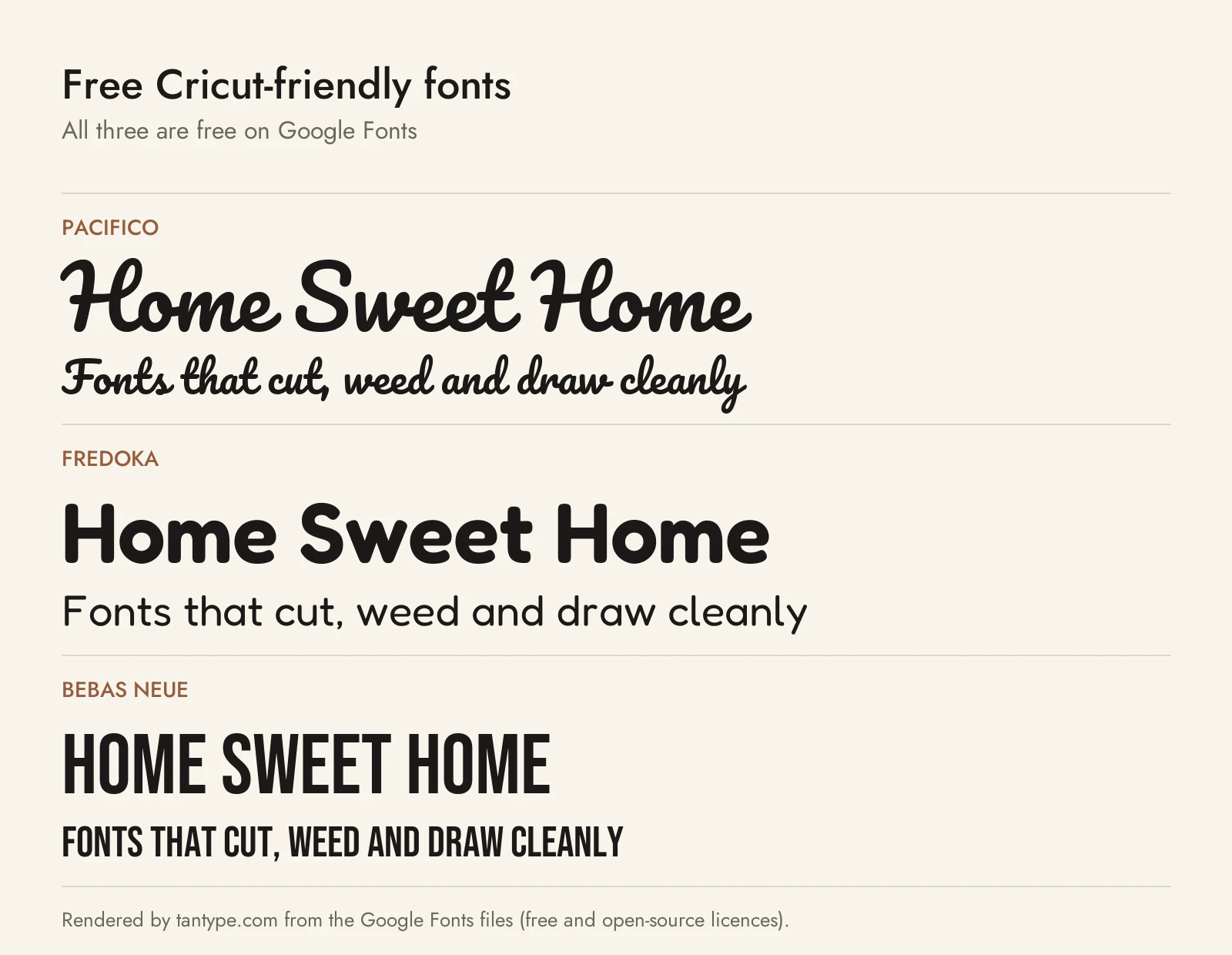
These three Google Fonts use the SIL Open Font License, which allows commercial use, including products you sell.
- Pacifico: Vernon Adams’ thick, connected brush script, in one weight. Its joins overlap, so a word welds into one piece, and the strokes are heavy enough for iron-on. The closest free match to Homebody and Black.
- Fredoka: a rounded sans by Milena Brandão and Hafontia, variable from Light to Bold with a width axis. Set bold, it does Sardin’s job for kids’ names and banners, with nothing hidden behind OpenType.
- Bebas Neue: Ryoichi Tsunekawa’s condensed all-caps sans, in one weight. Tall, narrow letters fit long words across a shirt or tumbler. Think Very Tired without the swashes.
None of the three has a Writing style, so use a single-line font for pens.
Licensing: personal vs commercial use for vinyl, shirts and decals
Two sets of terms can apply: your font’s licence, and Cricut’s Angel Policy for Cricut’s own fonts and images.
- Creative Market Desktop licence: the font licence page allows “unlimited commercial and personal projects”, including physical end products, and says you can “sell an unlimited amount of items for the number of projects permitted”. Buy one seat per person using the font. That covers shirts and decals you make and sell.
- Print-on-demand: “Only the Licensee may use the font to create a completed end product”, and POD use is forbidden “whenever the end user is not the Licensee”. That rules out shops where customers type their own text in your font.
- Cut files and templates: the licence page doesn’t address selling SVG cut files or editable templates. Those hand over the letter shapes, so ask the designer first.
- Designer-specific terms: read the licence in the ZIP. Monogram She is “Not allowed to be digitized, shared or resold as embroidery fonts” without a separate licence. Designers who sell direct may cap volume: Letterayu Studio’s Small Commercial licence covers shirts, mugs and stickers “up to approximately 250 units/sales per design per font”.
- Cricut’s Angel Policy: Cricut’s legal terms let you sell “up to 10,000 completed craftwork projects per year” that you make yourself, not on an assembly line. Cricut Access fonts showing only the Access icon qualify; licensed fonts with a brand icon don’t. Products using Cricut’s copyright materials must carry “Includes Copyright Materials of Cricut”. Cricut’s blog post confirms that “Fonts within Cricut Design Space are also covered”; fonts you install follow their own licence.
This is a summary of published terms, not legal advice.
Cricut font FAQ
How do I add fonts to Cricut Design Space?
Install the font on your computer: Font Book on a Mac, or right-click and Install on Windows. It then appears among your system fonts in Design Space; if not, reopen the app.
What are the best fonts for Cricut?
Homebody or Hazelnut Macchiato for vinyl scripts, Black or Very Tired for iron-on, Single Line Font Bundle Vol. 2 for pens. Free: Pacifico, Fredoka and Bebas Neue.
Are Cricut fonts free?
Some are. Cricut Access fonts need the subscription. Fonts you install yourself cost nothing extra in Design Space; you pay the designer for the licence, or use open-source fonts from Google Fonts.
Why does my font draw as an outline with a Cricut pen?
It was made for cutting, so the pen traces its outline. Use the Writing Style filter in Design Space or a single-line font.
Why won’t my script letters cut as one piece?
The letters don’t overlap, or they were ungrouped. Reduce the letter spacing until they overlap, then select the text and use Weld or Combine > Unite.
