
Comic Fonts: 10 Best Comic Lettering Fonts for Speech Bubbles, Captions and Sound Effects
Comic fonts are typefaces built for the words in a comic: the dialogue in speech balloons, the captions in boxes and the sound effects that crash across a panel. The best ones are made by working comic letterers and copy the pen-drawn letters of printed comic books.
Our top three picks are the Benoda Dialogue Bundle for dialogue, Clean Cut Kid for neat captions and kids’ comics, and Biff Bam Boom for Silver Age sound effects. Most of the list comes from Comicraft, the lettering studio Richard Starkings founded in 1992, with three picks from other designers. Every font in the main list is a commercial font sold on Creative Market. Six free comic fonts are further down: five you can use commercially and one that is free only for indie comics.
Browse comic fonts on Creative Market Commercial fonts: check each listing for current pricing
What is a comic font?
A comic font is a typeface that imitates the hand lettering in comic books: mostly capital letters with a slightly uneven pen stroke, spaced to stay readable inside small speech balloons. The term also covers sound effect (SFX) fonts and cartoon title fonts, which are bolder and far more expressive.
This guide is about lettering, the text inside the story. For loud logos and cover titles, see our roundup of the best superhero fonts; none of its picks are repeated here.
From hand lettering to comic book fonts
For most of the 20th century every word in a comic was drawn by hand. Wikipedia lists the letterer’s kit as “a lettering guide, a pen or brush, India ink, and white paint for corrections.” The guide was usually an Ames Lettering Guide, a plastic template with a numbered wheel for ruling evenly spaced pencil lines. Letterer Todd Klein shows one on his hand-lettering basics page, with the pens he uses, including a heavier one for bold italic words.
Wikipedia says digital lettering took off with “the first commercial comic book font” around 1990. In 1992 Richard Starkings, then lettering Uncanny X-Men, founded Comicraft, digitised his hand and teamed up with designer John Roshell; from 1995 the studio sold its comic book fonts to the public, today through ComicBookFonts.com. In the late 1990s Nate Piekos started Blambot to make lettering fonts an aspiring creator could afford. Piekos writes that the American industry moved on from hand lettering in the late 1990s.
Comic lettering rules a good font follows
- All-caps dialogue. Comicraft’s John Roshell wrote on Balloon Tales that all-uppercase balloons are “left over from the days when crappy printing quality often rendered lowercase letters unreadable.” Most lettering fonts are still capitals only.
- The crossbar I. Blambot’s Comic Book Grammar & Tradition guide keeps the I with top and bottom bars for the pronoun and acronyms; “any other instance of the letter should just be the vertical stroke version.” Comicraft automates this in many fonts as Crossbar I Technology.
- Bold italic for stress. “Bold italic is used when emphasis is placed on a word,” the guide says, and plain bold almost never appears in dialogue. A lettering font needs a bold italic style.
- Italics for captions and machines. Editorial captions are italic, and so is any speech “transmitted through a radio, TV, telephone, or any type of speaker.”
- Balloon tails. A tail should point to the speaker’s mouth and stop “at roughly 50-60% of the distance between the balloon and the character’s head.” Thought balloon tails point to the head, and whispers get a dashed outline.
Good lettering fonts also have automatic alternates, versions of common letters that rotate as you type so “LOOK” never shows two identical O’s.
Sound effect fonts
SFX fonts are heavier, often slanted or shaky, and usually come with outline or “open” styles for two-colour effects. Webtoon creator Walter Ostlie, writing on Clip Studio’s CLIP STUDIO TIPS site, types an effect one letter per layer, then moves, rotates and resizes each letter so it doesn’t look like it “came off a typewriter.”
Comic Sans: a comic font that isn’t a lettering font
Its designer, Vincent Connare, explains on Microsoft’s typography site that in 1994 he saw many cartoon-style software titles in development at Microsoft and wanted “a lettering script similar to the lettering used by the major comic books.” He started it in October 1994. The Microsoft 3D Movie Maker team first picked it up for speech balloons, and it later shipped with Windows 95. Wikipedia notes that Connare had been looking at The Dark Knight Returns and Watchmen, the latter lettered by Dave Gibbons.
So Comic Sans was inspired by comics but made for software. On TypeDrawers, one type designer calls it “much too wide” and notes that comic book lettering “should be very vertical and compact” and is traditionally all caps. It is mixed case, with no alternates or crossbar I handling. Wikipedia quotes Gibbons saying it was “a shame they couldn’t have used just the original font.” Comic Neue and Comic Relief, below, are free Comic Sans alternatives.
Manga lettering basics
According to Wikipedia, “Japanese manga tend to use vertical direction for text,” which is why manga speech bubbles are tall and narrow, and pages run right to left. Japanese dialogue has its own type style too: Google’s free Shippori Antique follows “long-established standards for dialogue in manga,” pairing heavy Mincho-style kana with Gothic kanji. English translations are lettered in Western comic fonts. Comicraft says its Wildwords has been used to letter everything from manga translations to Saga (it is sold through Comicraft’s own site), and Blambot’s Anime Ace, a manga font covered below, is free for indie creators.
The best comic fonts at a glance
| Font | Best for | Styles | Desktop price* |
|---|---|---|---|
| Benoda Dialogue Bundle | Dialogue, captions and emphasis | 3 (Text, Narrative, Emphatic) | $39 |
| Wascally Wabbit | Cartoon and webcomic dialogue | 4 (Regular, Italic, Bold, Bold Italic) | $139 |
| Comicon Comic Type Pack | Budget dialogue plus titles | 6 (4 text styles, Display, Outline) | $16 |
| Scoundrel | Mixed-case lettering and notes | 4 (Regular, Italic, Bold, Bold Italic) | $49 |
| Clean Cut Kid | Captions and kids’ comics | 4 (Regular, Italic, Bold, Bold Italic) | $49 |
| Letterbot | Robot, AI and computer voices | 4 (Regular, Italic, Bold, Bold Italic) | $49 |
| Biff Bam Boom | Silver Age sound effects | 2 (Regular, Outline) | $29 |
| Battle Cry | Bouncy SFX and cover blurbs | 4 (Regular, Italic, Open, Open Italic) | $49 |
| Hero Bump | Cartoon SFX and kids’ titles | 2 (Regular, Extrude) | $25 |
| Onomatopedia | Ready-made sound effects | 2 (Echo, Source) | $29 |
*One-seat desktop licence on Creative Market, checked 22 October 2026. Comicraft style lists come from Comicraft’s own pages.
How we chose these fonts
We looked for fonts built for the lettering inside a comic rather than logos, which our superhero guide covers, and opened every Creative Market listing live on 22 October 2026. Comicraft, a studio of working comic letterers, supplies most picks, alongside three other designers. We compared styles, alternates, language support, crossbar I handling, licence terms and value, then grouped the list by job: dialogue (picks 1 to 4), captions (5), character voices (6) and sound effects (7 to 10). Nothing here repeats our other roundups.
Best comic fonts on Creative Market
Regular one-seat desktop prices on Creative Market, 22 October 2026.
1. Benoda Dialogue Bundle: a complete comic lettering font kit
Benoda, from the shop category4, is a family of comic book typefaces inspired by the hand lettering of Ben Oda, especially his early-1950s work for EC Comics. The bundle gives you three styles built around lettering jobs: Benoda Text for dialogue, Benoda Narrative for captions and thought balloons, and Benoda Emphatic for stressed words, covering the regular, italic and bold italic roles. Each has three alternates for A to Z, a to z, 0 to 9 and common punctuation, cycled by contextual alternates, plus wide Latin diacritic support. A 32-page specimen book PDF is included. Desktop licence: $39.
See Benoda Dialogue Bundle on Creative Market
2. Wascally Wabbit: a speech bubble font for cartoons
Wascally Wabbit is one of Comicraft’s balloon lettering fonts, which the studio calls “a toon town tattler” for “comic books and animated features.” The capitals are chunky, rounded and a little bouncy, ideal for funny animal comics and cartoon webcomics. The listing describes four weights with “automatically alternating uppercase alphabets,” Western and Central European support, manga characters and Crossbar I Technology. It is the most expensive pick here, so it suits a long-running series or animated work. Desktop licence: $139.
See Wascally Wabbit on Creative Market
3. Comicon Comic Type Pack: the budget lettering set
StudioWorks’ Comicon pack is the cheapest complete kit in this list. It has four dialogue styles, Regular, Italic, Bold and Bold Italic, with multilingual support, plus an all-caps Display face and a matching Outline for titles. The listing says mixing upper and lower case in the Regular family varies repeated letters so pairs don’t look identical. Files are OTF. It suits first webcomics, zines and school projects where you want dialogue, emphasis and a title font from one purchase. Desktop licence: $16.
See Comicon Comic Type Pack on Creative Market
4. Scoundrel: lettering drawn in Procreate
Comicraft says Richard Starkings drew Scoundrel with an Apple Pencil in Procreate on his iPad, in the style of the studio’s ShoutOut font, recreating a pen lettering style. The listing confirms four weights, Regular, Italic, Bold and Bold Italic, each with upper and lower case, plus Western and Central European characters, automatic alternates, manga characters and Crossbar I Technology. It suits webcomics and graphic novels lettered in sentence case, and the notes, letters and journal pages inside a story. Desktop licence: $49.
See Scoundrel on Creative Market
5. Clean Cut Kid: a neat caption and kids’ comic font
Comicraft files Clean Cut Kid under narrative captions and journals and calls it “perfectly neat and trim in appearance”; the listing pitches it as a friendly comic font. It is mixed case, with rounded felt-pen letters, so captions read like tidy handwriting and stay readable at small sizes. Comicraft’s 2022 update added Bold and Bold Italic, Central European and Vietnamese support, automatic alternates and Crossbar I Technology. Use it for school comics, worksheets and storybooks, with a title font from our best kids fonts guide. Desktop licence: $49.
See Clean Cut Kid on Creative Market
6. Letterbot: a character voice for robots
Comics give non-human characters their own lettering, and Letterbot is Comicraft’s robot voice, designed by John Roshell. The letters are smooth, rounded and monoline, with a lowercase, so they look machine-made next to the pen-drawn wobble of an ordinary dialogue font in the same panel. Comicraft lists Regular, Italic, Bold and Bold Italic, and a 2024 update added tabular numbers and Central European support. Use it for robots, AI characters and computer screens. Desktop licence: $49.
See Letterbot on Creative Market
7. Biff Bam Boom: a classic sound effect font
Biff Bam Boom is Comicraft’s take on the punches and crashes of Silver Age Marvel books, “thrown from the pages of Spider-Man, Daredevil and Hulk,” with heavy, slanted capitals. Comicraft lists Regular and Outline styles that layer for two-colour effects. The listing says the remastered version adds Central European, Vietnamese and Cyrillic characters, automatic double-letter ligatures, Crossbar I Technology and 18 Chinese sound effects. Use it for fight panels, stickers and pop art prints. Desktop licence: $29.
See Biff Bam Boom on Creative Market
8. Battle Cry: bouncy effects with an open style
Battle Cry was made by Spanish letterer Ferran Delgado with John Roshell, and Comicraft says it draws on “the assembled Cover Lettering Styles of Yore.” The capitals are chunky with a hand-cut edge, and the italic leans hard for action. Comicraft lists Regular, Italic, Open and Open Italic; the Open styles give outlined letters for two-colour effects. A 2024 update added automatic alternates, Crossbar I Technology and Central European support. Use it for comedy effects, cover blurbs and game screens. Desktop licence: $49.
See Battle Cry on Creative Market
9. Hero Bump: a chunky cartoon SFX and title font
Hero Bump, from figuree studio, is a bold, all-caps comic display font aimed at kids’ projects, games, cartoons, packaging and comic books. It combines smooth curves with sharp edges, and comes with a bonus Hero Bump Extrude style, a 3D version you can layer under the regular letters. It supports Western and Central European languages and ships as OTF, TTF and WOFF. It is friendlier than Biff Bam Boom, so use it for cartoon sound effects, stickers and kids’ comic titles. Desktop licence: $25.
See Hero Bump on Creative Market
10. Onomatopedia: ready-made sound effects
Onomatopedia isn’t an alphabet. It is a symbol font of finished sound effects by John Roshell, “over One Hundred” of them in alphabetical order, from loud crashes to restrained ones. Each key types a complete effect, and Comicraft lists two styles, Echo and Source. It is the quickest route to professional-looking SFX, especially in Canva or Procreate, where layering single letters is fiddly. Use it for webcomics, memes and stickers. Desktop licence: $29.
See Onomatopedia on Creative Market
How to choose a comic font
Build a small kit. Comicraft’s getting-started advice is one full-featured balloon lettering font, a few sound effect fonts and a display font or two for titles and credits. One dialogue font plus one SFX font, say the Benoda Dialogue Bundle and Biff Bam Boom, covers most comics.
Check for bold italic and the crossbar I. A comic lettering font without bold italic forces you to break the emphasis rule.
Test at real size. Set a full balloon at final size and read it on your readers’ device, usually a phone for webtoons; rough, textured fonts fall apart small.
Match the voice. Rounded, wobbly letters read as funny and young; neat ones as calm. Give robots and narrators their own font, but keep to two or three per page.
Canva. Canva’s upload fonts page says paid plans such as Pro and Teams can add OTF, TTF or WOFF files to a Brand Kit, and that you should only upload fonts you are licensed to use. For puffy title lettering, see our bubble fonts guide.
Procreate. The Procreate Handbook says it imports TTF, OTF and TTC files: add text, tap Edit Style, then Import Font, or drag the file in from the Files app. Unzip downloads first.
Clip Studio Paint. Ostlie’s advice is to “simply download the font and install on your device”; steps differ by operating system.
Memes and kids’ material. Here legibility beats authenticity: use a clean capital font or a ready-made Onomatopedia effect. For hand-drawn headings next to comic text, try our marker fonts roundup.
Free comic fonts
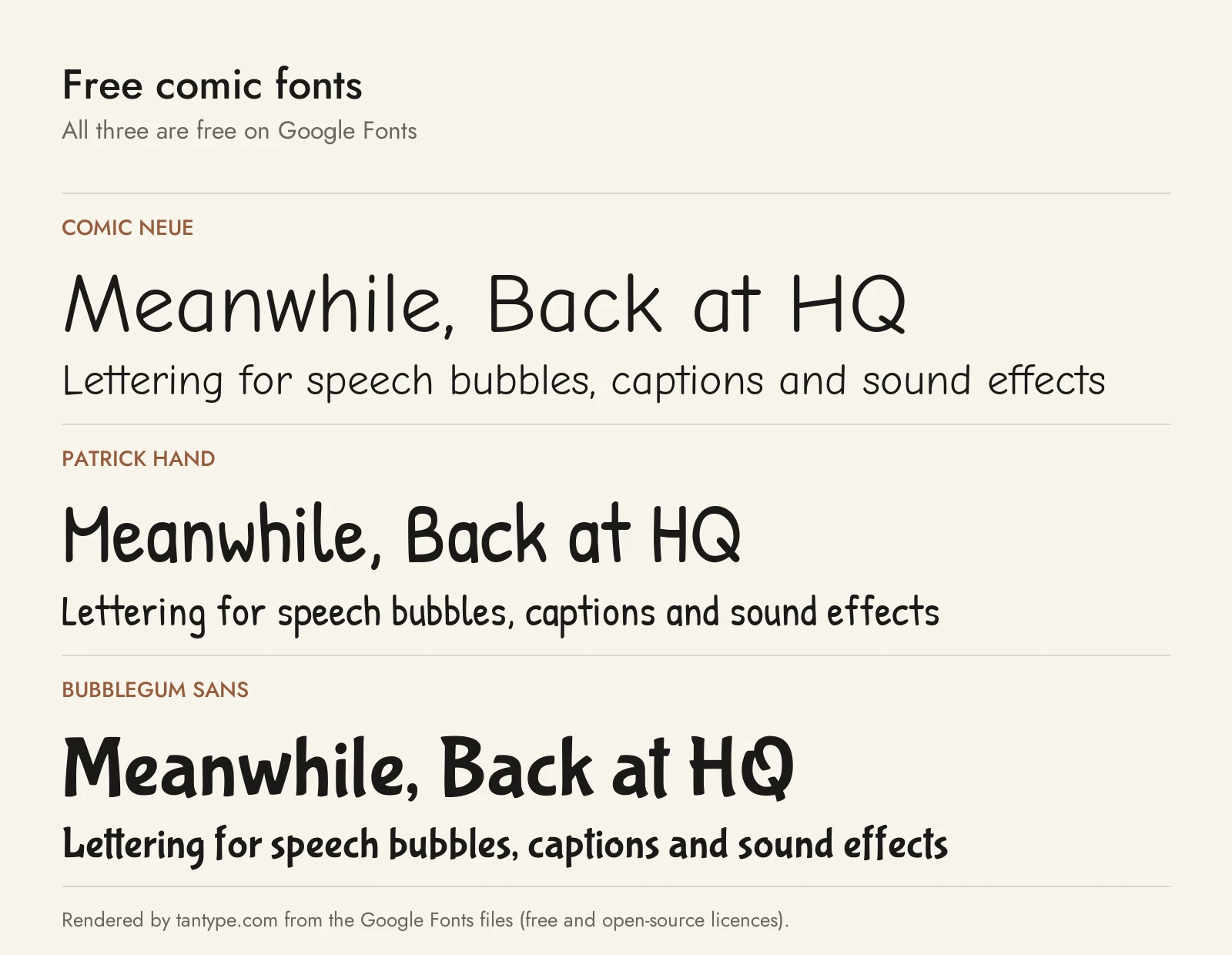
The first five are on Google Fonts and free for personal and commercial use, but none has automatic alternates or crossbar I handling.
- Comic Neue (Craig Rozynski, Hrant Papazian; SIL Open Font License): “an original reinterpretation of the classic, Comic Sans,” in Light, Regular and Bold with italics, so bold italic emphasis works. It is mixed case, so use caps lock in balloons. A free stand-in for Clean Cut Kid or Benoda.
- Patrick Hand (Patrick Wagesreiter; SIL OFL): based on the designer’s handwriting, with a casual felt-pen feel and a Small Caps sister family for an all-caps balloon look. The nearest free match to Scoundrel, but one weight and no bold italic.
- Bubblegum Sans (Sudtipos; SIL OFL): a bouncy brush letter inspired by 1930s advertising lettering. One display style for cartoon titles and gentle sound effects, far softer than Biff Bam Boom.
- Comic Relief (Jeff Davis; SIL OFL): metrically equivalent to Comic Sans MS, so it replaces Comic Sans in a document without reflowing text. Regular and Bold only.
- Shippori Antique (FONTDASU; SIL OFL): a Japanese manga dialogue font with Latin letters too. Use it to letter in Japanese or add authentic Japanese text to manga-style art.
- Anime Ace 3 (Blambot): a manga-style dialogue font in Regular, Italic, Bold and Bold Italic, free only under Blambot’s “Non-profit/Indie Comics Use” option. Blambot’s licence page lets independent and small-press creators use it free in print, web graphics, merchandise and videos supporting their indie comic, “even if you are making money with your project.” Mainstream publishers need a paid licence, and the clause “does not apply to any other ‘indie’ use,” such as games. Other commercial use needs a paid desktop licence. The Badaboom SFX font has the same terms.
| Font | Source | Licence | Commercial use |
|---|---|---|---|
| Comic Neue | Google Fonts | SIL OFL 1.1 | Yes |
| Patrick Hand | Google Fonts | SIL OFL 1.1 | Yes |
| Bubblegum Sans | Google Fonts | SIL OFL 1.1 | Yes |
| Comic Relief | Google Fonts | SIL OFL 1.1 | Yes |
| Shippori Antique | Google Fonts | SIL OFL 1.1 | Yes |
| Anime Ace 3 | Blambot | Non-profit/Indie Comics Use | Indie comics only; paid licence otherwise |
Bangers, often recommended for comics, is a cover title font, so it lives in our superhero guide.
Licensing: personal vs commercial use
Creative Market’s font licence page sets out four main licences:
- Desktop: unlimited personal and commercial projects, including printed comics, merchandise and ads. On websites, apps and games, text must be rasterized, as an image.
- Webfont: embedding on websites you own, up to a pageview limit chosen at checkout.
- App: embedding in one app or game, as long as the font can’t be extracted.
- E-pub: one ebook title.
A desktop licence covers a print comic or a webcomic posted as images, which is how most webcomics and webtoons are published. A reader app or game that renders live text needs the app licence, and desktop licences are per seat. Print-on-demand tools where customers type their own text are not covered, and the licence page restricts using a font as the dominant element of a logo. This is a summary, not legal advice.
Comic font FAQ
What font do comic books use?
Most modern comics use digital lettering fonts based on letterers’ hand lettering, largely from Comicraft and Blambot. Before the 1990s every balloon was lettered by hand.
What is the best font for comic speech bubbles?
A lettering font with bold italic and automatic alternates, such as the Benoda Dialogue Bundle or Wascally Wabbit, or Clean Cut Kid if you prefer mixed case. Free options are Comic Neue with caps lock on, or Blambot’s free fonts for indie comics.
Is Comic Sans a comic book font?
Not really. Vincent Connare based it on comic lettering in 1994, but he made it for Microsoft software, not comic pages. It is mixed case, wide and lacks the alternates and crossbar I handling of real lettering fonts.
What font is used for manga translations?
English manga is lettered in Western comic fonts, mostly in all caps. Comicraft says its Wildwords has been used for manga translations, and Blambot’s Anime Ace is free for indie creators.
Why are comics lettered in all caps?
It started as a practical fix. John Roshell says the habit dates from poor printing that made lowercase letters hard to read. Some webcomics and graphic novels now use mixed case.
Are there free comic fonts for commercial use?
Yes. Comic Neue, Patrick Hand, Bubblegum Sans, Comic Relief and Shippori Antique are on Google Fonts under the SIL Open Font License. Blambot’s free fonts are free only for indie comics and non-profit use.
What is a sound effect font?
A sound effect (SFX) font is a bold, expressive display font for noises like BOOM or KRAK, often with outline or open styles for colouring, such as Biff Bam Boom and Battle Cry. Onomatopedia goes further, with a finished effect on each key.
Do comic font generators give you a real font?
No. Most “comic font generator” sites swap your letters for look-alike Unicode symbols or show an image preview of a font. Neither gives you an editable font for lettering a comic.
