
Pixel Fonts: 11 Best Pixel Fonts for Retro Games, 8-Bit Logos and Pixel Art
A pixel font builds every letter from small squares on a grid, the look of arcade cabinets, early computers and 8-bit consoles. It is the default choice for indie game menus, Twitch overlays, retro merch and posters that want a digital, nostalgic feel.
If you only try three, start with Player One for a twelve-style arcade family, Gridbit for crisp, monospaced game dialogue and Blockraft for the chunky, blocky look people call a Minecraft font. All eleven picks are commercial fonts sold on Creative Market, so they need a licence. Six genuinely free pixel fonts you can use commercially are further down.
See pixel fonts on Creative Market Commercial fonts; one-seat desktop licences for these picks are $12 to $45 at regular price (October 2026)
What is a pixel font?
A pixel font is a typeface whose letters are built from square pixels on a fixed grid, so every curve becomes a little staircase of blocks. Also called bitmap fonts, 8-bit fonts, arcade fonts or retro game fonts, they began as the only way early computers and arcade machines could show text. Today they give games, logos and posters a digital, retro look.
Wikipedia’s computer font article notes that “the limited processing power and memory of early computer systems forced the exclusive use of bitmap fonts”, each stored as “an array of pixels” and drawn separately for each size.
A short history of pixel type
- Terminals and CRT screens. The free font VT323 was rebuilt from the glyphs of the DEC VT320 terminal. Its designer, Peter Hull, says the original pixels were not square, so he emulated the way the electron beam “smeared the pixels horizontally” on the CRT.
- Arcade games. Toshi Omagari’s book Arcade Game Typography (Thames & Hudson, 2019) surveys about 250 of the 8 × 8 pixel fonts used in arcade games from the 1970s to the 2000s. The free Press Start 2P traces its capitals to Atari’s Sprint (1977) and its letters to Namco’s Return of Ishtar (1986), one of the first games to use lowercase regularly.
- The Macintosh. Susan Kare joined Apple in 1983 and drew the original Mac’s icons and fonts on graph paper. She told Smithsonian Magazine that “the first typeface I designed was Chicago because we needed a bold system font”, limited to vertical, horizontal and 45-degree lines with capitals nine pixels tall. Wikipedia also credits her with Geneva and the monospaced Monaco.
- Minecraft and indie games. The Minecraft Wiki says the game’s primary font, known as Mojangles, is drawn as 8 × 8 pixel images, with early versions by Markus Persson. Its blocky, one-pixel-stroke look is what most people mean by a “Minecraft font”.
Bitmap fonts vs TTF and OTF pixel fonts
Almost every pixel font you buy today is an ordinary TrueType or OpenType outline font whose outlines happen to be squares. The Glyphs tutorial Creating a pixel font shows the method: one square “pixel” shape placed as components on a snapping grid, merged with Remove Overlap on export.
So a pixel TTF or OTF installs and works in Word, Canva, Cricut Design Space, Photoshop and game engines like any font, but software will smooth its edges unless you set the right size and switch smoothing off (see the how-to below). True bitmap formats still exist for games, such as the BMFont (.fnt) format supported by Godot.
8-bit, 16-bit and Minecraft-style fonts
- 8-bit font: the tightest grid, with letters about 5 to 8 pixels tall, single-pixel strokes and square corners, like 1980s arcade and console text.
- 16-bit font: a looser marketing term for pixel fonts with more pixels per letter, smoother diagonals and bolder strokes, closer to 1990s console and RPG menus.
- Minecraft font: chunky, evenly spaced letters with one-pixel details and often a drop shadow. No font on this page is Minecraft’s own font or affiliated with Mojang; they are independent designs with a similar look.
The best pixel fonts at a glance
| Font | Best for | Styles | Desktop price* |
|---|---|---|---|
| Player One | Arcade titles, esports, merch | 12 styles | $22 |
| Gridbit | Game dialogue, terminal and code UI | Regular + Italic, monospaced | $22 |
| Digital 808 | Translated game menus, overlays | 1 style, 63 languages | $12 |
| Blockraft | Blocky, Minecraft-style titles | 1 style, caps only | $12 |
| Bitbybit | 16-bit RPG menus | Regular + Bold, templates | $15 |
| Takako bit | Fantasy and editorial headings | 8-bit + 16-bit serif | $15 |
| Retro Variable Pixel Font | Square-to-round logos and labels | 2 variable + 4 static | $45 |
| Refrax | Experimental posters, album art | 4 layering styles | $24 |
| Fayte | Fantasy RPG and metal titles | Hard + Soft | $20 |
| Lucid Wake | Soft, dreamy pixel script | 1 style | $23 |
| Fine Love | Stitched, romantic pixel script | 1 style | $19 |
*One-seat desktop licence on Creative Market, checked October 2026.
How we chose these fonts
Every pick is a live Creative Market listing checked on 21 and 22 October 2026, with the regular one-seat desktop price, not a sale price. Each font had to be built on a visible pixel grid, not just carry “pixel” in its name. We compared package contents (styles, layers, templates), listed languages, whether the font works small or only as a headline, and licence terms. We covered several jobs, from game UI to pixel scripts for crafts, and left out every font in our 80s, 90s and Y2K roundups.
Best pixel fonts on Creative Market
1. Player One
Player One, by Alper Çakıcı, is the most complete arcade font family here. Its twelve styles share one grid: Regular, Inline, Outline and Shadow, plus Rounded and Circular versions that swap square pixels for softer dots. The designer cites arcade games, early home computers and retro consoles, and the 307 glyphs cover Latin and Cyrillic. Stack the Shadow under the Regular for a two-colour title screen, or use Circular for an LED-sign look. Suggested uses include game branding, streaming graphics, esports, merch and packaging. $22.
See Player One on Creative Market
2. Gridbit
Gridbit, from Indotype, is a bitmap-style font that keeps the aliased edges of 8-bit and 16-bit games and early computer interfaces as a deliberate feature. On Indotype’s own page it is listed as monospaced, in Regular and Italic, with upper and lowercase, accented characters and PUA-encoded characters you can reach without extra design software. The fixed width suits dialogue boxes, terminal screens and code-themed branding; Indotype also suggests cyberpunk graphics and lo-fi music visuals. $22.
See Gridbit on Creative Market
3. Digital 808
Digital 808, from HipFonts, blends 8-bit styling with a clean, contemporary look: crisp pixel edges on a geometric structure. Its 249 glyphs support 63 languages, the widest coverage among these picks, so it is a safe choice for game menus that will be translated and for stream overlays that show viewers’ names. HipFonts suggests logos, games, thumbnails, posters, apparel and tech branding. $12.
See Digital 808 on Creative Market
4. Blockraft
Blockraft, from the Overlay Templates shop, is the pick for the chunky look people call a “Minecraft font”. The listing describes a bold, blocky display face inspired by retro games and digital interfaces, aimed at gaming, pixel art, thumbnails, kids’ designs and “Minecraft-style visuals”. It is an independent font, not the game’s own. It has capitals, numbers and punctuation (no lowercase) with multilingual support, in TTF, OTF and WOFF. Add a one-pixel drop shadow for a sandbox-game feel. $12.
See Blockraft on Creative Market
5. Bitbybit
Bitbybit, from The Good Store, is a pixel sans in Regular and Bold inspired by J-RPGs, side-scrolling metroidvania games and consoles from the 8-bit to 32-bit eras. It reads more like a 16-bit menu font than an arcade one, with lowercase for dialogue. The package includes TTF, OTF and web fonts (EOT, WOFF, WOFF2), plus flyer, Instagram post and story and logo templates and icons. Best for indie RPG interfaces, game-jam pages and retro event flyers. $15.
See Bitbybit on Creative Market
6. Takako bit
Takako bit, by Gianluca Bergo, is a pixel reinterpretation of the Takako serif that keeps its sharp serifs. It shows the 8-bit vs 16-bit difference in one package: the 8-bit version is bolder and simpler, the 16-bit version more detailed. Serifs are rare in pixel type, and they give a storybook, fantasy-game feel for RPG title screens, book covers and editorial headings. The listing shows A to Z only, so check accents if you need them. $15.
See Takako bit on Creative Market
7. Retro Variable Pixel Font
Retro Variable, from That That Creative, adds a variable axis to pixel type: it controls roundness, taking the letters from hard squares to softened corners. You get variable roman and italic fonts plus four static fonts, in OTF, TTF, WOFF and WOFF2. The designer suggests posters, magazines, products, logos and social media. The most expensive pick, at $45.
See Retro Variable Pixel Font on Creative Market
8. Refrax
Refrax, by Anastasiia VNSK, treats pixels as a design system rather than a nostalgia trip. Its four styles, Regular, Fragment, Grid and Line, can be used alone or layered, so you can break letters into fragments or show the grid behind them. It has upper and lowercase, numbers, punctuation and multilingual support, as four OTF files. Best for experimental posters, album covers, editorial spreads and digital graphics, not game UI. $24.
9. Fayte
Fayte, also from That That Creative, blends blackletter with square, blocky pixel forms. It comes in two styles: Hard, with sharp, blade-like strokes, and Soft, with smoother ones. The designer pitches it for proclamations and scrolls as well as digital design, which makes it a natural fit for fantasy RPGs, medieval-themed games, metal merch and tabletop campaign art. $20.
10. Lucid Wake
Lucid Wake, from Struvictory.art, is a soft, pixel-inspired calligraphic script whose curves finish in faint steps. Our review found the pixel texture charming at large sizes but closer to roughness when small, so treat it as a display font. It suits a dreamy pixel look where a game font would feel too loud: lo-fi music artwork, beauty and lifestyle branding, covers, packaging and quotes. $23.
See Lucid Wake on Creative Market · Read our Lucid Wake review
11. Fine Love Handcrafted Pixel Font
Fine Love, from AnMark, is a pixel art font with craft roots. The designer cites vintage embroidery, crochet textures and pixel-like stitching, and the result is a romantic script that looks sewn from small squares. It is the pick for wedding stationery, monograms, keepsakes and cross-stitch or knitting-themed products, where a grid texture should feel warm rather than digital. $19.
See Fine Love on Creative Market · Read our Fine Love review
How to choose a pixel font
Match the grid to your art. In a pixel-art game the font should share the art’s pixel size: if sprites on an 8 or 16-pixel grid are scaled up 4×, use a font about 7 or 8 pixels tall scaled by the same 4×.
Pick by job. Dialogue and menus need lowercase, clear punctuation and even spacing (Digital 808, Gridbit, Bitbybit). Titles, thumbnails and logos can take bolder faces with outline and shadow layers (Player One, Blockraft). For merch, invitations and crafts, a pixel-textured serif or script such as Takako bit or Lucid Wake reads as “pixel” without looking like a game menu. For a sleek sci-fi HUD rather than a retro one, see our best space fonts.
Test the confusable characters. On a tiny grid I, l and 1, O and 0, or 5 and S can collapse into one shape; the-pixel.art’s guide names these as the usual problem pairs. Type Il1 O0 5S before you commit.
Pixel-perfect sizing: use multiples of the grid
A pixel font is sharp only when each font pixel lands exactly on one screen pixel, or on a whole block of them. That happens at the font’s native size and at exact multiples (2×, 3×, 4×); in between, squares are resampled unevenly and edges blur.
- Press Start 2P “works best at sizes of 8px, 16px and other multiples of 8”.
- Departure Mono’s documentation says: “For pixel-perfect results, set the font size to increments of 11px.”
- If a listing gives no native size, zoom in on a capital H and raise the size until one stroke is exactly one, two or three screen pixels wide. Godot and CSS measure in pixels; Photoshop and Word use points.
Turn off anti-aliasing in game engines
- Godot: the fonts documentation says pixel-art fonts “should have bilinear filtering disabled” (texture filter Nearest), that “the font size must also be an integer multiple of the design size”, and that subpixel positioning should be Disabled or the font “may appear to have uneven pixel sizes”. Set antialiasing to Disabled in the import settings too.
- Unity (TextMeshPro): in the Font Asset Creator, choose the RASTER or RASTER_HINTED render mode for a non-antialiased atlas; RASTER_HINTED “aligns character pixels with texture pixels for a crisper result”. A custom sampling size gives “pixel-accurate control over bitmap-only fonts”.
- GameMaker: switch off anti-aliasing in the Presets section of the Font Editor. Fonts added in code have it on by default; font_add_enable_aa turns it off.
Photoshop, Canva, Cricut and stream overlays
- Photoshop: set the anti-aliasing menu in the Character panel to None for hard pixel edges; the same menu is in the Properties panel and Type menu (Adobe Community). Design at 1×, then enlarge with Image Size using Nearest Neighbor resampling.
- Canva: you can’t switch off smoothing, but at headline sizes it doesn’t show. Pro and Teams plans can upload OTF, TTF or WOFF fonts to a Brand Kit (Canva: upload fonts); upload only fonts you’re licensed for.
- Cricut: choose a bold pixel font with strokes at least two pixels wide and set it large, because tiny squares are hard to cut and weed. If letters cut as separate squares, select them and use Weld so each word cuts as one piece.
- Stream overlays: set text at a multiple of the native size and use an outline or shadow style so alerts stay readable over gameplay.
Free pixel fonts
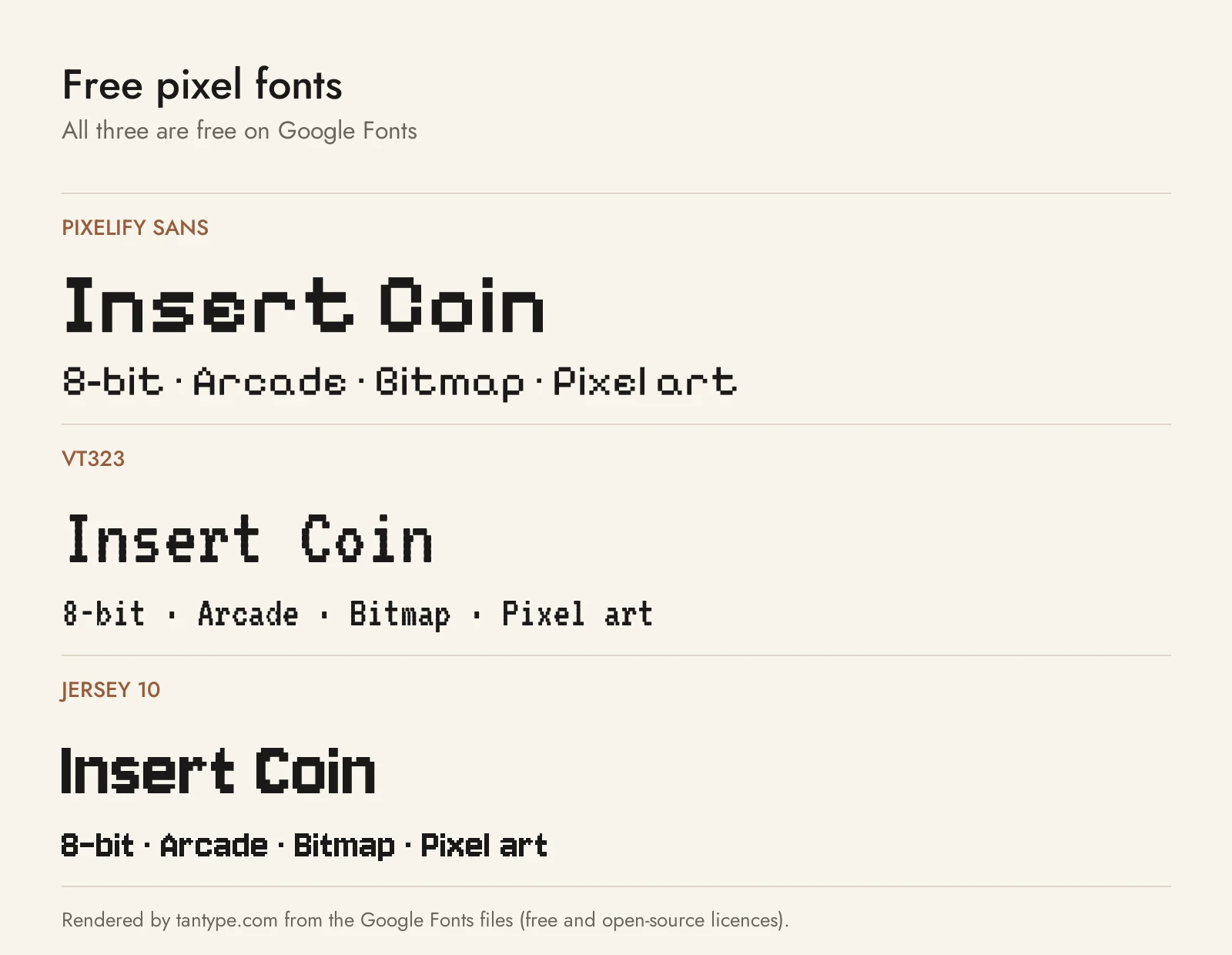
All six are free for personal and commercial use under the SIL Open Font License: four from Google Fonts and two from their designers. Press Start 2P and Silkscreen, the best-known free pixel fonts, are covered in our 80s and 90s roundups.
- Pixelify Sans by Stefie Justprince (2023) is a clean pixel sans with a variable weight axis from Regular to Bold and Cyrillic support, the free choice closest to Digital 808 or Gridbit for game menus.
- VT323 by Peter Hull recreates the DEC VT320 terminal, CRT smear included. Tall and narrow, it suits terminal screens and lo-fi captions rather than arcade titles.
- Jersey 10 by Sarah Cadigan-Fried belongs to the Soft Type Collection, drawn for knitters charting type into their projects; the number refers to the height of the capitals. A sporty, bold pixel sans for merch and knitting or cross-stitch charts.
- DotGothic16 by Fontworks covers Japanese as well as Latin and Cyrillic, for retro game text that needs kana and kanji.
- Departure Mono by Helena Zhang is a monospaced pixel font inspired by early command-line interfaces and the tiny pixel fonts of the late 90s and early 2000s. It is sharpest at multiples of 11px, a free alternative to Gridbit.
- Monocraft by Idrees is a monospaced programming font with more than 1,500 glyphs inspired by the Minecraft interface lettering. Its README says it is a fan project, not affiliated with Minecraft or Mojang, with no assets from the game.
| Font | Source | Licence | Commercial use |
|---|---|---|---|
| Pixelify Sans | Google Fonts | SIL OFL | Yes |
| VT323 | Google Fonts | SIL OFL | Yes |
| Jersey 10 | Google Fonts | SIL OFL | Yes |
| DotGothic16 | Google Fonts | SIL OFL | Yes |
| Departure Mono | Designer’s site / GitHub | SIL OFL | Yes |
| Monocraft | GitHub | SIL OFL | Yes |
Licensing: personal vs commercial use
Creative Market’s font licence page sets out four licence types:
- Desktop: unlimited personal and commercial projects, including printed products, packaging, social media and paid ads. On websites and in games the font may only appear as images, not as live text. One seat per user.
- Webfont: embed the font on websites you own or control, within a pageview limit.
- App: embed the font in one app or game so it can’t be extracted.
- E-pub: embed the font in one ebook.
A logo, poster or pre-rendered title image is covered by the Desktop licence. If the font file ships inside your game to draw menus, dialogue or scores as live text, you need the App licence, even for a small indie release. If a browser-source stream overlay loads the font for live text, ask the designer which licence applies, or render the text as images.
For merch and design apps: print-on-demand use is not allowed when the end customer, not you, is the licensee; a font can be part of a logo only if it is modified and isn’t the dominant element; and you may upload it only to a cloud design app you fully control.
The SIL Open Font License, used by all six free fonts above, allows commercial use, logos, merch and bundling the font inside a game or app; you just can’t sell the font files on their own. Terms change, so read the current licence. This is general information, not legal advice.
Pixel font FAQ
What font does Minecraft use?
Minecraft uses its own bitmap game font, which the Minecraft Wiki calls Mojangles. For your own projects, use an independent font with a similar blocky look, such as Blockraft or the free fan-made Monocraft, which says it is not affiliated with Mojang.
What is the 8-bit font called?
There is no single 8-bit font; it is a style of small-grid lettering from 1970s and 1980s arcade games, consoles and home computers. The best-known free revival is Press Start 2P, based on 1980s Namco arcade lettering.
Is a pixel font the same as a bitmap font?
Not quite. A true bitmap font stores each letter as pixels at fixed sizes, while most pixel fonts sold today are TTF or OTF outline fonts drawn to look like pixels, so they install anywhere but must be set at the right size to stay sharp.
Why does my pixel font look blurry?
It is set between multiples of its native size, or the software is smoothing it. Use a multiple of the font’s grid, switch anti-aliasing off and enlarge finished images with nearest-neighbour resampling.
Is there a pixel font generator?
Yes, but most pixel font generators don’t give you a font: they make an image or swap letters for look-alike Unicode symbols. For a game, logo, Cricut cut or Canva design, install a real pixel font.
Can I use a pixel font in my game?
Yes, with the right licence. Creative Market’s Desktop licence allows a font in games only as images; embedding the font file for live text needs the App licence. SIL OFL fonts such as Pixelify Sans and Departure Mono can be embedded free.
Are there free pixel fonts for commercial use?
Yes. Pixelify Sans, VT323, Jersey 10, DotGothic16, Departure Mono and Monocraft are all under the SIL Open Font License. Many “free pixel fonts” on download sites are personal-use demos, so read the licence.
