
Optima Font Free Download
There is no official Optima font free download. Optima is a commercial typeface by Hermann Zapf, first released by D. Stempel AG in 1958 and sold today through MyFonts, with no free, demo or personal-use version. Mac owners already have it, though: Apple ships five Optima styles with macOS, and you can use them on that Mac under Apple’s licence. You just can’t copy the files to another computer, a website or a friend.
Optima font free download: is there a legal free version?
No. The legal source for the original family is MyFonts’ Optima page, listed under the foundry name Zapf Alphabets. As of October 2026, single styles start at $45.99 and the 12-style Complete Family Pack costs $230.99. The redesigned Optima nova from Linotype starts at $57.99 per style, or $576.99 for all 20 fonts. Prices rise with the licence type and number of users, and neither page offers a trial.
The Mac route is the only free one. Apple’s list of fonts included with macOS Tahoe names Optima Regular, Italic, Bold, Bold Italic and ExtraBlack, and on a Mac running macOS 26.5 we found them in one file, Optima.ttc, in System/Library/Fonts. Download sites offering that file, or any other Optima file, have no right to give it to you.
Get Optima (MyFonts) Commercial font, from $45.99 per style as of October 2026
Optima font at a glance
- Designer: Hermann Zapf (1918–2015)
- Foundry: D. Stempel AG, Frankfurt; Mergenthaler Linotype made it in America shortly after
- Released: 1958, first shown by Stempel at the DRUPA fair, per Fonts In Use
- Style: humanist sans serif with flared strokes
- Versions: Optima (12 styles), Optima nova (2002, 20 fonts), and the 5-style macOS version
- Price: from $45.99 per style; $230.99 for the family pack (MyFonts, October 2026)
- Free alternatives: Marcellus, Belleza, Tenor Sans
Optima on a Mac: free to use, not free to share
The macOS Tahoe software licence has a clause on fonts. It says you “may use the fonts included with the Apple Software to display and print content while running the Apple Software”, and may embed them in content only where the font’s embedding restrictions allow, which Font Book shows. Fonts count as part of the Apple Software, which is “licensed, not sold”, and you may not “rent, lease, lend, sell, redistribute or sublicense” it.
In practice: type with Optima in Pages, Word, Keynote or Affinity on your Mac, print, and export PDFs or images. Don’t copy Optima.ttc to a Windows PC, host it for your website, bundle it in an app or send it to a client; those uses need a MyFonts licence. The file itself carries Linotype’s copyright notice. This is general information, not legal advice.
Optima typeface: design and character
Zapf drew Optima after a 1950 trip to Italy. Wikipedia says he studied tombstone lettering at the Basilica di Santa Croce in Florence, where strokes widen toward their ends without forming serifs, and sketched an early draft on a 1000 lira banknote. He wanted to call it “New Roman” (a MyFonts history sheet quotes him preferring “Neu Antiqua”), but Stempel’s sales staff chose “Optima”.
That carved origin sets it apart. Strokes thin slightly in the middle and swell at the ends, so letters look chiselled rather than drawn with an even pen. MyFonts’ description calls it “a serifless roman” and lists the details: wide, Roman-proportioned capitals with only E, F and L narrow, a splayed M, an S with a slight rightward tilt, and two-storey a and g. It advises setting Optima “more open than tight” to keep its “unhurried elegance and light gray typographic color”.
What’s in the Optima family
- Optima on MyFonts (12 styles): Roman, Medium, Demi Bold, Bold, Black and Extra Black, each with an italic, sold as Optima Pro OpenType fonts with small caps, ligatures and alternates.
- Optima nova (20 fonts): seven weights from Light to Black with true italics, five Condensed weights and a Titling font.
- macOS Optima (5 styles): Regular, Italic, Bold, Bold Italic and ExtraBlack. We checked the Mac file: 263 characters and no OpenType substitution features, so no small caps, alternates or old-style figures.
The italics of the original and the Mac version are slanted romans (obliques), not separately drawn italics.
Optima vs Optima nova
Optima nova is the 2002 redesign by Zapf and Akira Kobayashi, then Linotype’s type director. MyFonts’ Optima nova page lists the main changes:
- Real italics: the original “was never manufactured with a real italic, only an oblique version of the roman”. Nova’s italics are cursive, with new e, f and g shapes.
- New weights: Light, Demi and Heavy; Wikipedia notes Extra Black was dropped.
- Extras: small caps, old-style figures, a Condensed sub-family and a capitals-only Titling font with unusual ligatures.
- Spacing: MyFonts’ Hidden Gems note says spacing and proportion problems left over from metal type were corrected.
Sources differ on details. MyFonts’ nova page says 2002, its history sheet says 2003. The store sells five Condensed fonts, but the MyFonts Font Field Guide mentions six. Pick nova for true italics, a Light weight or small caps in long text; pick the original to match an existing brand.
Get Optima nova (MyFonts) From $57.99 per style as of October 2026
Language support and OpenType features
MyFonts says the Optima Pro fonts cover “most Central European and many Eastern European languages”, and Wikipedia records a four-style Optima Pro Cyrillic from 2010. The Mac version is smaller: the Western European Latin-1 set plus the euro sign. It has Polish Ł and Czech Š but not Č, Hungarian Ő or Turkish Ğ, and no Cyrillic or Greek.
OpenType features are optional extras inside a font file: small capitals, old-style figures that dip below the line, ligatures that join awkward letter pairs, and alternate letter shapes. InDesign, Illustrator, Affinity and Figma can switch them on. Canva and Cricut Design Space can’t, so there you get the default letters. The Mac copy has none of these features anyway.
Optima font pairings and best uses
Optima suits work that needs warmth with some formality: beauty branding, invitations, memorials, book covers, museum signs and annual reports. Zapf set his own book About Alphabets in the regular weight to prove it handles text.
- Foundry suggestions: MyFonts pairs it with Monotype Century Old Style, Dante, Frutiger Serif, Joanna Nova, Malabar and Soho.
- Free serif partners: EB Garamond or Lora under Optima headings keeps the classical feel.
- Spacing: give all-caps lines generous letter spacing.
Its best-known uses are civic. The names on the Vietnam Veterans Memorial are inscribed in Optima, and the National September 11 Memorial sets its names in Optima small capitals. Wikipedia also credits the Expo 67 logo and John McCain’s 2008 campaign. Monotype’s look at beauty brands cites Estée Lauder’s light-weight Optima, and Fonts In Use shows Optima Bold on The Smiths’ 1984 debut album.
Optima licensing: personal vs commercial use
MyFonts sells Desktop, Company Desktop, Webfonts, App, Electronic Doc and Digital Ad/Email licences for Optima. There is no personal-use tier, so a Desktop licence is the starting point for a wedding invitation or a client logo alike. Read the EULA for the licence you pick before you buy.
On a Mac, Apple’s font clause, unlike the voices clause right after it, has no personal, non-commercial limit. It limits where the font runs and forbids redistribution, so websites, apps and other computers fall outside it. This is general information, not legal advice.
How to download and install Optima legally
- On a Mac: open Font Book and search for Optima. It comes installed with macOS.
- On Windows or for the web: buy the licence you need on MyFonts and download the ZIP from your account.
- Unzip it. On Windows, select the .otf files, right-click and choose Install (or Install for all users).
- Restart open apps so the fonts appear in their menus.
Free fonts similar to Optima
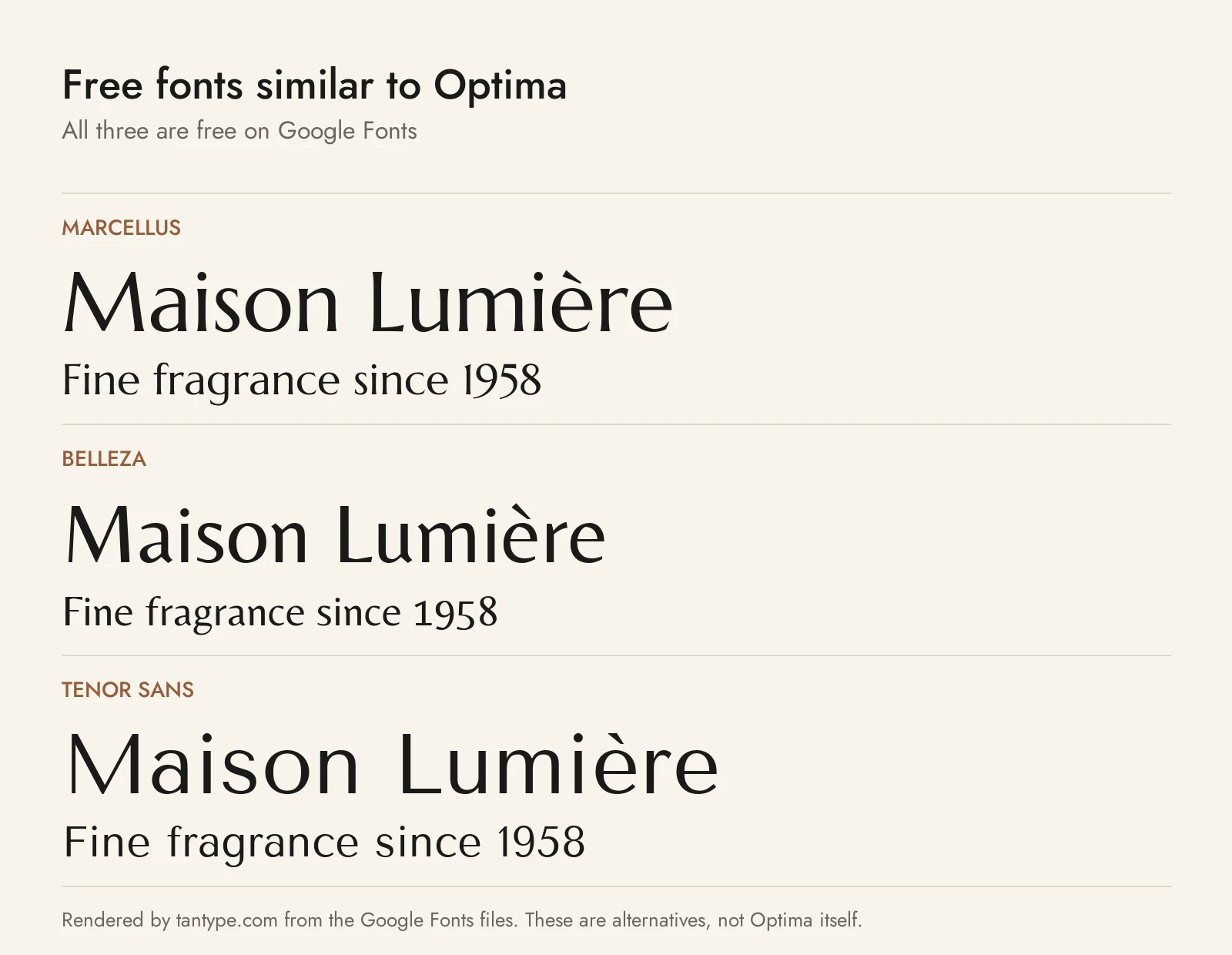
On Windows, or for a website on a budget, these Google Fonts come closest to Optima’s flared strokes. All three use the SIL Open Font License, which allows commercial use, and each has a single weight.
- Marcellus: the closest in feel. It is also based on Roman inscriptions, with a splayed M and swelling strokes, but it ends in tiny flared serifs, so it reads as a light serif. Marcellus SC adds small caps for titles.
- Belleza: a high-contrast humanist sans inspired, its designer says, by fashion. It is narrower and tighter than Optima, good for logos and packaging.
- Tenor Sans: wider and calmer, with less flare. It is the best of the three for paragraphs and web text, and it adds Cyrillic.
Among other fonts we cover, Clio is a restrained display sans for clean, elegant branding, Classy Marisa is an all-caps display sans for compact marks, and Whitney is a humanist sans built for crowded layouts.
Optima and Trajan Pro both draw on Roman inscriptions; see our Trajan guide for the all-caps classic.
For another humanist sans that holds up at a distance, compare Optima with Frutiger, used by the NHS and on Swiss road signs.
Optima font FAQ
Is Optima free on Mac?
It comes with macOS at no extra cost. Apple lists five Optima styles as included fonts, and its licence lets you use them to display and print content on that Mac, but not to copy or redistribute the files.
Can I use Optima for commercial work?
Yes, with a MyFonts licence that covers the use. On a Mac, Apple’s font clause has no personal-only limit for display and printing, but webfonts, apps and other computers need a MyFonts licence.
Is Optima a serif or sans serif?
It is usually classed as a humanist sans serif. Its flared stroke ends are why MyFonts calls it “a serifless roman”.
What font is on the Vietnam Veterans Memorial?
Optima. The names on the wall, 58,320 as of 2018 according to Wikipedia, are inscribed in Zapf’s typeface. The 9/11 Memorial in New York uses it too.
What is the closest free font to Optima?
Marcellus is closest in stroke shape, though it has small serifs. For a true sans, try Belleza for headlines or Tenor Sans for text.
