
Futura Font Free Download
There is no official Futura font free download. Futura is a commercial typeface, designed by Paul Renner and released by the Bauer Type Foundry in 1927, and every legal digital version is sold by a licensed foundry: URW, Linotype, ParaType, Neufville Digital or Monotype. Two routes cost nothing extra if you already have them. Apple ships five Futura styles with macOS, and Futura PT comes with paid Adobe Fonts plans such as Creative Cloud. Neither lets you pass the font files on.
Futura font free download: is there a legal free version?
No. No foundry offers a free, demo or personal-use Futura. As of October 2026, URW’s Futura on MyFonts starts at $39.99 for display and small-caps fonts, while its core text weights cost $89.99 to $102.99 each and the 22-font complete family is $1,679.99. Other versions sell whole families for $399 to $769. Sites offering a “Futura free download” have no right to give you the files, and those files come with no licence.
Get Futura (MyFonts) Commercial font, from $39.99 per style as of October 2026
Futura font at a glance
- Designer: Paul Renner, with Bauer’s staff designers
- Released: 1927, per Fonts In Use and Wikipedia; Linotype’s MyFonts page says 1928
- Style: geometric sans serif
- Price: from $39 per style; complete families $399 to $1,679.99 (MyFonts, October 2026)
- Included with: macOS (5 styles) and paid Adobe Fonts plans (Futura PT)
- Free alternatives: Jost, League Spartan, Kumbh Sans
Which Futura typeface to buy: URW, Linotype, Futura PT, ND or Futura Now
Bauer Types owns the Futura trademark and licenses it, so “Futura” can mean quite different files. MyFonts lists these, as of October 2026:
- URW Futura: Light to Extra Bold in normal and condensed widths, plus small caps and display extras such as Stencil and Shadowed. The priciest family, at $1,679.99 for 22 fonts.
- Linotype Futura: 22 fonts, Light to Extra Bold including Heavy, condensed, Display and Black. From $42.99 per style or $438.99 for the family.
- Futura PT (ParaType): Vladimir Yefimov’s version, first drawn in 1991–1995 and updated to version 3.000 in October 2024. 28 fonts: Thin to Extra Bold, normal and condensed, plus two Mono styles. From $39.00 per style or $399.00 for the family.
- Futura ND (Neufville Digital): a redigitisation from a joint venture of Bauer Types and Visualogik. 20 fonts, from $45.25 per style or $416.50 for the family. Apple ships this version.
- Futura Now (Monotype, 2020): 102 styles across Text, Headline, Script, Display and decorative subfamilies, plus variable fonts, with Latin, Greek and Cyrillic. From $53.99 per style or $769.00 for all.
Bitstream’s Futura is no longer sold on MyFonts. To match an existing brand, buy the version its guidelines name, because spacing and character sets differ. For new work, Futura PT is the cheapest complete family, adds Cyrillic, and is the one on Adobe Fonts. Pick Futura Now for the most styles, variable fonts, Greek or a dedicated Text cut.
Get Futura PT (MyFonts) From $39.00 per style; 28 fonts for $399.00 as of October 2026
Futura on a Mac: free to use, not free to share
Apple’s list of fonts included with macOS Tahoe names Futura Medium, Medium Italic, Bold, Condensed Medium and Condensed ExtraBold. On macOS 26.5 we found them in one file, Futura.ttc, in System/Library/Fonts/Supplemental, with a Neufville Digital copyright notice.
The macOS Tahoe licence says you “may use the fonts included with the Apple Software to display and print content while running the Apple Software”, embedding them only where the font’s restrictions allow, and that you “may not rent, lease, lend, sell, redistribute or sublicense the Apple Software”. So type with Futura in Pages, Keynote, Word or Affinity, print, and export PDFs or images. Don’t copy Futura.ttc to a Windows PC, a website, an app or a client; those need a paid licence. This is general information, not legal advice.
Futura PT on Adobe Fonts
Futura PT on Adobe Fonts has 22 fonts, without the Thin and Mono styles sold on MyFonts. Adobe’s subscription page says the free tier gets a basic library of about 5,500 fonts, while Creative Cloud, Acrobat Pro and Standard, and paid Adobe Express plans get the complete library. Futura PT’s page asks free users to subscribe, so expect to need a paid plan. It works in desktop apps and Adobe-hosted web projects while you subscribe; Adobe says self-hosted webfonts and app embedding need a licence from ParaType.
Futura typeface: design and character
Linotype’s MyFonts description says Renner based his drawings “loosely on the simple forms of circle, triangle and square”. Wikipedia notes the near-even strokes, tall ascenders, single-storey a and g, and capitals modelled on classical Roman forms.
Futura is often credited to the Bauhaus, but MyFonts’ Futura Font Field Guide says Renner “had no Bauhaus affiliation”. Bauer accepted his drawings on condition that its staff could change them; they left the capitals mostly alone and reworked most of the lowercase. The guide warns that the small x-height and even strokes “hamper readability in continuous text”, so keep Futura for headings, logos and captions.
Futura Bold, Extra Bold and Condensed: what’s in the family
Weight names vary. URW runs Light, Book, Medium, Demi, Bold and Extra Bold; Futura PT adds Thin and Heavy, and Linotype adds Heavy and Black. The field guide calls the Bold and Condensed designs “powerful display typefaces”. Every retail version has condensed styles, and the Mac has Condensed Medium and Condensed ExtraBold. Most versions’ slanted styles are obliques: slanted uprights, not redrawn italics.
Language support and OpenType features
We checked the macOS file. Futura Medium has 393 characters covering extended Latin, including Polish, Czech, Hungarian and Turkish letters, but no Cyrillic or Greek. Only the Bold adds ligatures, fractions, superscripts and stylistic alternates.
Futura PT has 740+ glyphs per style, extended Latin and Cyrillic, and 20+ OpenType features, such as old-style figures that dip below the line. Its stylistic set ss01 gives t, j, l and y softer shapes with tails, and ss02 brings in display shapes from Renner’s earliest sketches. Linotype’s W1G fonts cover Vietnamese, Cyrillic and Greek.
InDesign, Illustrator, Affinity and Figma can switch these features on. Canva and Cricut Design Space can’t, so there you get the default letters.
Futura font pairings and famous uses
MyFonts’ field guide pairs Futura with the serifs Dante, ITC Berkeley Old Style, Joanna Nova and Menhart. For free body text under Futura headings, try EB Garamond or Lora.
- Apollo 11: per Fonts In Use, the plaque left on the Moon “bears an inscription written in Futura”.
- Stanley Kubrick: Typographica, quoting a Guardian report, says Futura Extra Bold was his favourite and appears on the Eyes Wide Shut posters and titles.
- Wes Anderson: Wikipedia lists Rushmore, The Royal Tenenbaums and Fantastic Mr. Fox.
- IKEA: its catalogue moved from Futura to Verdana in 2009, its first type change in about 50 years, ABC News reported.
- Louis Vuitton: Monotype says Futura is used for the wordmark and text.
- Supreme: the V&A says the box logo is white Futura Heavy Oblique, “argued to be largely based on” Barbara Kruger’s work.
Futura licensing: personal vs commercial use
MyFonts sells Desktop, Company Desktop, Webfonts, Electronic Doc, Digital Ad/Email and App licences. Desktop covers personal and commercial design work such as logos, packaging and social posts, but not websites, apps, e-books, digital ads or sharing the files. There is no cheaper personal-use tier, and each foundry has its own EULA. Apple’s font clause has no personal-only limit but covers only your Mac. This is general information, not legal advice.
How to get a Futura font download legally
- Mac: open Font Book and search for Futura. If a style is dimmed, download it there.
- Creative Cloud: on a paid plan, activate Futura PT on Adobe Fonts; it syncs through the Creative Cloud app.
- Everyone else: buy the licence you need on MyFonts and download the ZIP from your account.
- On Windows, select the .otf files, right-click and choose Install; on a Mac, double-click and choose Install.
- Restart open apps so the fonts appear.
Free fonts similar to Futura
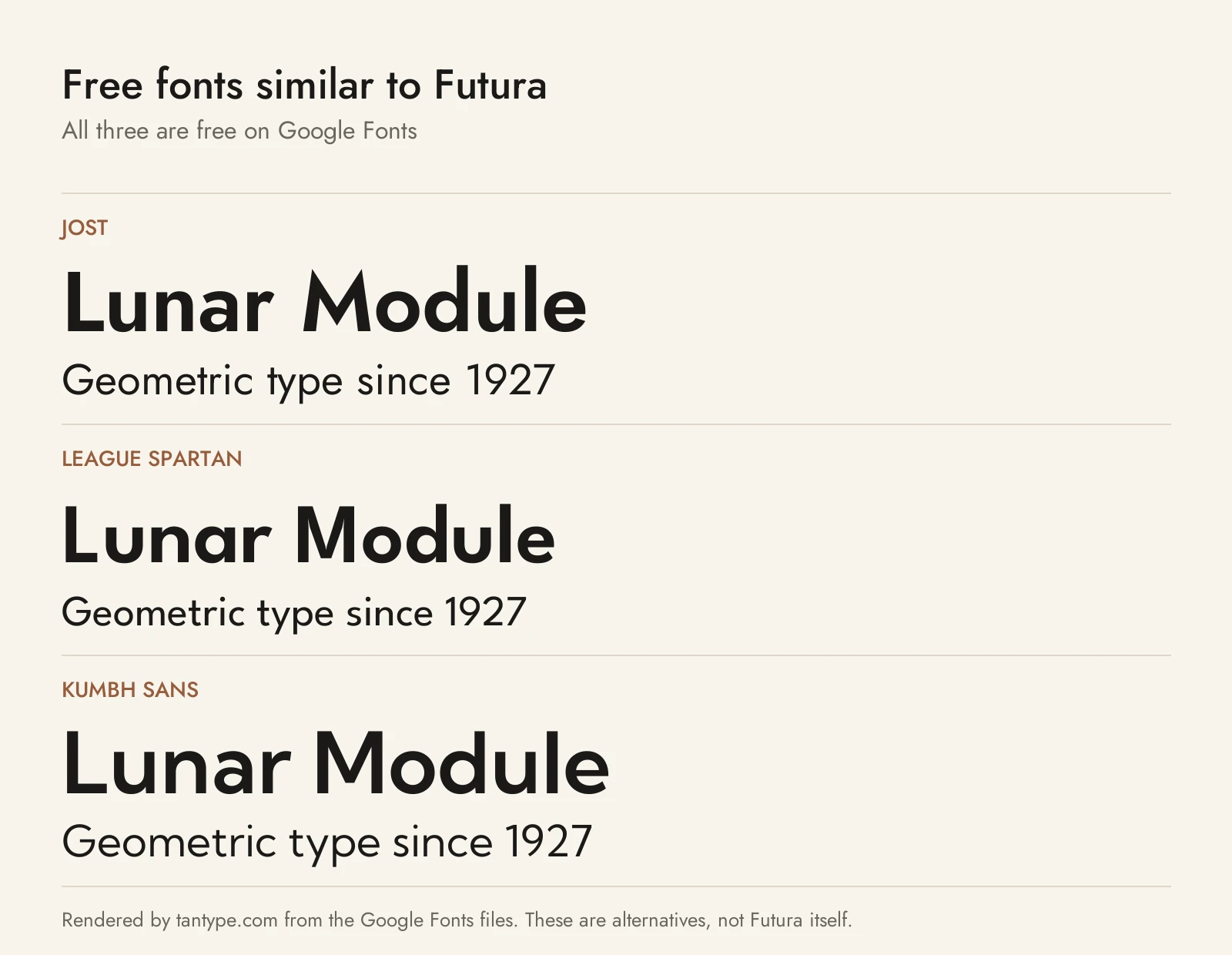
Futura isn’t on Google Fonts, but these three are, under the SIL Open Font License, which allows commercial use.
- Jost: the closest. Designer Owen Earl says it is inspired by 1920s German sans serifs, and it shares Futura’s round O and pointed M. Thin to Black with italics, plus Cyrillic.
- League Spartan: based on early 20th-century American geometric sans serifs, the line of Spartan, which Fonts In Use calls a near-direct copy of Futura. A larger x-height and a strong heavy end make it a good Futura Bold stand-in. No italics.
- Kumbh Sans: a calmer geometric with a flat-topped M, curved j and y tails and a bigger x-height. Its designer built it as a workhorse for web and mobile apps.
Among fonts we cover, Lemon Milk is a free all-caps display face in Futura’s family tree, Gilroy is a modern geometric sans with two free weights, and Avenir Next is the softer geometric MyFonts lists as a Futura alternative.
For a modern sans that blends Futura’s geometry with grotesque proportions, see our guide to Proxima Nova by Mark Simonson.
For the round, wide geometric sans most people already have through Microsoft Office, see our guide to Century Gothic.
For a caps-only sans with a British railway-signage flavour, see our guide to Gravesend Sans by Rian Hughes.
Futura font FAQ
Is Futura free on Mac?
Five styles come with macOS at no extra cost. Apple’s licence lets you display and print content with them on that Mac, not copy or redistribute the files.
Is Futura PT free with Adobe Fonts?
It comes with paid plans that include Adobe Fonts’ complete library, such as Creative Cloud. The free tier’s basic library doesn’t appear to include it.
Is Futura on Google Fonts?
No. It is a commercial font and the name is a Bauer Types trademark. Jost is the closest free match there.
What font is the Supreme logo?
Futura Heavy Oblique, according to the V&A. Heavy is in Futura PT and Linotype’s Futura, not the macOS set.
Can I use Futura for commercial work?
Yes, with a licence that covers the use: a MyFonts Desktop licence for logos and print, or Webfont and App licences for sites and apps.
