
Century Gothic Font Free Download
There is no official Century Gothic font free download: Century Gothic is a commercial Monotype typeface, and no foundry offers a free or personal-use edition. Many people already have it, though. Microsoft says Century Gothic is available within Office applications, and macOS keeps a copy for opening documents that use it. If you need a licence of your own, MyFonts sells Century Gothic from $40.99 per style or $122.99 for the 4-font family, as of October 2026.
Century Gothic font free download: check what you already have
Check your font menus before you buy. Two products include it:
- Microsoft Office: Microsoft’s Century Gothic page lists four styles (Regular, Italic, Bold and Bold Italic) and says the typeface “is also available within Office applications”. Century Gothic is also on Microsoft’s cloud fonts list for Microsoft 365 subscribers.
- macOS: Apple’s macOS Tahoe font list includes the same four styles, but in the “Document-support fonts” group. Apple says these are “available only to documents that already use the font, or to apps that request the font by name”. A Word file set in Century Gothic opens correctly, but the font may not appear in your font menu.
Windows itself doesn’t include it: Century Gothic is not on Microsoft’s Windows 10 or Windows 11 font lists. None of these copies may be passed on to anyone else.
Get Century Gothic (MyFonts) Commercial font, from $40.99 per style or $122.99 for 4 fonts as of October 2026
Sites offering a free Century Gothic ZIP are handing out copies of Monotype’s files that they have no right to license.
Century Gothic font at a glance
- Foundry: Monotype
- Designers: Monotype’s drawing office, based on Sol Hess’s Twentieth Century
- Released: 1990 according to Fonts In Use; the font data is dated 1990–91
- Style: geometric sans serif with a large x-height
- Classic family: 4 fonts (Century Gothic Std), $40.99 each or $122.99 complete on MyFonts
- Century Gothic Paneuropean: 14 fonts from Thin to Black with italics, $495.99 complete
- Free alternatives: Questrial, Didact Gothic, Poppins
Where Century Gothic comes from: Twentieth Century and Avant Garde
Century Gothic has two parents. The first is Twentieth Century, which Microsoft’s description says “was drawn by Sol Hess between 1936 and 1947” for Monotype. Fonts In Use calls Twentieth Century “Lanston Monotype’s copy of Futura” and dates its release to 1937.
The second is ITC Avant Garde Gothic, Herb Lubalin and Tom Carnase’s 1970 geometric sans. Century Gothic was built to stand in for it. The type designer Mark Simonson writes that “Century Gothic is Monotype’s Twentieth Century redrawn to match the weight and proportions of ITC Avant Garde Gothic”. He puts it in the same group as Arial: Monotype designs reworked to fit the measurements of a font Monotype didn’t own. Fonts In Use agrees, dates it to 1990, and says it was redrawn “to match the widths” of Avant Garde, so text can swap between them without reflowing much.
Design and character
Microsoft’s description says Century Gothic keeps “the basic design of 20th Century but has an enlarged ‘x’ height”, and that the design “is influenced by the geometric style sans serif faces which were popular during the 1920’s and 30’s”. In the copy that ships with macOS, which we looked at, O, C and G are drawn as near-circles. Lowercase a and g are single-storey, and strokes keep almost the same thickness all the way round.
The letters are wide, which gives Century Gothic its open look and makes it take more space than Arial at the same size. Microsoft recommends it for headlines, display work and “small quantities of text”.
What’s in the family: Century Gothic Bold and the Paneuropean weights
The classic family on MyFonts is sold as Century Gothic Std in 4 fonts: Regular, Italic, Bold and Bold Italic. Each is $40.99, and the complete family is $122.99. These are the same four styles Office and macOS include.
Century Gothic Bold
Century Gothic Bold, with its Bold Italic, is the only heavy weight in the classic family, and Office users already have it. For anything lighter than Regular or heavier than Bold, you need the Paneuropean family.
Century Gothic Paneuropean
Century Gothic Paneuropean on MyFonts has 14 fonts: Thin, Light, Regular, SemiBold, Bold, ExtraBold and Black, each with an italic. Single styles start at $50.99, a 4-font Basic Pack is $123.99, and the complete family is $495.99. A variable version followed in 2021. Adobe Fonts also lists Century Gothic Pro in 4 styles on Adobe Fonts.
Language support and OpenType features
Microsoft’s page lists code pages for Western and Central European Latin, Cyrillic, Greek, Turkish and Baltic. The macOS copy we checked has 668 characters, including Greek and Cyrillic, but not Vietnamese. MyFonts says the Paneuropean versions contain Latin, Greek and Cyrillic characters.
The bundled Century Gothic has no OpenType layout features: no ligatures, stylistic sets or alternate letters. Canva and Cricut Design Space can’t reach OpenType alternates anyway, but here you lose nothing, since there are none to unlock.
Does Century Gothic really save ink?
In April 2010 the Associated Press reported that the University of Wisconsin–Green Bay had asked staff to use Century Gothic after tests by Printer.com, a Dutch company, found it “uses about 30 percent less ink than Arial”. The same AP story said the university spent about $100,000 a year on ink and toner and expected to save $5,000 to $10,000 a year.
There is a catch, and the AP piece spelled it out: Century Gothic is wider, so “a document that’s one page in Arial could extend to a second page”. Allan Haley of Monotype told the AP, “Maybe the individual characters use less ink, but if you’re using more paper, that’s not so green, is it?” He added that Century Gothic was designed for titles and headlines, not full documents. So it saves ink per letter but can cost you paper.
Century Gothic font pairings and best uses
Century Gothic works best in headlines, logos, posters, slide titles and signs. In long paragraphs the wide letters slow reading, so pair it with a narrower body face.
- With a serif: EB Garamond or Lora gives a classic contrast under Century Gothic headings.
- With a sans: Lato is calmer and narrower for body text.
On Fonts In Use, Century Gothic’s 33 documented uses include the Late Bloomers poster and the opening titles of The Prom (2020).
Can you use Century Gothic for commercial work?
It depends on where your copy came from (general information, not legal advice).
- Bought from MyFonts: the licence type you buy sets the limits. Websites, apps, ads and e-books each need their own licence.
- Microsoft Office: Microsoft’s font redistribution FAQ covers only fonts supplied with Windows. For fonts that come with other apps, it says to “review the license agreements that accompany those applications”. Century Gothic is an Office font, so your Office licence terms apply, including whether your edition allows commercial use.
- macOS: Apple’s macOS Tahoe licence lets you use bundled fonts “to display and print content while running the Apple Software”. The Century Gothic files we checked allow embedding in documents for preview and print only.
None of the bundled licences described here covers uploading Century Gothic to a website server, a Canva account or an app. Microsoft points anyone who needs those rights to Monotype’s licensing page.
Century Gothic font download: how to get it legally
- Check first: type “Century Gothic” in Word’s or PowerPoint’s font menu. Microsoft 365 cloud fonts need Office signed in and online.
- Adobe subscribers: open Century Gothic Pro on Adobe Fonts and click Activate if your plan includes it.
- Buying: choose Century Gothic Std or Paneuropean on MyFonts, pick a licence and download the ZIP from your account.
- Installing: unzip it, then right-click the files and choose Install (Windows) or double-click and choose Install Font (Mac).
Free fonts similar to Century Gothic
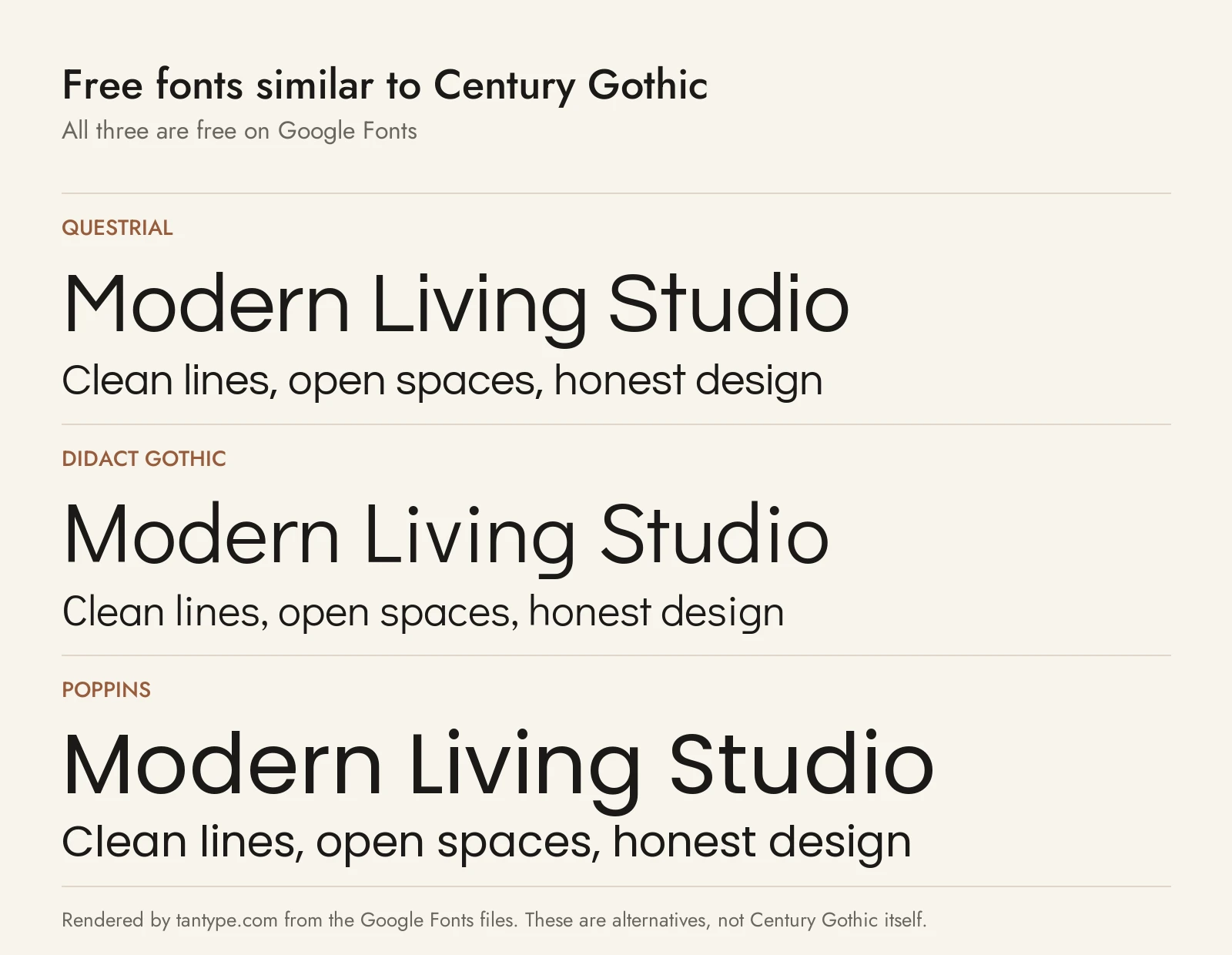
For an open licence you can share, self-host or upload to Canva, these Google Fonts come closest; we compared each against Century Gothic. All three are under the SIL Open Font License, which allows commercial use.
- Questrial: the closest match. Joe Prince and Laura Meseguer gave it full-circle curves and a single-storey a, so headlines look very much like Century Gothic. It is slightly narrower and comes in one weight only.
- Didact Gothic: designed to show letters the way they are taught in elementary classrooms, with round bowls and a single-storey a. Like Century Gothic it covers Greek and Cyrillic. It also has a single weight.
- Poppins: a geometric sans from Indian Type Foundry with nine weights and italics, so it is the one to use when you need a Century Gothic Bold look. Its width is close, but its lowercase a has two storeys.
Among the paid fonts we cover, Futura is the 1920s original behind Twentieth Century, Avenir Next is a less strictly geometric sans built for text, and Gilroy is a modern geometric with an official free download of two weights.
Century Gothic font FAQ
Is Century Gothic font free?
No. It is a commercial Monotype font. The copies in Office and macOS fall under those products’ licences and can’t be shared. On MyFonts each style costs $40.99.
Is Century Gothic on Windows?
Not as part of Windows 10 or 11. It comes with Microsoft Office, including Bold and Bold Italic, and is an Office cloud font for Microsoft 365 subscribers.
What is the difference between Century Gothic and Avant Garde?
Century Gothic is Monotype’s Twentieth Century redrawn to the widths of ITC Avant Garde Gothic, so the two set text to similar lengths. The letter shapes differ because they come from different designs.
Does Century Gothic save ink?
Per letter, yes: about 30% less than Arial in Printer.com’s 2010 tests. But wider letters mean longer documents and more paper.
What is the closest free font to Century Gothic?
Questrial, for its round shapes and single-storey a. Use Poppins if you need bold weights.
