
Amoresa Font Free Download
There is no official Amoresa font free download. Amoresa is a commercial calligraphic script by the Ukrainian type designer Andrey Sharonov, sold in two styles, Regular and Aged, and we found no free, demo or personal-use version from the designer. As of October 2026 MyFonts sells one style from $28 and the two-style family for $35. Sites that offer it free are passing around unlicensed copies.
Amoresa font free download: is there an official free version?
No. MyFonts’ Amoresa family page lists Amoresa Regular and Amoresa Aged, each from $28.00 USD, and the Complete Family of both fonts for $35.00 USD. That works out to $17.50 per style, so the family costs only $7 more than a single font.
We also checked the places where designers usually post free versions. A DaFont search for “amoresa” returned no fonts in October 2026. Sharonov’s Creative Market shop and Behance profile show his other fonts but no Amoresa listing and no free edition. His own domain, which older directories list, now redirects to an unrelated site, so we haven’t linked it.
Get Amoresa (MyFonts) Commercial font, $35 for both styles as of October 2026
A copy from a free-font site gives you no licence for a logo, label or invitation you sell, and you can’t be sure the file is even Sharonov’s font.
Amoresa font at a glance
- Designer and publisher: Andrey Sharonov, a type designer and illustrator from Ukraine (also known as Aurora Type Co)
- Released: 2019. MyFonts dates its listing to December 13, 2019.
- Style: connected calligraphic script with long end-swashes
- Styles: 2, Amoresa Regular (clean) and Amoresa Aged (textured)
- Glyphs: 487 in Regular and 486 in Aged, according to MyFonts’ tech specs
- Format: OpenType CFF (.otf), version 1.000
- Price: from $28 per style or $35 for the family (Desktop, 1 user), as of October 2026
- Free alternatives: Yellowtail, Damion, Courgette
Design and character
Sharonov writes that Amoresa “was handwritten under inspiration of traditional calligraphy and the wonderful mystic soundtrack of Wojciech Kilar”, the Polish film composer. He suggests it for logotypes, wedding invitations, alcohol labels and romantic cards, and those are exactly the scenes his specimens show.
On MyFonts’ specimen images, Amoresa leans to the right with joined lowercase letters, thicker downstrokes and thin connecting strokes, like a flexible pen or brush pen rather than a sharp engraver’s nib. The capitals are where it gets dramatic. In the “Nataly, Nicole, Norton, Nick” sample, each N has a bigger entry loop or a longer tail than the last. Words can finish with a long horizontal swash, as in the “Amoresa” title image, where the final “a” trails off under the stamp.
The love-letter paragraph on the same page shows that it stays readable over several lines when you leave the swashes off. Even so, it’s a display script: it looks best in names, short headlines and labels.
Amoresa Regular vs Amoresa Aged font: the difference
The family has one design in two finishes. The specimen title calls it “an elegant script font, clean & aged”.
- Amoresa Regular is the clean version, with smooth, solid strokes. Use it for invitations, fine print and anything that will be cut, engraved or embroidered.
- Amoresa Aged is the same letters with a worn print texture. On the “Valerian” clothing-label specimen and the main “Amoresa” image, the strokes are full of small specks and gaps where ink seems to be missing, like an old letterpress or rubber-stamp print. The texture sits inside the letters, so you don’t need a separate texture overlay.
MyFonts lists the Aged file at about 848 KB against 258 KB for Regular, which fits a texture drawn into the outlines. Keep Aged at headline sizes; at small sizes the specks will fill in or disappear. The family package is the sensible buy, since both styles together cost $35.
Language support and OpenType features
The designer lists 18 languages: English, Danish, Dutch, Estonian, Faroese, Filipino, Finnish, French, German, Hungarian, Icelandic, Irish, Italian, Norwegian, Polish, Portuguese, Spanish and Swedish. MyFonts’ automatic tech specs give a longer list that adds languages such as Catalan, Afrikaans, Indonesian and Swahili, but leave out Dutch, so test any Dutch words before you commit. There is no Cyrillic or Greek in either list.
MyFonts reports five OpenType features in both styles: contextual alternates (calt), standard and discretionary ligatures (liga, dlig), stylistic alternates (salt) and kerning. In plain terms:
- Alternate capitals: type 2, 3 or 4 right after a capital to swap in an alternate. The specimen says each capital has one to three alternates; the description says one to four.
- Lowercase alternates: the description says lowercase has alternates too, and the specimen labels stylistic alternates on t, l and r.
- End-swashes: eight lengths, added by typing an underscore and a number from 1 to 8 after the last letter of a word (_1 to _8).
- Ligatures: the specimen marks discretionary ligatures in “First” and “Whiskey”.
- Ampersands: one specimen shows five different & designs.
The number and underscore codes only work when the app applies the font’s ligature features; the specimen notes they work “with active standard ligatures”. Sharonov recommends Adobe Illustrator or Photoshop and says the special features don’t work in Microsoft Word. In apps that ignore OpenType, such as Word and, as far as we could confirm, Cricut Design Space, you’ll see the literal “N2” or “_3” rather than the alternate.
Amoresa font pairings and best uses
Amoresa suits bottle and coffee labels, wedding names, menu headings, apparel badges, barbershop or bakery logos and greeting cards. The Aged style fits anything that should look vintage or printed by hand.
- With spaced capitals: every MyFonts specimen pairs it with small, widely spaced sans-serif capitals. Oswald or Montserrat in uppercase gives the same label look.
- With a serif: Cormorant Garamond keeps a wedding suite formal and readable.
- Swashes: leave room on the right for end-swashes, and use one long swash per line at most.
Can you use Amoresa for commercial work?
Yes, once you buy a licence. MyFonts offers Desktop, Company Desktop, Webfonts, App, Electronic Doc and Digital Ad/Email licences. As of October 2026 the Desktop licence costs $28 per style or $35 for the family for one user, and $44.80 or $56 for two users. A Webfont licence for 10,000 monthly pageviews costs the same as Desktop.
The Desktop licence is Monotype’s standard desktop EULA. MyFonts’ summary says it covers logos, brand identity, packaging, posters, social posts, videos and invitations. It does not cover websites, apps, e-books, digital ads or email templates; those need their own licences. You can’t share the font files with clients or modify them, and PDFs with the font embedded must be non-commercial and non-editable. The agreement also bars using the font or its rendered glyphs for AI training. This is general information, not legal advice; read the EULA for your use.
How to download and install Amoresa legally
- Open the MyFonts family page, choose the Complete Family (or one style) and pick the licence type and number of users.
- After checkout, download the fonts from your MyFonts account.
- Windows: right-click the .otf files and choose Install.
- Mac: double-click each file and click Install Font in Font Book.
- Restart your design app. Amoresa and Amoresa Aged appear as separate fonts.
- In Illustrator or Photoshop, keep ligatures on, then type codes such as “N2” or “a_4”, or pick alternates from the Glyphs panel.
Free fonts similar to Amoresa
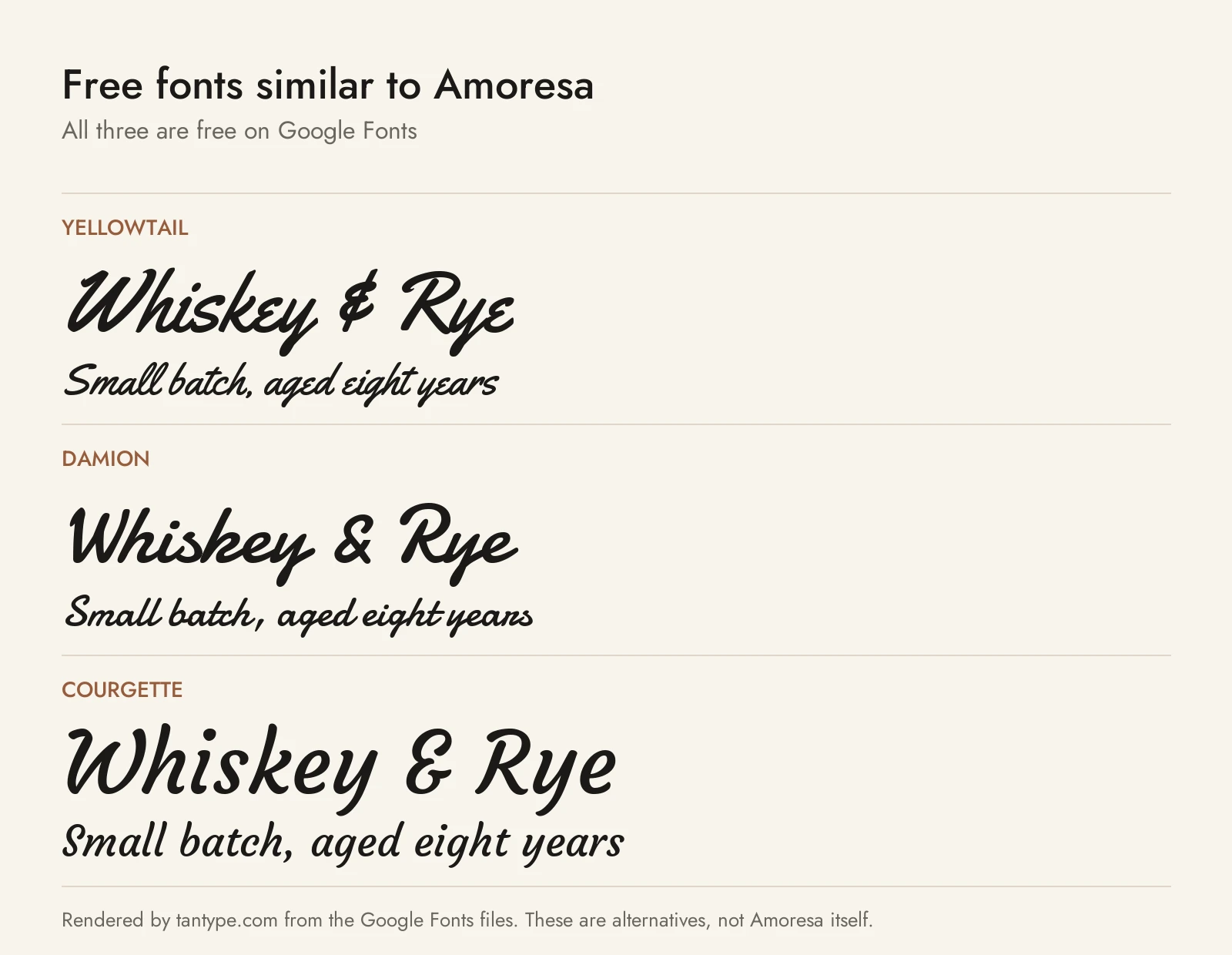
None of these copies Amoresa’s looping capitals or eight swash lengths, but they give a similar slanted, connected look at no cost. All three allow commercial use: Yellowtail is under the Apache License and the other two under the SIL Open Font License.
- Yellowtail: a vintage-style connected script by Astigmatic with a similar slant and stroke contrast. It is the closest match for labels and retro logos, though its capitals are simpler and it has no swash set.
- Damion: Vernon Adams’ casual script, a little heavier and rounder than Amoresa. It keeps the pen-like thick and thin strokes and works well for short brand names.
- Courgette: Karolina Lach’s lighter, calmer script. Its letters are only partly joined and it lacks flourishes, but it is the best stand-in when you need a few lines of readable script text.
Among paid scripts we cover, Haglos Bold Script is a heavyweight brush script for retro logos, Naterium is a retro-modern script for logos, quotes and wedding sets, and Glory Culture is a textured brush script worth a look if the Aged finish is what drew you to Amoresa.
Amoresa font FAQ
Is the Amoresa font free?
No. It is a commercial font. As of October 2026 MyFonts sells Amoresa Regular or Amoresa Aged from $28 each, or both for $35. We found no official free or personal-use version.
Is there an Amoresa Aged font free download?
Not a legal one. Amoresa Aged is sold on MyFonts like Amoresa Regular, and buying the Complete Family gets you both.
Is Amoresa on DaFont?
No. A DaFont search for “amoresa” returned no fonts in October 2026, and the designer has no Amoresa listing there.
Who designed Amoresa?
Andrey Sharonov, a type designer and illustrator from Ukraine who has made fonts since 2015. He published Amoresa himself in 2019.
Can I use Amoresa in Canva or Cricut?
Canva Pro lets you upload font files you have licensed, and Cricut Design Space can use fonts installed on your computer. The default letters will work, but the alternates and swashes are typed as codes that need OpenType ligature support, so check the result before you rely on them. Check the licence covers your use too.
What is the closest free font to Amoresa?
Yellowtail is closest in slant, contrast and vintage feel. Courgette is the better choice for longer script text.
