
TAN Headline Font Free Download

A search for a TAN Headline free download mostly turns up unofficial file sites, so here is the straight answer: TanType Co. sells TAN Headline as a commercial font and does not offer an official free demo or personal-use version that we could find. The legitimate route is a licence from TanType’s Creative Market shop, starting at $17 for desktop use.
TAN Headline free download: what the designer actually offers
The official Creative Market listing has paid licences and nothing else; no demo file is mentioned. We also looked for TanType Co. pages offering TAN Headline on MyFonts, DaFont, FontSpace, Behance and Gumroad and found none. A site offering the complete font as a TAN Headline free download is not an official channel, and its files carry no licence you can rely on, even for personal use.
According to the listing, a purchase includes .otf, .ttf, .woff and .woff2 files, multilingual support and free future updates. The desktop licence costs $17 per seat, with webfont, e-pub and app licences sold separately. The product was published on 13 September 2021.
Get TAN Headline — official listing
Independence note: tantype.com reviews fonts and has no affiliation with TanType Co., the foundry behind TAN Headline.
Free download: TAN Headline (Regular), personal use One style for personal use, shared with the designer’s permission. Commercial use needs a licence.
TAN Headline specimen and verified specs
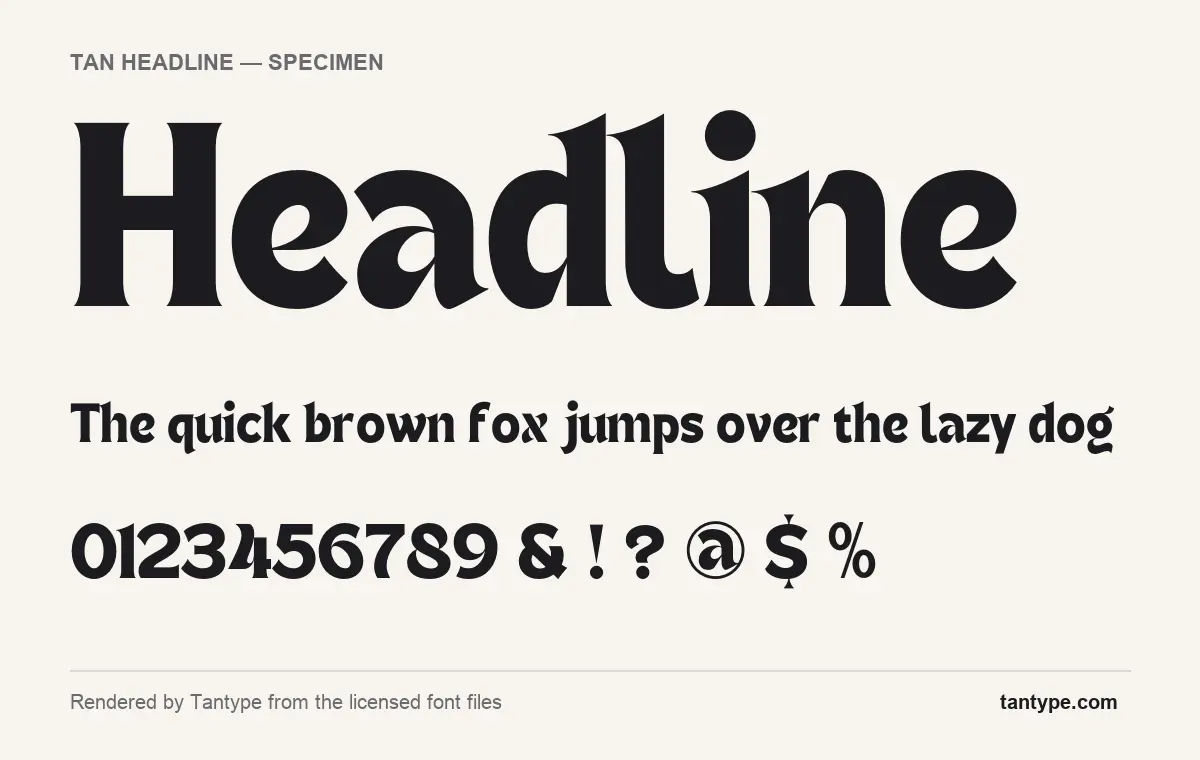
- Styles: 1 (Regular)
- File formats: OTF
- Glyphs: 337
- Language support: Basic Latin (English), Western European, Central & Eastern European
- OpenType features: stylistic alternates, kerning
- Designer: Novia Jonatan (TanType Co.)
Checked by Tantype from the licensed font files.
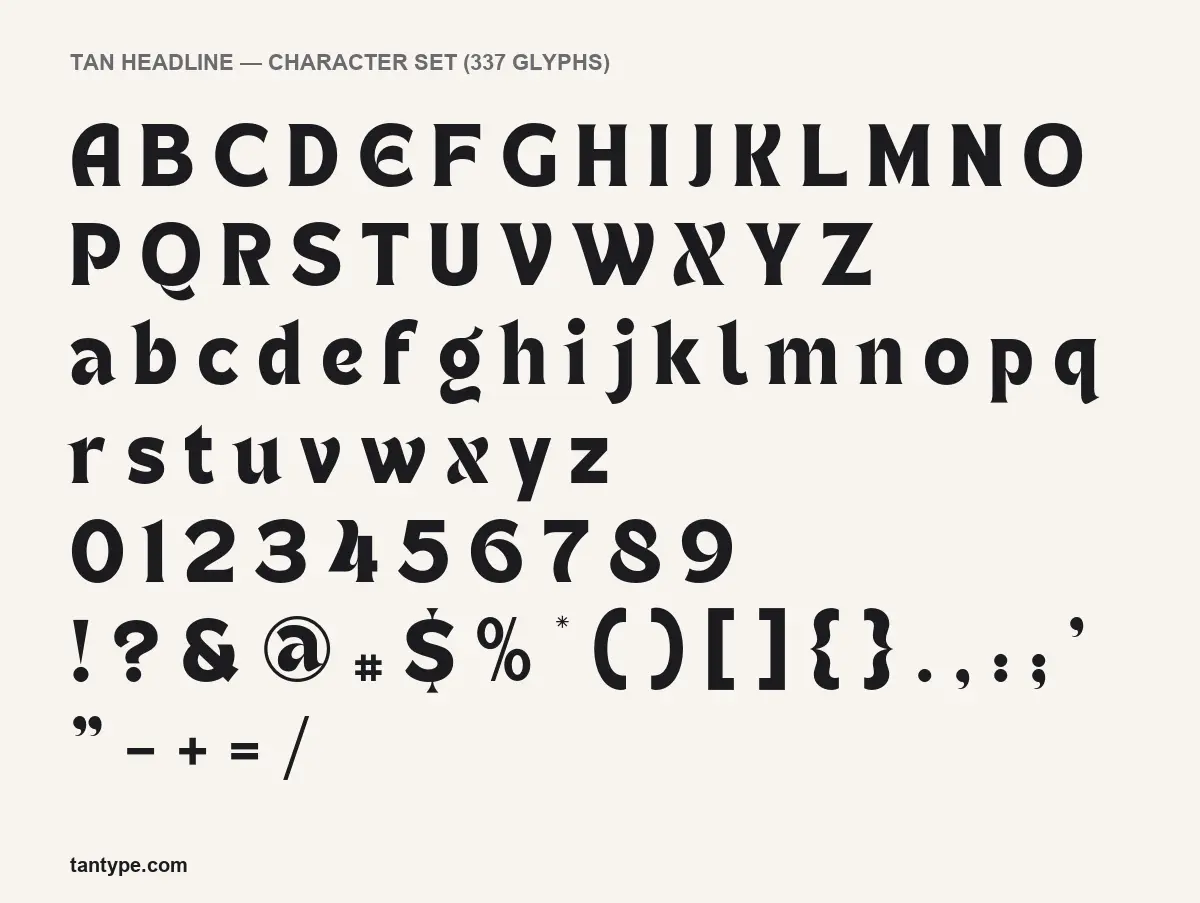
Design and character
TanType describes TAN Headline as “a simple-looking retro inspired display serif with enough twist to make it interesting”. That is a fair summary of the specimen above, which we rendered from the licensed font files. At a glance it is a heavy, slightly narrow serif. Up close, the serifs are not the usual bracketed kind: the stems flare out into wedge-shaped ends, closer to carved lettering than to a book face.
The “twist” shows in individual letters. The lowercase e has a slanted crossbar, which gives it an old, hand-drawn look. The x is drawn with a curved, almost calligraphic stroke. The l ends in a small upturned foot, the g has an open, swinging tail, and the capital Q trails a long sweeping tail beneath the next letter. The capital E is rounded rather than square, and the dollar sign carries its vertical stroke only above and below the S.
The contrast between thick and thin strokes is moderate and the counters are fairly open, but the heavy weight and quirky details are made for size. As the name suggests, it reads best in headlines, poster lines and short pull quotes.
What’s in the TAN Headline package
- Styles: one, Regular.
- Formats: OTF in the licensed files we rendered; the listing also lists .ttf, .woff and .woff2.
- Glyphs: 337, including upper and lowercase, figures, punctuation and accented letters.
- Version: 1.000. Not a variable font.
- Designer: Novia Jonatan, per the font files, published by TanType Co.
Language support and OpenType features
The TAN Headline font covers Basic Latin (English) plus Western European and Central and Eastern European characters, so text in French, German, Spanish, Polish or Czech will not show missing-letter boxes.
The font has two OpenType features:
- Kerning corrects the spacing between particular letter pairs. It is applied automatically in nearly every app.
- Stylistic alternates are extra versions of certain letters stored inside the font. You reach them through the Glyphs panel in Illustrator, InDesign or Photoshop, the Typography or Glyph Browser panels in Affinity apps, or by turning on stylistic alternates in an OpenType menu.
The font has no glyphs in the Private Use Area (PUA), which matters for Canva and Cricut. Those apps cannot switch OpenType alternates on, and without PUA codes there is no copy-and-paste workaround. You will get the default letters shown in the character set; to use the alternates, set the text in an OpenType-capable app and bring it in as an image or SVG.
Best uses and font pairings
TAN Headline fits editorial and vintage-leaning work: magazine and newsletter titles, book covers, record sleeves, restaurant and coffee branding, product packaging and event posters.
Some pairings that keep the hierarchy clear:
- Source Sans 3 for body text, a clean sans that stays out of the way.
- Libre Franklin for subheads and captions, with a slightly American, newspaper tone.
- DM Mono for dates, prices and small labels, adding a modern counterpoint to the retro serif.
Licensing: personal vs commercial use
Licences are issued under Creative Market’s font licence terms. In short: the Desktop licence covers unlimited personal and commercial projects, and you buy one seat per user. It allows the font on the web only as images. A website that loads the font file needs the Webfont licence, which has a pageview limit set at checkout, and apps and e-books each require a separate licence. The terms also set conditions for logo use. This summary is not legal advice; read the full licence for your case.
How to install TAN Headline
Download the zip from Creative Market and unzip it. On Windows, right-click TAN Headline’s OTF file and choose Install. On a Mac, double-click it and click Install in Font Book. Install only one desktop format (OTF or TTF), and restart open apps so they list the new font.
Free alternatives to TAN Headline
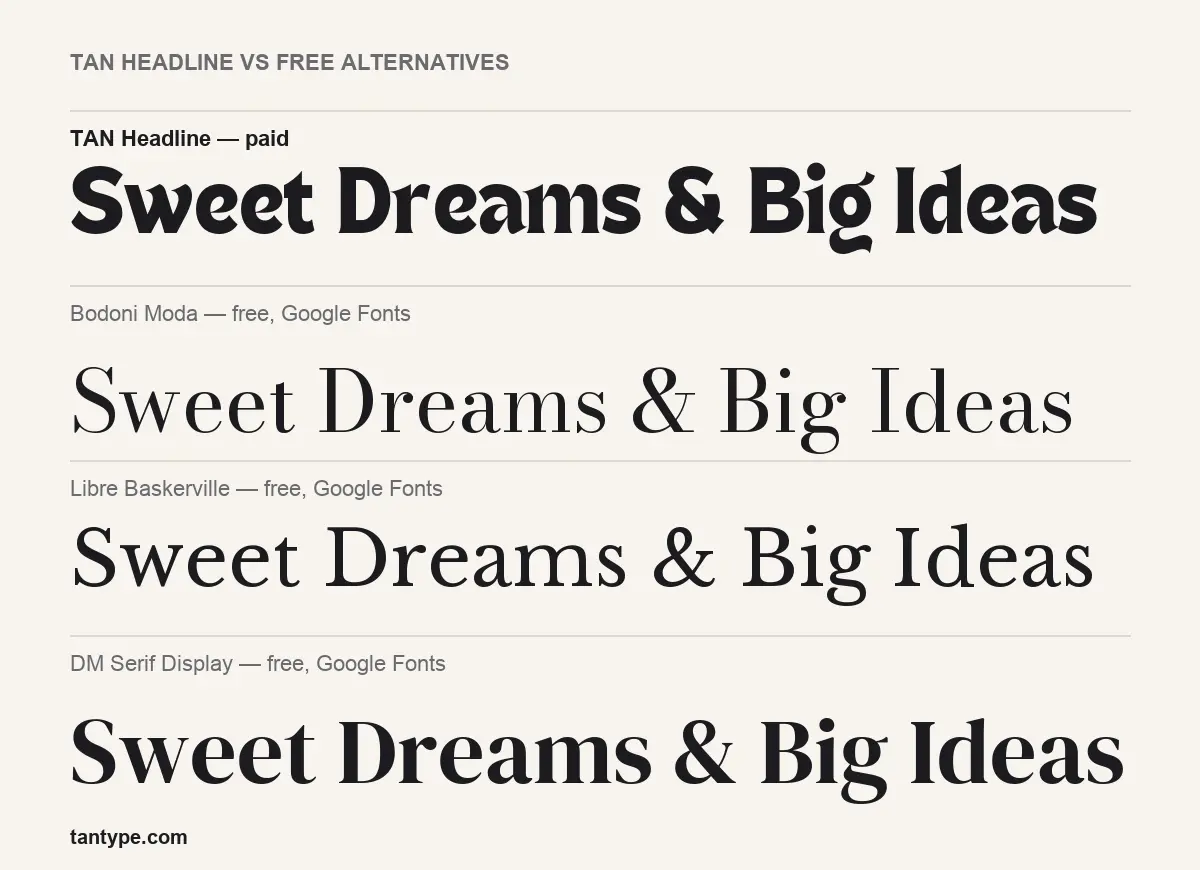
If you need something free today, these three Google Fonts are licensed for commercial use. Each matches one side of TAN Headline:
- Bodoni Moda is a high-contrast Didone with hairline serifs. It is far more formal and much lighter in the weight shown in our comparison, with none of Headline’s quirky letters.
- Libre Baskerville is a traditional serif built for reading. It works for longer text but lacks the flared, retro character.
- DM Serif Display is the closest in weight and impact. Its shapes are classical, with sharp serifs and ball terminals, so it looks polished where Headline looks hand-cut.
TAN Headline FAQ
Is TAN Headline free?
No. There is no official TAN Headline free download, demo or personal-use version. The font is licensed on Creative Market from $17 per desktop seat.
Can I use TAN Headline commercially?
Yes, once licensed. The Desktop licence covers commercial projects; web embedding, apps and e-books need their own licences.
Can I use the alternates in Canva or Cricut?
No. Those apps show the default letters only. Use an OpenType-capable app such as Illustrator or Affinity Designer for the alternates.
Who designed TAN Headline?
Novia Jonatan, according to the font files, for TanType Co. tantype.com is not connected to the foundry.
Where do I download TAN Headline safely?
From the official Creative Market listing linked above, after buying a licence.

Tantype writes independent reviews of typefaces: what each font does well, where it falls short, what it suits, and where it is sold.