
Vintage Postman Font Free Download
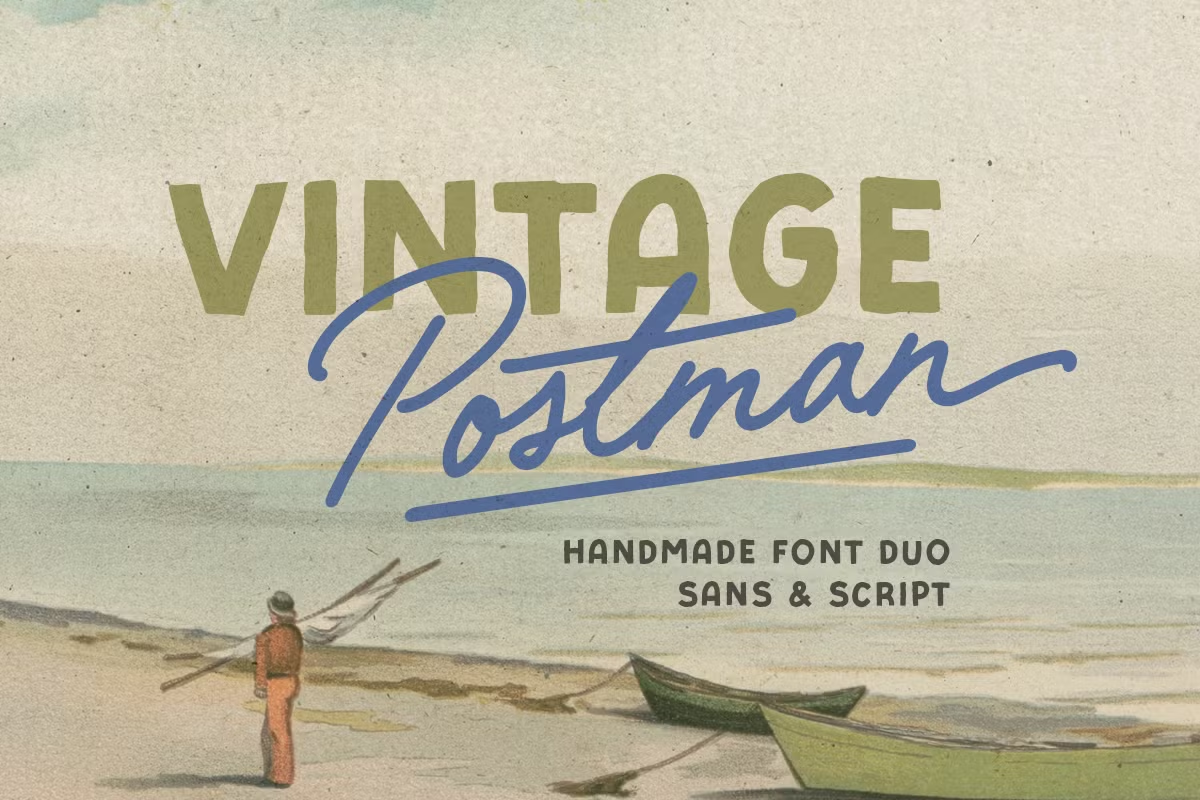
Most results for a Vintage Postman free download are unofficial copies, because Sarid Ezra sells this retro font duo as a commercial product and we found no official free or demo version. The full duo, a bold sans plus a monoline script, is licensed on Creative Market, where a desktop licence cost $19 per seat when we checked in October 2026.
Vintage Postman free download: is there an official free version?
No. The Creative Market listing sells licences only. The one “trial” it mentions belongs to Creative Market’s enterprise licence offer, not to this font. The MyFonts page for the same duo offers no demo either, and our searches for a personal-use version from Sarid Ezra found none. A site that hands out the whole font for free is not doing it with the designer’s permission, and the file would come with no licence.
Here is what a paid licence gets you, according to the listings:
- Two fonts: Vintage Postman Sans and Vintage Postman Script (the style names MyFonts uses).
- OTF and TTF files, per the Creative Market page.
- Alternates, ligatures and decorative lines for the script, including underline and end-line ligatures.
- Multi-language support, which the designer mentions without listing the languages.
On Creative Market the desktop licence is $19 per seat, with separate webfont, e-pub and app licences. MyFonts sells the complete two-font family for $19, or single styles from $17 (prices checked October 2026).
Get Vintage Postman — official listing
A sans and a script sold as one retro kit
Sarid Ezra describes Vintage Postman as “a handmade font duo that contains bold sans and monoline script.” Monoline means the strokes keep roughly the same width, so the script reads like pen lettering rather than brush calligraphy. The designer says the duo suits “any purposes especially for design that needs retro and old vibes,” and names posters, logotypes, quotes and branding as typical jobs.
The useful part of a duo is that the pairing work is already done. The bold sans can carry a headline or a shop name, and the script can sit above or below it as a tagline, a date or a signature line. The listing says the alternates, ligatures and lines “will make your project looks more appealing,” which is the designer’s pitch rather than a measured claim.
The Creative Market listing was created on 25 October 2024, and the duo appeared on MyFonts on 4 November 2024, so this is a recent release rather than a vintage digitisation of an old typeface. The “vintage” is in the styling, not the history.
How to type the underline and end-line ligatures
The Creative Market description explains the decorative lines. In Photoshop or Illustrator:
- For an underline, type an underscore followed by a number from 1 to 3 in the middle of your text.
- For an end line, type an equals sign followed by a number from 1 to 3 at the end of your text.
These codes work because they are ligatures, so standard ligatures must be switched on. Both Adobe apps turn them on by default. In Illustrator, the regular alternates sit in the Glyphs panel (Window, then Type, then Glyphs): select a letter and pick a variant from the small pop-up next to it.
In Microsoft Word, open the Font dialog, go to the Advanced tab and set Ligatures to “Standard Only” or higher. Canva and Cricut Design Space handle OpenType features less predictably. If the codes appear as a plain underscore and digit, the app is not applying the ligature, and you would need to set the line in Illustrator or another OpenType-aware editor and import it as an image or SVG.
Where the duo fits, and fonts to pair with it
The designer’s own list is the best guide: posters, logotypes, quote graphics and branding. Think of a coffee roaster’s label, a barbershop sign, a mail-themed stationery set or an event poster with a retro feel. Script fonts with decorative swashes are hard to read in long passages, so keep the script for short phrases.
For body text next to Vintage Postman, a plain companion keeps the page readable:
- Courier Prime adds a typewriter, postal-office tone for addresses, small print or labels.
- Lora is a calm serif for longer paragraphs on menus or packaging backs.
- Work Sans is a neutral sans for websites, where the bold display sans would be too heavy.
Licences: what you are paying for
Creative Market splits font licences by use. When we checked in October 2026, the Vintage Postman listing showed:
- Desktop: $19 per seat, for installing the font on a computer and making graphics, print work and logos.
- Webfont: $20, shown on sale at $17.15, for embedding the font on a website.
- E-pub: $50, shown on sale at $47.15, for ebooks.
- App: $152, shown on sale at $149.15, for use inside apps.
MyFonts offers its own licence types (Desktop, Company Desktop, Webfonts, App, Electronic Doc and Digital Ad/Email). Read the licence text on the store you buy from before you start a client job. This is a general summary, not legal advice.
Installing Vintage Postman on Windows or Mac
Unzip the download first. On Windows, right-click each OTF or TTF file and choose Install, or “Install for all users” if several accounts need it. On a Mac, double-click the file and click Install Font in Font Book. Restart Photoshop, Illustrator, Word or Canva’s desktop app so the new fonts show in the menu. Install either OTF or TTF, not both, to avoid duplicate names.
Free alternatives to Vintage Postman
If budget is the reason you searched for a Vintage Postman free download, these free Google Fonts are legal options. None of them comes with a matching bold sans, so you would be replacing only the script half of the duo.
- Dancing Script is a casual, bouncy script with several weights. It is the closest in mood for friendly retro signs, though its strokes vary more in thickness than a monoline script.
- Allura is a formal connected script. It suits invitations and certificates better than workwear-style logos.
- Tangerine is a narrow calligraphic script that needs large sizes. It looks more elegant than retro, so pair it with a heavy sans if you want a vintage poster feel.
All three are licensed under the SIL Open Font License, which allows commercial use.
Vintage Postman FAQ
Is there an official Vintage Postman free download for personal use?
We found no official free or personal-use version. Both the Creative Market and MyFonts listings sell paid licences only.
Who designed the Vintage Postman font?
Sarid Ezra. The duo is sold under that name on Creative Market and MyFonts.
What file formats does Vintage Postman come in?
The Creative Market listing says OTF and TTF. MyFonts also sells webfont licences for websites.
How do I add the underline in Vintage Postman?
The designer says to type an underscore plus a number from 1 to 3 in your text, with ligatures on. For an end line, type an equals sign plus a number from 1 to 3 at the end.
How much does Vintage Postman cost?
When we checked in October 2026, a Creative Market desktop licence was $19 per seat. MyFonts listed the two-font family at $19 and single styles from $17.

Tantype writes independent reviews of typefaces: what each font does well, where it falls short, what it suits, and where it is sold.