
TAN Summers Font Free Download
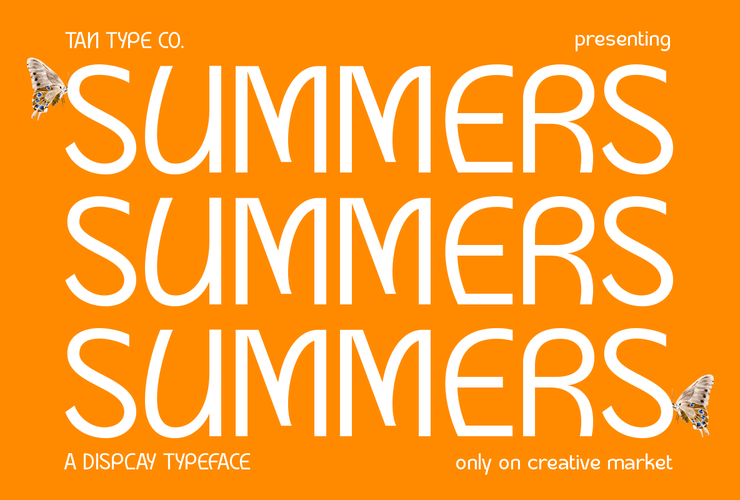
Anyone hoping for a TAN Summers free download should know up front that TanType Co. sells this font only as a paid product. We found no official demo or personal-use file in October 2026. The cheapest way to use it legally is a $17 Desktop licence from the official Creative Market listing.
TAN Summers free download: the official answer
TAN Summers lives on the TAN – SUMMERS page on Creative Market, TanType’s own shop, where it was listed on 19 July 2021. That page has a text preview box you can type into, which is the closest thing to a free trial. It does not offer a demo file, and we found none on DaFont either.
When we checked in October 2026, the prices were:
- Desktop: $17 per seat (one seat per person).
- Webfont: $17, shown at $14.45.
- E-pub: $34, shown at $31.45.
- App: $136, shown at $133.45.
Any licence gets you the same download: the font in .otf, .ttf, .woff and .woff2 formats, with multilingual support and free future updates, according to the listing.
Get TAN Summers — official listing
TAN fonts are designed and sold by TanType Co. tantype.com is an independent review site and is not affiliated with TanType Co.; we do not host or sell its fonts.
Geometric display or informal sans?
TanType describes the font in one line: “TAN – SUMMERS is a display type with simple and geometric lines making it look modern and sleek.” Creative Market files it under sans serif fonts.
Luc Devroye’s type design index lists it among TanType’s 2021 releases as “Summers (an informal sans)”. So two sources agree it is a sans serif made for display sizes, and they stress different sides of it: TanType says geometric and sleek, Devroye says informal.
We have not examined the font files and will not describe individual letters. Use the official preview images and type your own headline into the preview box before buying.
What the four TAN Summers file formats are for
The listing names four formats. Each has a job:
- .otf (OpenType): install this one on your computer for Adobe apps, Affinity, Word and most design software.
- .ttf (TrueType): an alternative desktop format. Install OTF or TTF, not both, so the font does not appear twice in menus.
- .woff: a compressed web format. It is also the file Canva accepts if your licence allows the upload.
- .woff2: the smaller, newer web format for websites, used with a Webfont licence. Canva does not accept WOFF2.
Good jobs for the TAN Summers font
“Display type” means headlines, not paragraphs. Based on how TanType describes it, sensible uses include:
- Brand names and logotypes that need a clean, modern look.
- Social media graphics and short slogans.
- Product packaging and labels.
- Website hero headings, with the Webfont licence.
For text under a geometric headline, a neutral workhorse works best. DM Sans keeps the geometric tone at small sizes. Source Serif 4 adds contrast when you want a serif for body copy.
Licensing in plain English
TAN Summers uses Creative Market’s standard licences. According to Creative Market’s font licence page:
- Desktop covers unlimited commercial and personal projects: print, packaging, merchandise, social media and paid ads.
- Under Desktop, websites, games and print-on-demand are allowed only as flattened images, and the font file cannot be embedded.
- Webfont is required for live text on your websites, declared with @font-face, up to the pageview limit chosen at checkout.
- E-pub covers one publication; App covers one application.
- Teams buy one Desktop seat per user. Sharing the files is not allowed.
This is a summary, not legal advice. The licence text on Creative Market is the one that applies.
Installing TAN Summers on Windows and Mac
- Download the zip from your Creative Market purchases and unzip it.
- Windows: right-click the .otf file and choose Install (or Install for all users).
- Mac: double-click the .otf file and click Install in Font Book.
- Restart any open design apps.
For Canva, font uploads need a paid plan, and Canva’s help pages say your licence must allow embedding. Ask TanType before uploading the .woff or .otf.
Free alternatives to TAN Summers
There is no legal TAN Summers free download, but these Google Fonts are free for personal and commercial use under the SIL Open Font License. They are not copies; they are different sans serifs that can do a similar job.
- Manrope by Mikhail Sharanda is a modern geometric-leaning sans with a variable weight axis. It is the nearest match for a “simple and geometric” feel, and it also handles body text.
- Raleway started as a thin display face by Matt McInerney and now runs from Thin to Black. Its lighter weights give a sleek, fashion-style headline.
- Inter by Rasmus Andersson was built for screens. It is plainer and more neutral than a display font, so it suits interfaces and long text more than logos.
TAN Summers FAQ
Can I get TAN Summers for free?
Not legally. TanType Co. sells TAN Summers on Creative Market and does not offer a demo, so the cheapest option is the $17 Desktop licence (October 2026).
Is a TAN Summers free download from a font site legal?
No. A TAN Summers free download on a third-party site is not published by TanType Co. and comes with no licence. Only a purchase from the official listing lets you use the font.
Is TAN Summers a sans serif or a display font?
Both. TanType calls it display type with simple, geometric lines, and Creative Market lists it under sans serif fonts.
When was TAN Summers released?
The Creative Market listing is dated 19 July 2021. Luc Devroye’s index also places it among TanType’s 2021 fonts.
Does TAN Summers support languages other than English?
The listing says it has multilingual support but does not name the languages. Type your text into the preview box to check accented letters before buying.
Can I use TAN Summers in a logo?
Yes, with a Desktop licence. Creative Market lists logo design among the uses Desktop covers.

Tantype writes independent reviews of typefaces: what each font does well, where it falls short, what it suits, and where it is sold.