
TAN St. Canard Font Free Download
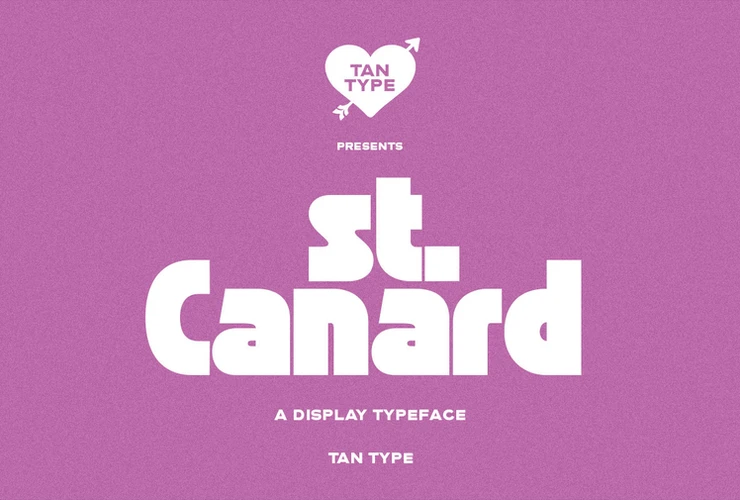
TanType Co. does not offer a TAN St. Canard free download, demo or personal-use version. St. Canard is a paid display font, sold on Creative Market since September 2020, and a Desktop licence cost $15 per seat when we checked in October 2026.
That is the short answer. Below is what the licence includes, how the font is described by its maker, and three free Google Fonts that cover similar ground.
TAN St. Canard free download: is there a legal option?
No. We checked the official TAN – St. Canard listing on Creative Market and searched DaFont, and found no free or trial file from TanType. The only “trial fonts” Creative Market mentions are part of its Enterprise/Custom service, not a download on this page.
Here is what the listing charged in October 2026:
- Desktop: $15 per seat, for logos, print, merchandise and images for social media or websites.
- Webfont: $15, shown at $12.75.
- E-pub: $30, shown at $27.75.
- App: $120, shown at $117.75.
According to the listing, every purchase includes multilingual support and free future updates.
Get TAN St. Canard — official listing
TAN fonts are designed and sold by TanType Co. tantype.com is an independent review site; we are not affiliated with TanType Co. and do not host or sell its fonts.
A mid-century display face, in TanType’s words
TanType’s description is one sentence: “St. Canard is a display typeface that embraces the mid century feeling.” Creative Market lists it under sans serif fonts. Type historian Luc Devroye’s TanType page includes St. Canard among the foundry’s 2020 releases.
“Mid century” usually points to the commercial lettering of the 1940s to the 1960s: signs, diners, packaging and travel posters. The listing does not go further than that, and we have not examined the font files, so we will not describe specific letters. The official preview images on Creative Market are the best way to judge the shapes.
The name does not describe the style. “Canard” is simply French for duck, so do not read anything about the letterforms into it.
What buyers say about spacing
The listing had one buyer review when we checked. The reviewer called St. Canard a fun, bold display font that works well in uppercase, and added: “Not 100% a fan of the kerning, but you can tweak this yourselves.”
That is one opinion, but it is useful advice for any display font. Before you export a logo or poster, check the space between each pair of letters.
- Illustrator: place the cursor between two letters and press Option + Left/Right arrow (Mac) or Alt + Left/Right arrow (Windows) to adjust kerning. Try switching the Character panel’s kerning from Metrics to Optical and compare.
- Photoshop: the same shortcuts work on live type.
- Canva and Word: you can change overall letter spacing, but not single letter pairs. For a logo, finish the lettering in a vector app.
Where the TAN St. Canard font works best
A single-style display font like this belongs in big, short text:
- Retro poster titles and event flyers.
- Café, bar and food-truck signage with a 1950s mood.
- Packaging labels and badges.
- Logo wordmarks, set in capitals as the reviewer suggests.
For body copy next to it, pick a calm typeface. Work Sans has a grotesque feel that suits mid-century layouts. Lora adds a warm serif for menus and longer descriptions.
Personal and commercial use
St. Canard is licensed under Creative Market’s standard font licences. Creative Market’s licence page says the Desktop licence allows unlimited commercial and personal projects, including physical products, packaging, social media and paid ads.
A few limits matter:
- Websites, games and print-on-demand are covered by Desktop only as rasterized images.
- Live web text needs the Webfont licence, and apps need the App licence.
- Buy one seat per person who installs the font.
- You cannot share or resell the font files.
This is a plain-English summary, not legal advice.
Installing St. Canard
Unzip the download first. On Windows, right-click the font file and choose Install. On a Mac, double-click it and click Install in Font Book. Restart open apps so they pick up the new font.
Canva needs a paid plan for font uploads and accepts OTF, TTF and WOFF files. Canva’s help pages also say your licence must allow embedding, so check with TanType before uploading.
Free alternatives to TAN St. Canard
A TAN St. Canard free download does not exist, but these three Google Fonts are free for commercial use under the SIL Open Font License. None of them copies St. Canard; each covers part of the job.
- Monoton by Vernon Adams draws every letter in parallel lines, like neon tubing. It is the most obviously retro of the three and works only at large sizes.
- Alfa Slab One by JM Solé is a heavy slab serif. It gives the bold weight of mid-century advertising. Unlike St. Canard, which Creative Market lists as a sans serif, it has thick slab serifs.
- Anton is a tall, condensed sans. It is the plain workhorse option for headlines that need to fit in a narrow column.
TAN St. Canard FAQ
Is TAN St. Canard free for personal use?
No. TanType Co. sells it only as a paid font, and we found no official personal-use version. The cheapest licence in October 2026 was Desktop at $15 per seat.
Who makes TAN St. Canard?
TanType Co., the foundry behind the TAN font series. It was released in 2020, and the Creative Market listing is dated 14 September 2020.
Does TAN St. Canard support other languages?
The listing says it has multilingual support. It does not list the languages, so test your text in the preview box first.
Is a TAN St. Canard free download from a font site safe to use?
Those files are not published by TanType Co., and downloading one does not give you a licence. Commercial work set in an unlicensed font can lead to takedown requests or licence claims.
Does St. Canard get updates?
Yes. The listing promises free future updates, which you download again from your Creative Market purchases.

Tantype writes independent reviews of typefaces: what each font does well, where it falls short, what it suits, and where it is sold.