
TAN Spring Font Free Download
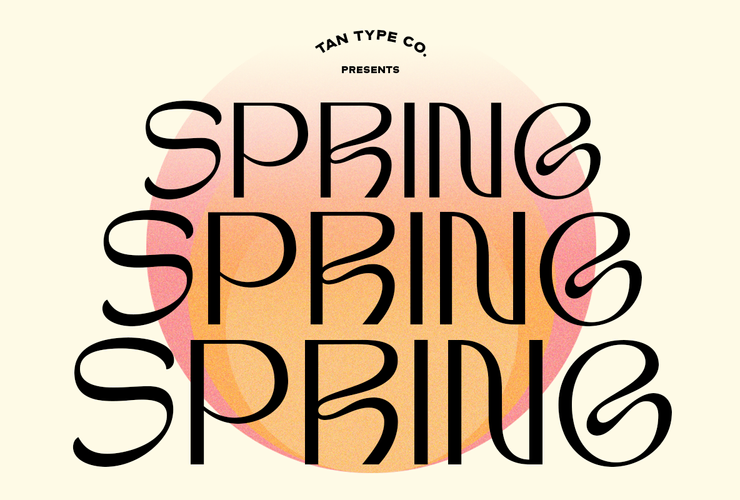
There is no official TAN Spring free download. TanType Co. sells TAN Spring as a commercial display font, and the only place we could confirm it is TanType’s own shop on Creative Market, where a Desktop licence cost $17 per seat when we checked in October 2026.
A site promising a TAN Spring free download of the full font is not TanType, and the files it hands out come with no licence. Below is what the paid version includes, how the designer describes it, and three free Google Fonts that get you close.
TAN Spring free download: what TanType actually offers
The TAN – SPRING listing on Creative Market was created on 6 April 2021. It offers a live text preview, but no demo file, trial or personal-use version. The only “trial fonts” Creative Market mentions belong to its Enterprise/Custom licence service, not to this product. Searches of DaFont and FontSpace turned up no TanType upload of Spring either.
Prices on the listing in October 2026:
- Desktop: $17 per seat.
- Webfont: $17, shown at $14.45.
- E-pub: $34, shown at $31.45.
- App: $136, shown at $133.45.
Every licence downloads the same font files. According to the listing, you get .otf, .ttf, .woff and .woff2 formats, multilingual support and free future updates.
Get TAN Spring — official listing
TAN fonts are designed and sold by TanType Co. tantype.com is an independent review site; we are not affiliated with TanType Co. and do not host or sell its fonts.
How TanType describes Spring
TanType Co. is the studio of designer Novia Jonatan. Its listing calls TAN Spring “a retro inspired display typeface” with “clean shapes with a hint of groove, bringing a mid-century feel to it.”
Two other sources add a little detail. Creative Market files the font under Sans Serif. The type archive of Luc Devroye lists it among TanType’s 2021 releases with a one-word note: “Spring (wavy)”. Put together, the official picture is a clean, sans-style display face with a gentle wave in its shapes and a 1950s–60s flavour.
The listing does not name a weight range or extra styles, so plan on a single display style. It is a headline font, not a text face for long paragraphs.
What buyers say on the listing
The Creative Market page showed five reviews in October 2026, three of them visible. One buyer praised its “art nouveau style”, its legibility in print and on screen and its balanced weight. Another simply wrote that she loved it. A 2021 review reported a download error (“file cannot be found”); the shop owner replied asking her to get in touch by email. If a download fails, contact the seller through Creative Market rather than looking for a copy elsewhere.
Good uses and font pairings
A wavy, mid-century display face works best large and short:
- Spring and summer promotions, café menus and market posters.
- Logos and wordmarks for brands with a retro or vintage angle.
- Album covers, gig flyers and social media title cards.
- Product labels where a two- or three-word name carries the design.
Pair it with something calm for body text. A geometric sans such as Work Sans keeps the period feel without competing. For a softer, editorial look, try a serif such as Lora. Keep Spring for headings only, and avoid pairing it with a second decorative font.
Personal or commercial use: which licence?
Creative Market’s font licence page sets the rules for all four tiers. In short:
- Desktop covers “unlimited commercial and personal projects”, including physical products, packaging, social media and paid ads. On the web, the font may only appear as rasterized images. Buy one seat per person who installs it.
- Webfont lets you embed the font on websites you own or control, up to the pageview limit chosen at checkout.
- E-pub covers one e-book or digital publication title.
- App covers embedding in one desktop, game or mobile application.
None of the tiers lets you share or resell the font files. Because there is no official TAN Spring free download, there is also no separate cheaper “personal use” licence; the $17 Desktop licence is the entry point for personal and commercial work alike. This is a summary, not legal advice, so read the full terms before a large job.
Installing TAN Spring
- Download TAN Spring from your Creative Market purchases page and unzip the folder.
- Windows: right-click the .otf file and choose Install (or Install for all users).
- Mac: double-click the .otf file and click Install Font in Font Book.
- Restart your design app so the font appears in its menu.
The .woff and .woff2 files are for websites under a Webfont licence, not for your computer. Canva Pro and Teams users can upload OTF, TTF or WOFF files to a Brand Kit.
Free Google Fonts with a similar retro feel
None of these copies Spring’s wave, but each is free for commercial use under the SIL Open Font License:
- Alfa Slab One is a heavy slab serif. It shares the vintage poster mood but swaps Spring’s clean sans-style shapes for chunky serifs.
- Anton is a tall, condensed sans. It is the most neutral of the three and fits long headlines into narrow columns, but has no groove at all.
- Shrikhand is a bold, rounded italic display face. It is the closest in spirit to Spring’s playful 1960s side, though it leans much more towards lettering.
TAN Spring FAQ
Is TAN Spring free for personal use?
No. TanType does not publish a personal-use or demo version, so any TAN Spring free download you find is unofficial. Personal projects need the same Desktop licence as commercial ones, $17 per seat in October 2026.
Who designed TAN Spring?
TAN Spring is by TanType Co., the studio of designer Novia Jonatan. It went on sale on Creative Market in April 2021.
What file formats does TAN Spring come in?
The listing names .otf, .ttf, .woff and .woff2. Install the OTF or TTF on your computer and use the WOFF files for the web.
Can I use TAN Spring in a logo?
Creative Market’s Desktop licence covers logos and other commercial end products. Check the full licence text if the logo will be trademarked or used at large scale.
Does TAN Spring support other languages?
The listing promises “Multilingual Support” but does not list the languages. Type your text into the preview box on Creative Market before buying to check accented characters.
Is there a free alternative to TAN Spring?
Shrikhand, Alfa Slab One and Anton are free on Google Fonts for any use. None has Spring’s exact wavy shapes.

Tantype writes independent reviews of typefaces: what each font does well, where it falls short, what it suits, and where it is sold.