
TAN Daisy Font Free Download

TAN fonts are designed and sold by TanType Co. Tantype is an independent review site — we’re not affiliated with TanType Co. and don’t host or sell their fonts.
There is no official TAN Daisy free download: the font is a paid release from TanType Co., and the only legitimate way to get it is a licence from the foundry’s Creative Market shop. We looked for a demo or personal-use version and found none, so the “free” files floating around download sites are not ones the designer has released.
The good news is that it isn’t expensive. A Desktop licence was $17 when we checked, and it covers the full TAN Daisy font: all 332 glyphs, including the flower-dotted letters that are the reason most people search for it. A TAN Daisy free download from an unofficial site skips the licence and may not match the current files.
TAN Daisy free download: what’s actually available
The TAN Daisy listing on Creative Market sells four standard licences and mentions no free version. Its “trial fonts” note refers to Creative Market’s enterprise service, not to a demo of this typeface. Prices on the listing in October 2026:
- Desktop: $17 per seat, for one person
- Webfont: $17
- E-pub: $34
- App: $136
Creative Market also shows 15% off when you combine licence types. The listing says you get .otf or .ttf files after unzipping. It doesn’t promise mockups or other extras.
Get TAN Daisy — official listing
Free download: TAN Daisy (Regular), personal use One style for personal use, shared with the designer’s permission. Commercial use needs a licence.
TAN Daisy specimen and verified specs
- Styles: 1 (Regular)
- File formats: OTF
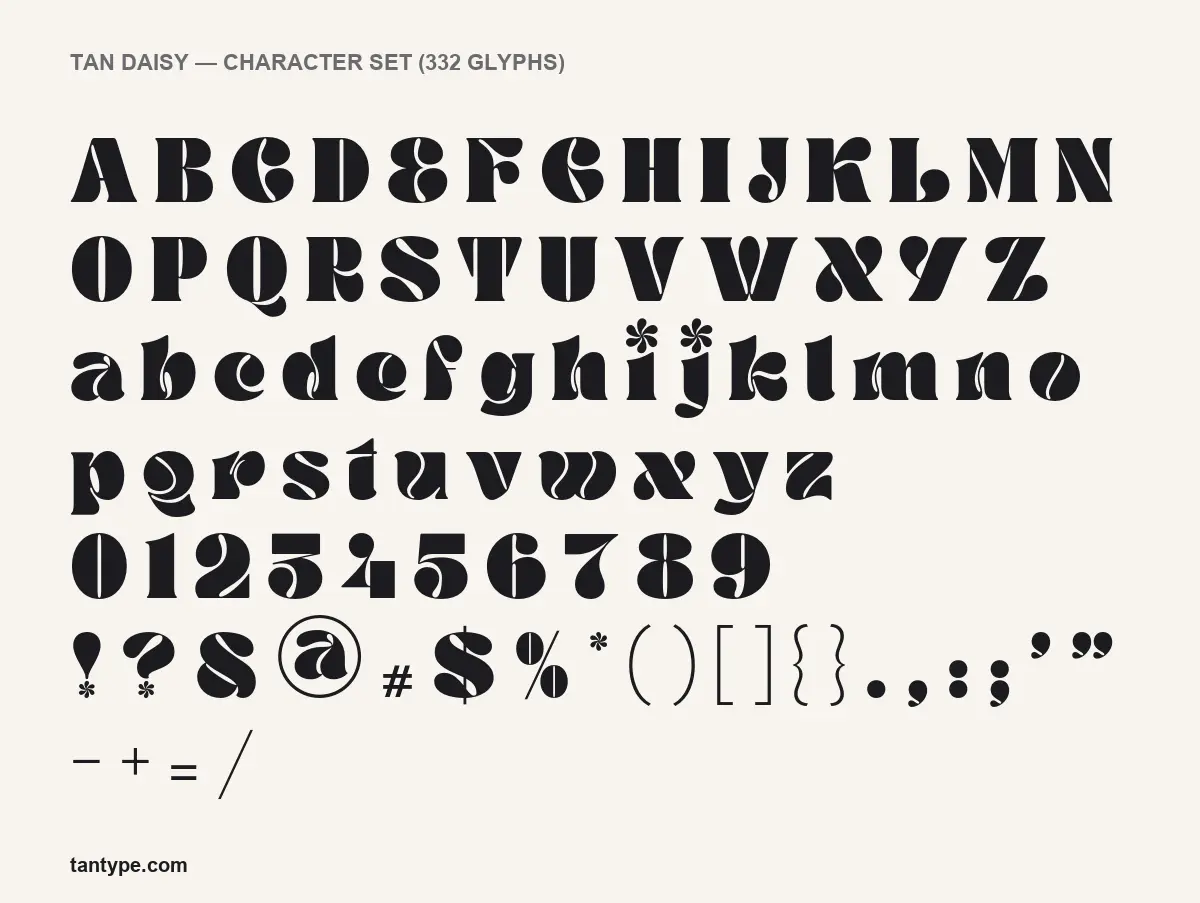
- Glyphs: 332
- Language support: Basic Latin (English), Western European, Central & Eastern European
- OpenType features: kerning
- Designer: Novia Jonatan (TanType Co.)
Checked by Tantype from the licensed font files.
What TAN Daisy looks like
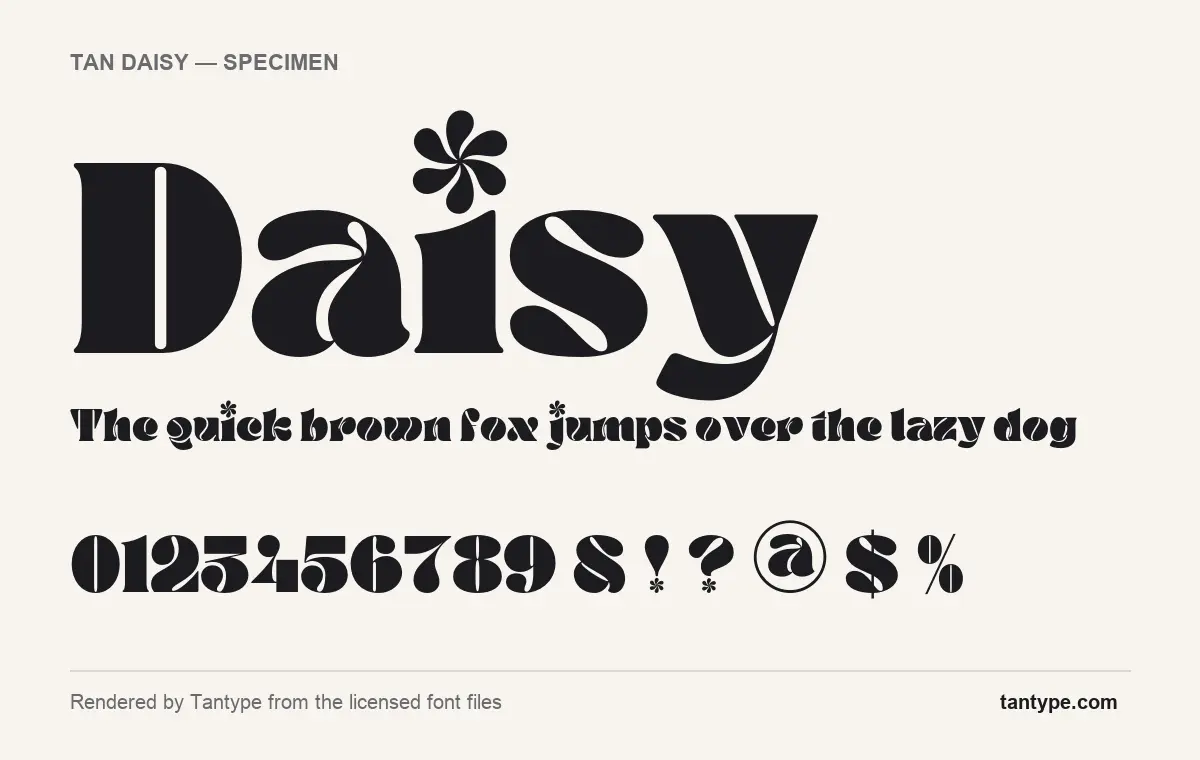
TanType’s own description is brief: “a display typeface full of retro power”, “quirky, groovy, and funky”, “bold and thick”. The specimens rendered from the font files show what that means in practice.
The letters are extremely heavy, with counters squeezed down to thin slits. Instead of open bowls, the D, B, P, a, b, d and the figures have narrow curved cuts running through them, which gives the font a stencil-like, almost carved look. Curves swell and pinch the way 1970s headline lettering does. The capital E is drawn like a reversed 3, the W, X and Y lean into curly shapes, and the ampersand is a looping 8-like form.
The detail people remember is the flower. The dots on the i and j, and on the exclamation and question marks, are small six-petal daisies instead of round dots. In a word like “Daisy” the dot becomes the biggest decorative element on the line. Use that with care. A paragraph full of i’s turns into a field of flowers, which is fun on a poster and distracting anywhere else.
What’s in the TAN Daisy package
- Styles: one Regular style. There are no other weights or an italic.
- Glyphs: 332 in the licensed file.
- Format in our licensed copy: OTF. The listing’s FAQ says buyers receive .otf or .ttf files.
- Version: 1.000. Creative Market lists the product as created on 28 September 2021, with no update notes.
- Designer: Novia Jonatan, according to the font files, for TanType Co.
Language support and OpenType features
TAN Daisy covers Basic Latin plus the accented letters for Western European languages (French, Spanish, German, Portuguese and others) and Central and Eastern European languages (Polish, Czech, Croatian, Hungarian and others).
The only OpenType feature is kerning, the built-in spacing that tightens or loosens specific letter pairs so the word looks evenly spaced. Every mainstream app, from Word to Illustrator to Canva, applies it automatically.
There are no ligatures, stylistic alternates or swashes, and nothing is stored in the Private Use Area (PUA). The flower dots aren’t hidden extras. They are part of the normal i, j, exclamation mark and question mark, so you get them just by typing. That makes TAN Daisy easy to use in Canva, Cricut Design Space and other simple tools, which can’t reach OpenType alternates.
Where TAN Daisy works, and what to pair it with
This is a font for big, short text: record sleeves, gig and festival posters, café and bakery signs, kids’ party invitations, packaging fronts, sticker designs and social graphics with a 1970s mood. Because the counters are so narrow, it needs to be set large. At small sizes the slits close up and the letters read as solid blobs. Leave some extra tracking if you set it in all caps.
Pair it with something calm:
- DM Sans or Poppins for supporting text. Their round, geometric shapes echo Daisy’s curves without competing.
- Cooper Hewitt or Space Grotesk for small labels if you want a slightly technical contrast.
- Fraunces at a light weight for a softer, retro-friendly serif in body copy.
Licensing: personal vs commercial use
The listing has no personal-only or free tier. All four licences are paid, and each is scoped by medium. The listing describes the Desktop licence’s common uses as “logo design, print media, souvenirs, merchandise, and creation of images for websites or social media”. Webfont covers “headings and text blocks on websites”, E-pub covers e-books and interactive PDFs, and App covers software. A seat is per person, so a team needs a seat for each designer. Treat this as an overview and read the licence on the listing itself. It is not legal advice.
Installing TAN Daisy
- Windows 10 and 11: unzip the download, right-click the .otf file and choose Install. You can also drag it into Settings, then Personalization, then Fonts.
- macOS: double-click the .otf file and click Install in Font Book.
- Install one format only (OTF or TTF, not both), then restart your design app so it picks up the new font.
Free alternatives to TAN Daisy
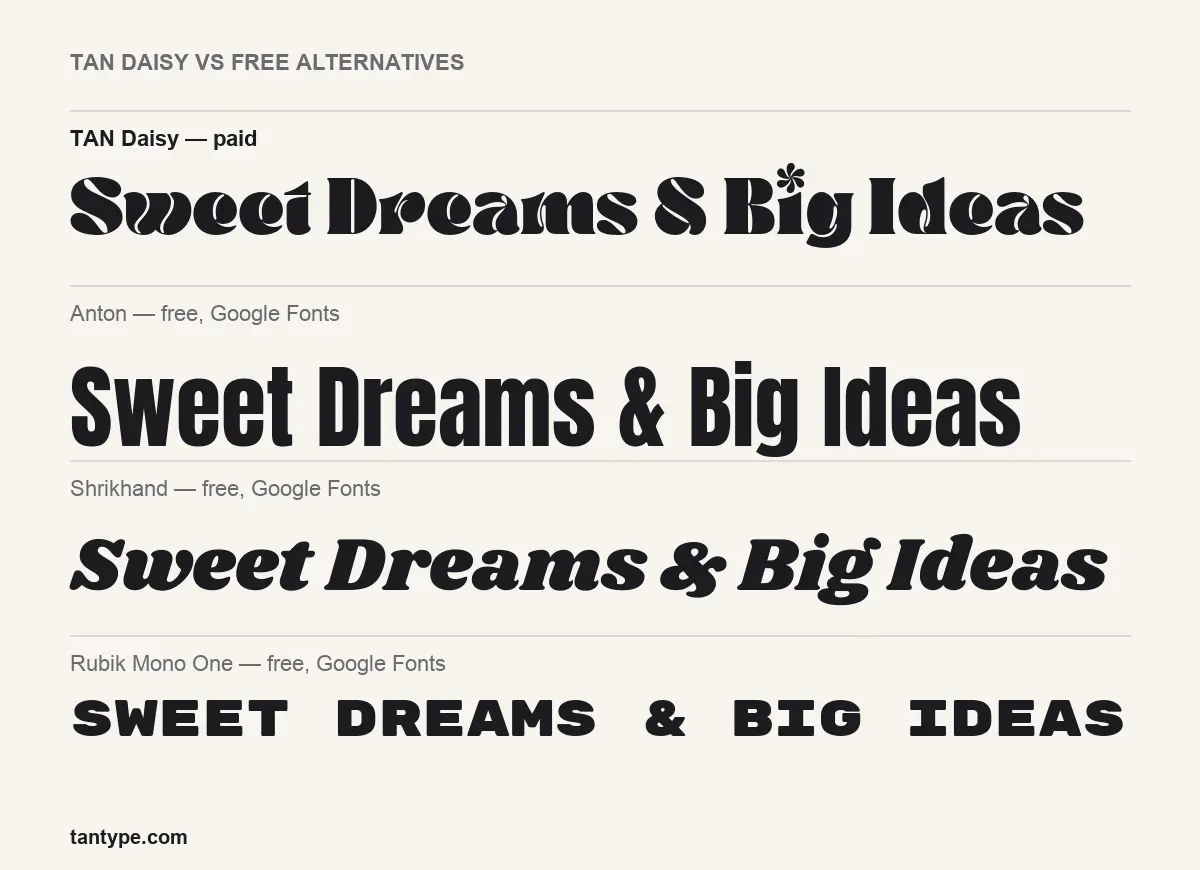
None of the free options has Daisy’s flower dots or slit counters, but each covers part of its job:
- Shrikhand is the closest in mood. It is a heavy, retro display face with ball-like terminals, but it is permanently slanted and its counters are open, so it looks friendlier and less sculpted.
- Anton is a condensed grotesque sans. It has the same heaviness and poster presence, but it is straight-sided and neutral, with none of Daisy’s curves.
- Rubik Mono One is a wide, monospaced, capitals-only face. It gives a chunky retro headline, but it has no lowercase and a far more mechanical rhythm.
If the flowers are the reason you want TAN Daisy, none of these will substitute. In that case, download TAN Daisy from the official listing.
We included TAN Daisy in our roundup of the best floral fonts, alongside other picks in the same style.
TAN Daisy FAQ
Is TAN Daisy free to download?
No. We found no official free or demo version. Any TAN Daisy free download outside the Creative Market listing is unauthorised. A Desktop licence was $17 when we checked.
Can I use it for commercial projects?
Yes, once you buy the right licence. Desktop covers print, logos, merchandise and social images, according to the listing. Websites, e-books and apps need their own licences.
Will TAN Daisy work in Canva or Cricut?
Yes. It has no hidden alternates, so the flower dots and every other glyph come straight from the keyboard. Canva needs a paid plan to upload custom fonts.
Who made TAN Daisy?
Novia Jonatan of TanType Co., per the font files. Tantype.com is an independent site with no connection to the foundry.
What font pairs well with TAN Daisy?
A plain geometric sans such as DM Sans or Poppins for body text keeps the focus on Daisy’s headline.

Tantype writes independent reviews of typefaces: what each font does well, where it falls short, what it suits, and where it is sold.