
TAN Buster Font Free Download

TAN fonts are designed and sold by TanType Co. Tantype is an independent review site — we’re not affiliated with TanType Co. and don’t host or sell their fonts.
There is no official TAN Buster free download: TanType Co. sells this retro display font as a paid product and, as far as we could find, has never released a free demo or personal-use version. The only official way to get the full font is to license it from the TanType shop on Creative Market, from $17 for a desktop licence.
TAN Buster free download: the official options
The Creative Market listing for TAN Buster offers paid licences only. It mentions no demo file, and the “trial fonts” Creative Market advertises belong to its enterprise licensing, not to individual buyers. We also found no TanType Co. release of TAN Buster on MyFonts, DaFont, FontSpace, Behance or Gumroad. Any site handing out a TAN Buster free download of the complete font is not an official source, and the file would come without a usable licence.
Here is what the listing says you get: .otf, .ttf, .woff and .woff2 files, multilingual support and free future updates. The desktop licence is $17 per seat, and webfont, e-pub and app licences are sold separately on the same page. The product went live on Creative Market on 22 February 2021.
Get TAN Buster — official listing
tantype.com is an independent review site with no connection to TanType Co., whatever the names suggest. We don’t sell the font; the button goes to the official listing.
Free download: TAN Buster (Bold), personal use One style for personal use, shared with the designer’s permission. Commercial use needs a licence.
TAN Buster specimen and verified specs
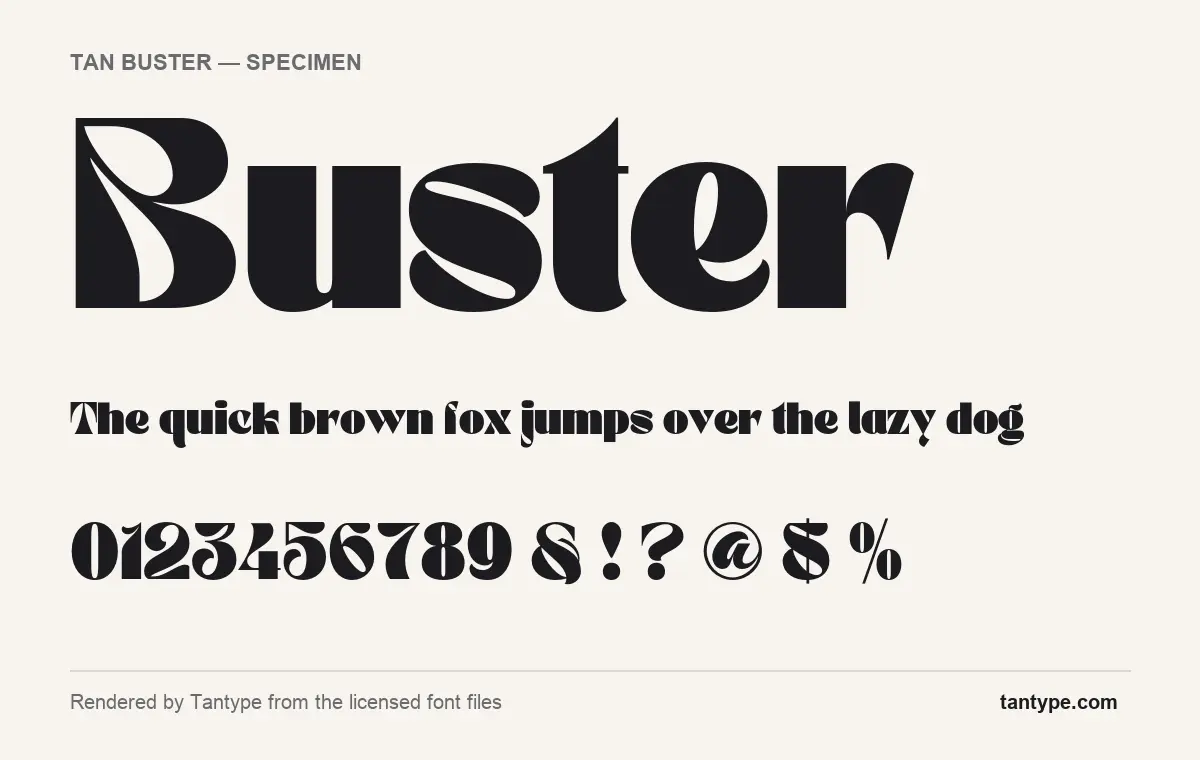
- Styles: 1 (Bold)
- File formats: OTF
- Glyphs: 343
- Language support: Basic Latin (English), Western European, Central & Eastern European
- OpenType features: kerning, fractions
- Designer: Novia Jonatan (TanType Co.)
Checked by Tantype from the licensed font files.
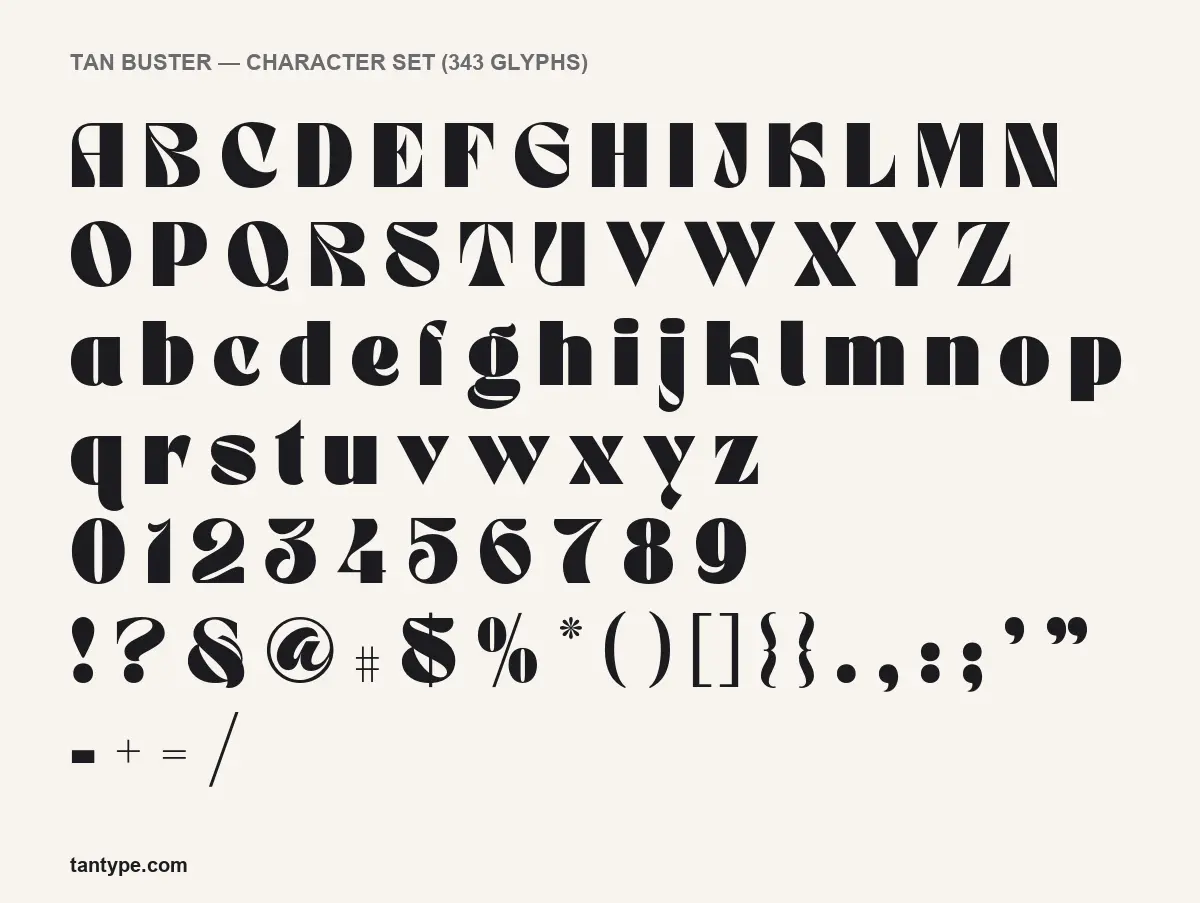
How TAN Buster looks
The designer calls TAN Buster “a retro inspired display typeface”, “fun and groovy with a bold personality”. The specimen above, rendered from the licensed font files, bears that out. This is a very heavy face with extreme contrast: fat strokes that thin to hairline points, and counters cut as teardrops and slivers rather than rounded holes.
Look at the B in the large sample. Its upper bowl is replaced by a long leaf-shaped cut that runs from the top left corner down to the middle. The s has a thick diagonal spine that tapers to points at both ends. The t rises to a sharp spike, the r ends in a sweeping flag, and the y finishes in a curled tail below the baseline. Stems end flat, without bracketed serifs, so the drama comes from the contrast and the curves, not from serifs.
The figures follow the same logic, with heavy curves and thin diagonals, and the ampersand is drawn as a looping S-like form with a crossing stroke. Hairlines this thin need size to survive. TAN Buster is at its best in large headlines and logos; at small sizes the cuts close up and the thin strokes fade.
What’s in the TAN Buster package
- Styles: one, named Bold in the font files.
- Formats: the licensed files we rendered from were OTF; the listing says .ttf, .woff and .woff2 are included as well.
- Glyphs: 343, with upper and lowercase, figures, punctuation and accented letters.
- Version: 1.000, with free future updates promised on the listing.
- Variable font: no.
- Designer: Novia Jonatan according to the font files, published by TanType Co.
Language support and OpenType features
TAN Buster covers Basic Latin (English), Western European and Central and Eastern European character sets, so accented text in languages such as French, German, Spanish, Polish and Czech sets without missing letters.
Two OpenType features are built in:
- Kerning adjusts the space between specific letter pairs. It is on by default in almost every app, including Word, Canva and Adobe software.
- Fractions turn typed sequences like 1/2 into a proper stacked fraction. You switch it on in apps with an OpenType panel, such as Illustrator, InDesign and Affinity Designer. Canva and Cricut Design Space do not offer the control.
There are no stylistic alternates, swashes or ligatures, and no glyphs in the Private Use Area (PUA). In practice, Canva and Cricut users get the whole design: every letter shown in the character set is reachable by typing it.
Where TAN Buster works best, and what to pair it with
The listing suggests mastheads and logos, and the shapes agree. Think magazine and zine covers, album and gig artwork, café and bakery branding, packaging for drinks or sweets, and short social graphics with a 70s flavour. Keep lines short: one to five words.
Because TAN Buster is so loud, partners should be quiet:
- DM Sans, a simple geometric sans for body text and small labels.
- Karla, a slightly quirky grotesque that keeps a friendly tone without competing.
- Lora, a readable serif for longer text when you want a warmer, bookish feel under the headline.
Licensing: personal vs commercial use
The font is licensed under Creative Market’s font licence terms. In summary, the Desktop licence allows unlimited personal and commercial projects, and you should buy as many seats as there are people using the font. Websites that load the font itself need a Webfont licence with a pageview limit set at checkout; apps and e-books each need their own licence. Creative Market also sets specific conditions for logos, which matters with a typeface pitched at logos, so read that section first. This is general information, not legal advice.
How to install TAN Buster
After purchase, download the zip from Creative Market and unzip it. On Windows, right-click the OTF and choose Install (or Install for all users). On a Mac, double-click the OTF and press Install in Font Book. Restart design apps afterwards. Use the WOFF or WOFF2 files only on websites.
Free alternatives to TAN Buster
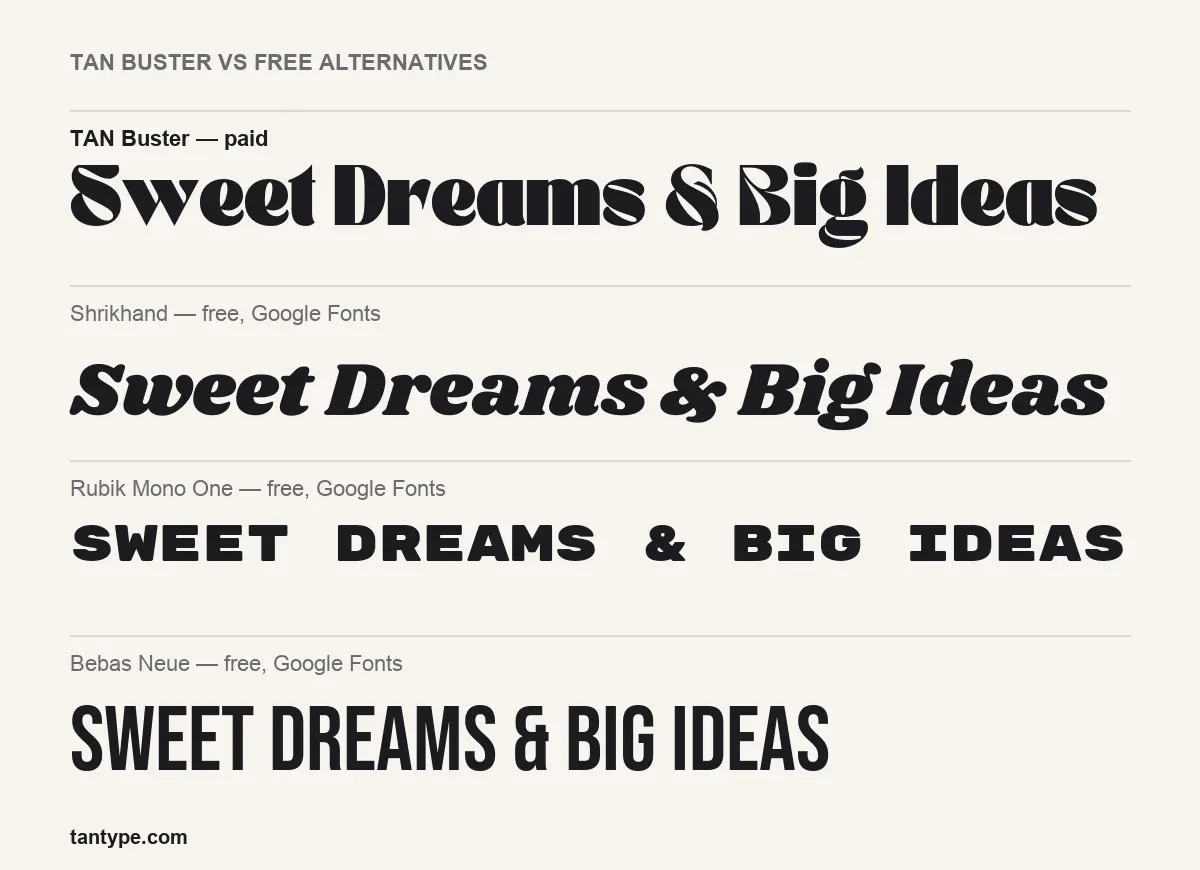
If a TAN Buster free download is out of reach, three Google Fonts get part of the way, each free for commercial use:
- Shrikhand comes closest in mood: heavy, retro and curvy. It slants like an italic and has much less contrast, so it feels like brush lettering rather than Buster’s sharp cut-paper shapes.
- Rubik Mono One is equally heavy but monospaced, wide and set in capitals, with no contrast at all. It gives a blocky, arcade-like look.
- Bebas Neue is a condensed all-caps sans. It shares nothing of Buster’s curves; use it when you need a clean, narrow headline instead.
TAN Buster FAQ
Is TAN Buster free to download?
No. We found no official free or demo version. The TAN Buster font is a paid product, from $17 for a desktop licence on Creative Market.
Can I use TAN Buster in a logo or for client work?
Client and commercial work is covered by the Desktop licence. Logo use has extra conditions in Creative Market’s font licence, so check them first.
Will TAN Buster work in Canva or Cricut?
Yes. Upload the licensed OTF to Canva (font uploads need a paid Canva plan) or install it on your computer for Cricut Design Space. The font has no hidden alternates, so nothing is lost.
Who made TAN Buster?
Novia Jonatan, per the font files, published by TanType Co. We are not affiliated with the foundry.
Where can I download TAN Buster legally?
Only from TanType’s official Creative Market listing, linked above.

Tantype writes independent reviews of typefaces: what each font does well, where it falls short, what it suits, and where it is sold.