
TAN Ashford Font Free Download

TAN fonts are designed and sold by TanType Co. Tantype is an independent review site — we’re not affiliated with TanType Co. and don’t host or sell their fonts.
If you searched for a TAN Ashford free download, the short answer is that there isn’t an official one. TAN Ashford is a commercial font from TanType Co., sold through the foundry’s Creative Market shop, and we could not find a free demo or personal-use version on any official channel. Copies on “free font” sites are not authorised by the designer.
The legitimate way to download TAN Ashford is to buy a licence, which starts at $17 and gets you the full font with every glyph and feature described on this page.
TAN Ashford free download: what’s actually available
We checked the official Creative Market listing and searched for a demo on the foundry’s other storefronts. None of them offers a free or trial version of TAN Ashford. The only “trial fonts” Creative Market mentions belong to its enterprise licensing service, not to this product.
When we checked in October 2026, the listing priced the licences as follows:
- Desktop: $17 per seat (one seat covers one person)
- Webfont: $17
- E-pub: $40
- App: $136
The listing also advertises 15% off when you combine licence types. According to the listing, the download includes .otf, .ttf, .woff and .woff2 files, multilingual support and free future updates.
Get TAN Ashford — official listing
Free download: TAN Ashford (BOLD), personal use One style for personal use, shared with the designer’s permission. Commercial use needs a licence.
TAN Ashford specimen and verified specs
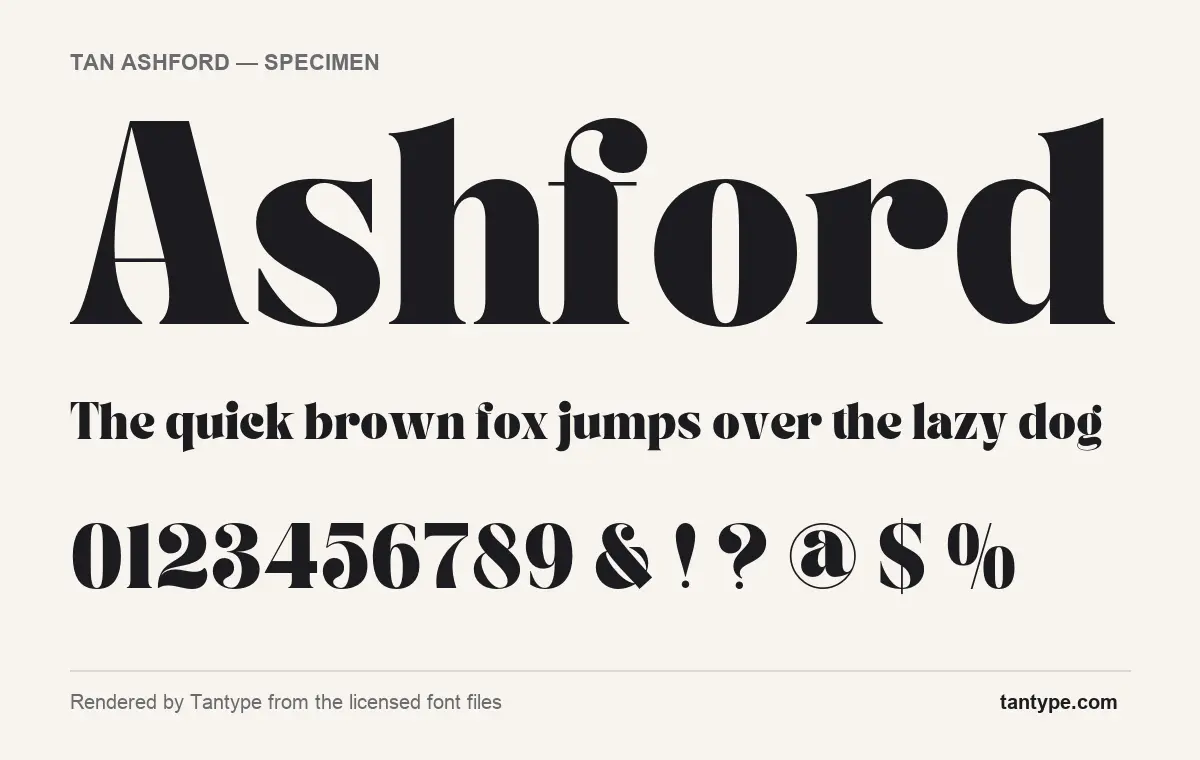
- Styles: 1 (Bold)
- File formats: OTF
- Glyphs: 347
- Language support: Basic Latin (English), Western European, Central & Eastern European
- OpenType features: standard ligatures, kerning, fractions
- Designer: Novia Jonatan (TanType Co.)
Checked by Tantype from the licensed font files.
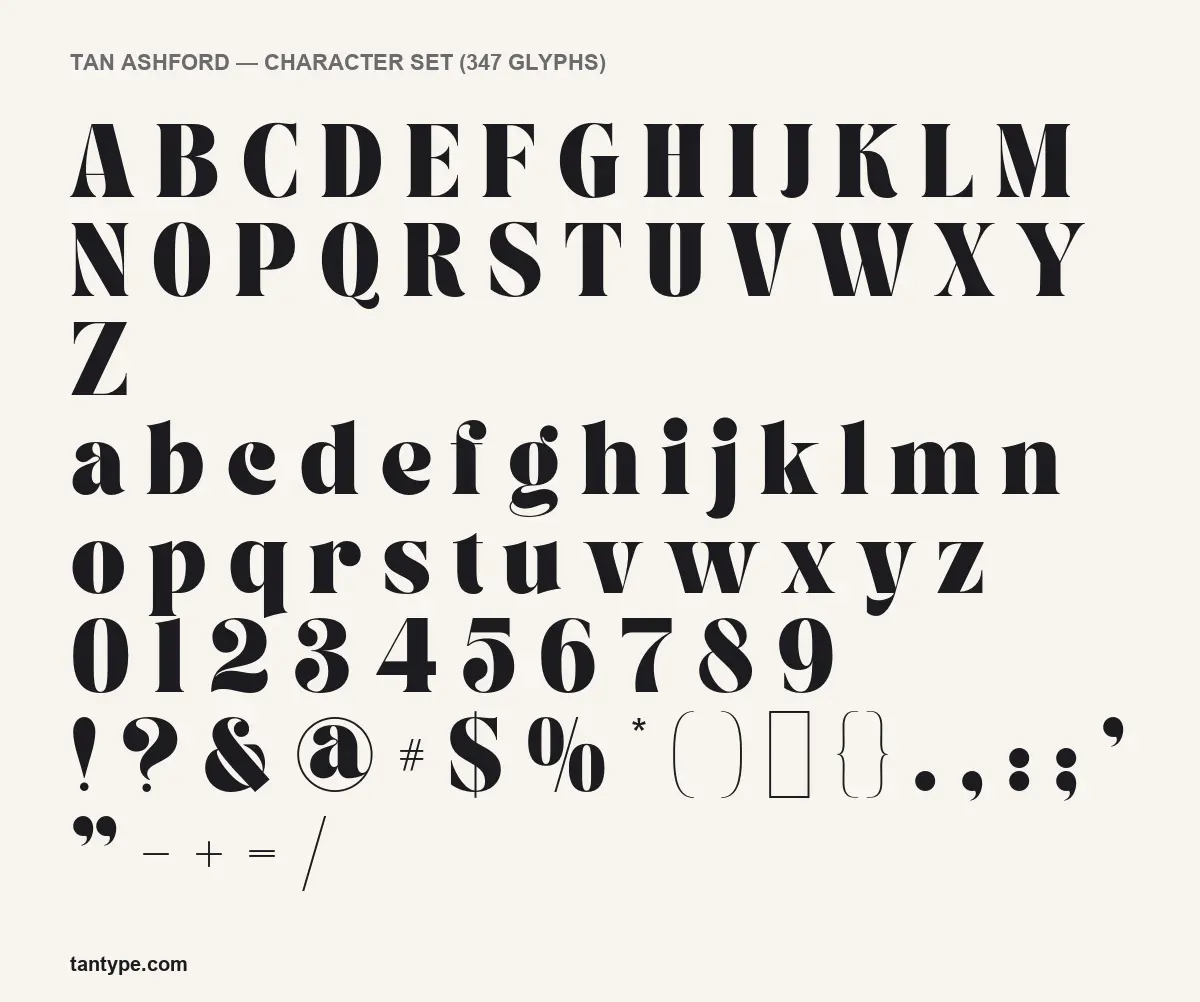
Design and character
The designer describes TAN Ashford as “a bold serif with high contrast” with “a touch of vintage vibes”, aimed at headlines, invitations and advertising. The specimens bear that out. The heavy strokes are very thick and the thin strokes drop to hairlines: the crossbars of A and H are single fine lines, and the brackets, plus, minus and slash are drawn almost as thin rules.
The lowercase is where most of the personality sits. The a, c, f, j, r and y end in round ball terminals, the g has a double-storey shape with a hairline loop for its lower bowl, and the f carries a long, thin crossbar. The Q finishes in a curled tail. The figures follow the same logic, with ball terminals on 2, 3, 5, 6 and 9, and the @ sits inside a thin ring. Spacing is fairly tight, which suits big display sizes and makes the font look dense and confident in a single line.
It is a display face. At small sizes the hairlines will thin out and the ball terminals will crowd each other, so keep it for headings and short phrases.
What’s in the TAN Ashford package
- Styles: one, named Bold in the font files. There is no regular, italic or lighter weight.
- Glyphs: 347 in the licensed file we examined.
- Formats: our licensed copy contained OTF. The listing says the product ships with .otf, .ttf, .woff and .woff2.
- Version: 1.000. The Creative Market product specs list it as created on 27 September 2020, and the listing title marks it as updated without saying what changed.
- Designer: Novia Jonatan, according to the font files. The publisher is TanType Co.
The listing does not mention extras such as mockups or ornaments, so expect a font file and nothing else.
Language support and OpenType features
The character set covers Basic Latin (English), Western European languages such as French, German and Spanish, and Central and Eastern European languages such as Polish, Czech and Hungarian.
TAN Ashford has three OpenType features:
- Standard ligatures: pairs of letters that would collide are swapped for a single combined shape automatically. Most design apps, including Adobe Illustrator, InDesign, Affinity and Figma, turn this on by default.
- Kerning: built-in spacing adjustments for awkward pairs such as “Te” or “AV”. Almost every app applies it automatically.
- Fractions: typing 1/2 and switching on the fractions feature turns it into a proper fraction. You will find this in the OpenType panel of Adobe apps and the Typography panel of Affinity.
The font has no glyphs in the Private Use Area (PUA). That doesn’t matter much here, because TAN Ashford has no stylistic alternates or swashes to unlock. Everything you see in the character set is typed directly from the keyboard, so it behaves the same in Canva or Cricut Design Space as it does in Illustrator.
Best uses and font pairings
TAN Ashford works best for magazine-style headlines, book and album covers, posters, wedding and event invitations, and wordmarks where a retro editorial look is wanted. Because there is only one heavy weight, pair it with a quieter typeface for everything else:
- Work Sans or Inter for body copy and captions. Their plain shapes leave the contrast in Ashford to do the talking.
- Lora if you want a serif for running text that reads as related but doesn’t compete.
- Montserrat in wide-tracked capitals for small labels, dates and taglines under an Ashford headline.
Licensing: personal vs commercial use
The Creative Market listing offers Desktop, Webfont, E-pub and App licences, plus a custom enterprise option. There is no separate free or personal-use tier. According to the listing, the Desktop licence covers common uses such as “logo design, print media, souvenirs, merchandise, and creation of images for websites or social media”. To embed the font on a website you need the Webfont licence, and apps and e-books need their own licences. A TAN Ashford free download from a file-sharing site comes with none of these licences, so using it for client or commercial work leaves you unlicensed. Read the full licence on the listing before you buy. This is a general summary, not legal advice.
How to install the TAN Ashford font
- Unzip the download and pick one desktop format. OTF is the better choice, and you should install only one format to avoid duplicate fonts.
- Windows: right-click the .otf file and choose Install (or “Install for all users”).
- Mac: double-click the file to open Font Book, then click Install.
- Restart any design app that was open. The .woff and .woff2 files are for websites and are not installed on your computer.
Free alternatives to TAN Ashford
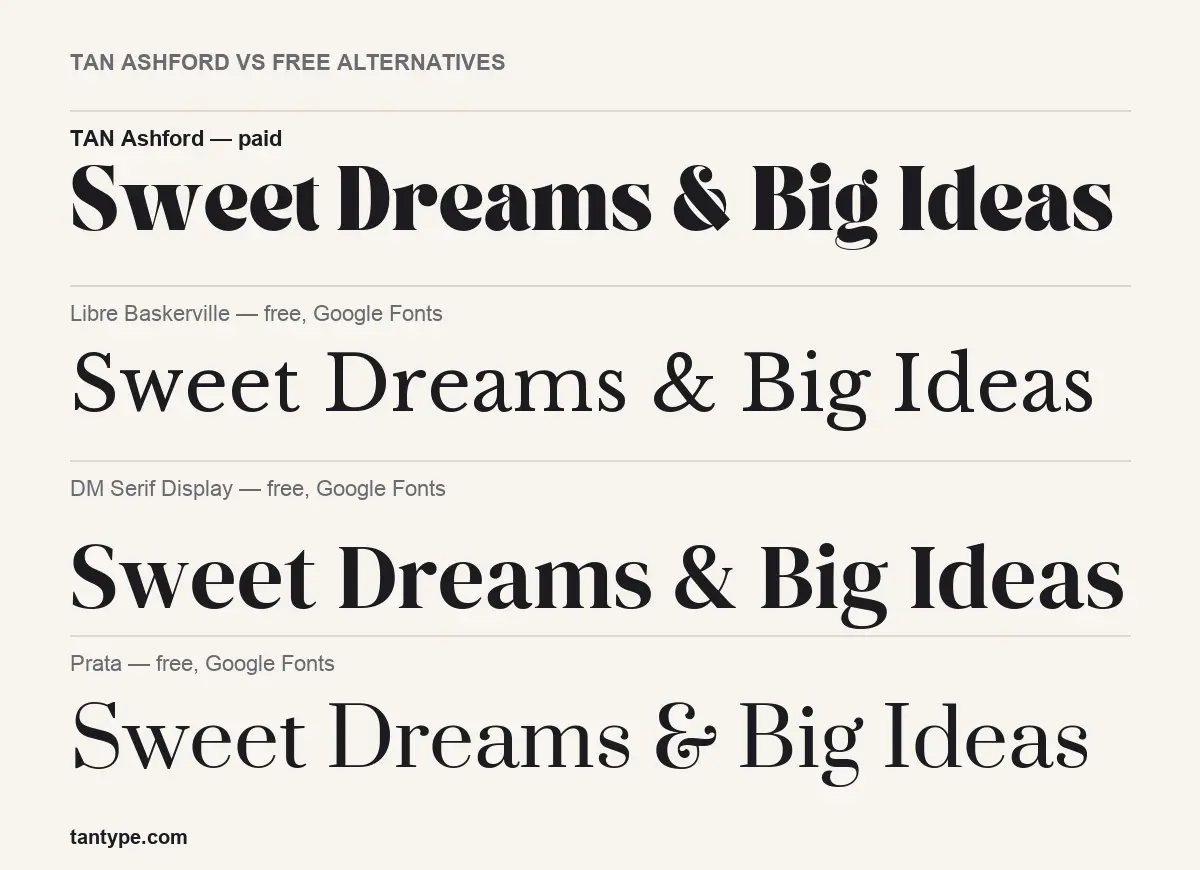
If you need something free, the closest options on Google Fonts each give up part of what makes Ashford distinctive:
- DM Serif Display is the nearest match. It is heavy and high-contrast with tight spacing, but its terminals are more restrained and its g is plainer, so it reads as cleaner and less vintage.
- Prata has the same Didone-style contrast but at a much lighter weight, with only a regular style. It feels elegant rather than bold.
- Libre Baskerville is built for reading text. Its contrast is moderate and its letters are wider, so it makes a sensible body face but will not give you Ashford’s punch in a headline.
TAN Ashford FAQ
Is TAN Ashford free?
No. Any TAN Ashford free download you find is unofficial. It is a commercial font, and we found no official free demo. A Desktop licence on Creative Market was $17 when we checked.
Can I use TAN Ashford for commercial work?
Yes, with a paid licence. The Desktop licence covers uses such as logos, print and merchandise, according to the listing. Web, app and e-book use each need their own licence.
Does TAN Ashford work in Canva and Cricut?
Yes. It has no hidden alternates, so every character can be typed directly. Uploading your own fonts to Canva needs a paid Canva plan.
Who designed TAN Ashford?
Novia Jonatan, per the font files, published by TanType Co. Tantype.com is an independent review site and has no connection to TanType Co.
Does it have a lowercase and numbers?
Yes. It has full upper and lowercase, figures, punctuation and accented letters for European languages.

Tantype writes independent reviews of typefaces: what each font does well, where it falls short, what it suits, and where it is sold.