
Naomi Modern Serif Font Free Download
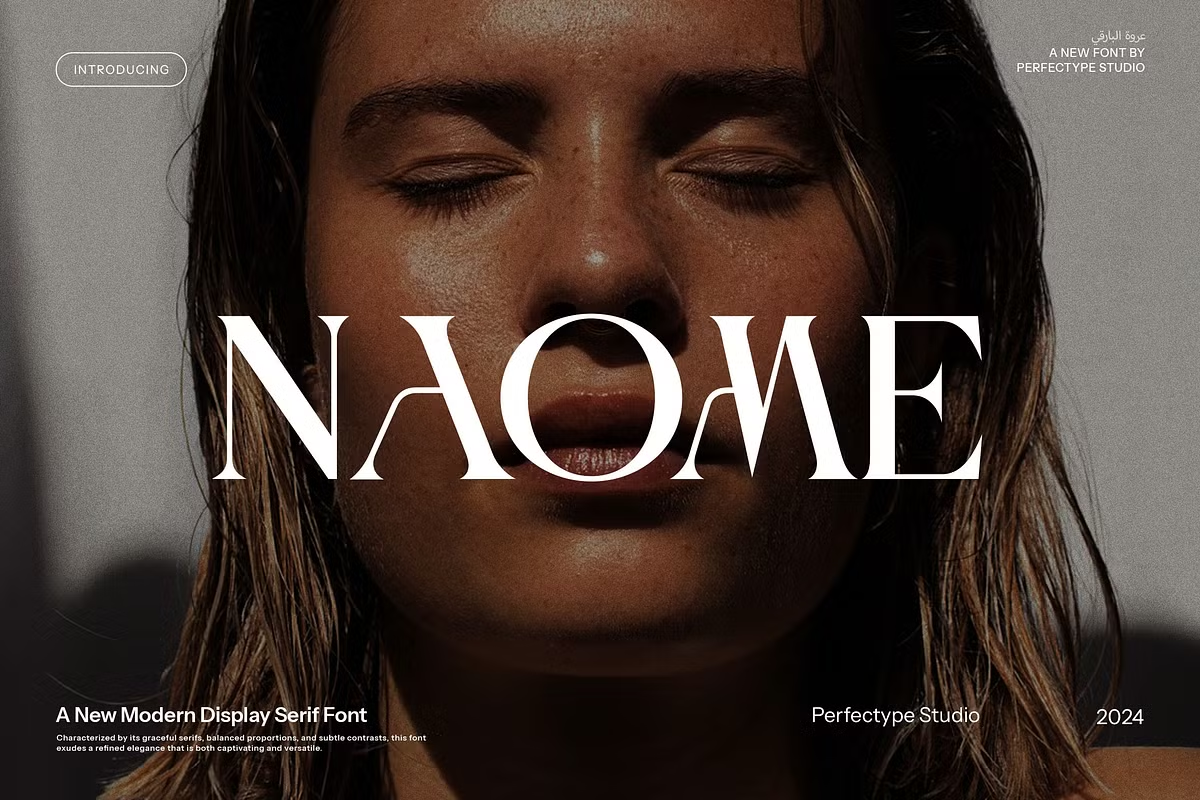
Looking for a Naomi Modern Serif free download? The font is a commercial release from the Creative Market shop Perfectype, and we found no official free, demo or personal-use version of it. A desktop licence on the official listing cost $19 per seat when we checked in October 2026.
Naomi Modern Serif free download: what is official and what is not
The Creative Market page sells licences only. Its line about “trial fonts” is part of Creative Market’s enterprise licence offer, not a free Naomi file. A copy from a free font site is unofficial and comes with no licence, which is a real risk for a font meant for logos and packaging.
Watch for a name mix-up too. Several “Naomi” serifs exist. Naomi Style, designed by Zamroni Hamzah and published by Sensatype Studio on MyFonts, is a different product with its own Regular and Italic. Free demos you find for “Naomi font” may belong to that family, not to Perfectype’s Naomi Modern Serif.
A paid licence for the Perfectype font gets you:
- The font files; Creative Market’s FAQ says downloads contain OTF or TTF fonts, and the listing is also tagged as a web font.
- A set of ligatures and alternate characters, which the designer highlights.
- Rights that match the licence you pick: desktop, webfont, e-pub or app.
Get Naomi Modern Serif — official listing
The listing’s pitch: a serif for luxury branding
Perfectype presents Naomi as a serif for branding and logo design, aimed at elegant, luxury projects. The listing names branding, logos, social media, advertising, packaging, weddings, invitations and stationery as intended uses, and stresses its many ligature and alternate options. The page heading reads Naomi Modern Serif Font, while the page header calls it Naomi Elegant Serif Font; both refer to the same product, created on Creative Market on 15 October 2024.
The listing does not state a number of weights or styles, a glyph count or supported languages. We have not examined the files, so we will not describe specific letters. The eight preview images and the live text box on the listing are the way to see the alternates before you buy.
Using the ligatures and alternates in your software
Ligatures and alternates are OpenType features. Each app exposes them differently:
- Illustrator and InDesign: open the Glyphs panel and select a letter to see its alternates, or switch on Stylistic Alternates and Discretionary Ligatures in the OpenType panel.
- Photoshop: use the Glyphs panel, or the OpenType buttons at the bottom of the Character panel.
- Microsoft Word: open the Font dialog, choose the Advanced tab and set Ligatures to “All” and Stylistic set to a number other than Default.
- Canva and Cricut Design Space: support for OpenType alternates is limited. If an alternate does not appear, set the word in Illustrator or another OpenType-aware editor and import it as an SVG or PNG.
The listing does not say whether the alternates are also PUA-encoded, which would allow copy and paste from Character Map or Font Book. Check the glyph previews or ask the shop before you rely on that for Cricut projects.
Where it works best, with pairings
Using the designer’s list as a guide, the Naomi Modern Serif font fits:
- Wordmarks for beauty, jewellery, fashion and interiors brands.
- Wedding invitations, save-the-dates and place cards.
- Packaging fronts for candles, skincare or premium food.
- Social media headlines and advertising.
A display serif with decorative alternates needs a calm partner for small text. Options:
- Montserrat in light weights for taglines and contact details.
- Mulish for website body copy.
- A script such as Great Vibes for names on wedding stationery, used sparingly.
Licences and prices
When we checked the listing in October 2026, Creative Market showed:
- Desktop: $19 per seat, for making graphics, print and logos on your computer.
- Webfont: $29, on sale at $26.15.
- E-pub: $59, on sale at $56.15.
- App: $152, on sale at $149.15.
The page also advertised 15% off a lower-priced licence and 15% off multiple licences, plus enterprise or custom licensing through Creative Market’s sales team. Commercial use, such as a client logo or packaging you sell, needs the right licence. This is general information, not legal advice.
Installing Naomi Modern Serif
Unzip the download. On Windows, right-click the OTF or TTF file and choose Install. On a Mac, double-click it and choose Install Font in Font Book. Restart your apps, then look for the font under Naomi in the font menu.
Free alternatives to Naomi Modern Serif
If you were hoping a Naomi Modern Serif free download would cover a quick personal project, these free Google Fonts are licensed under the SIL Open Font License and allow commercial use. They are text serifs rather than decorative display serifs, so expect fewer flourishes:
- Lora is a contemporary serif with brushed curves and a matching italic. It works for invitations and blog headings and reads well in paragraphs.
- EB Garamond is a classic Garamond revival with ligatures and small caps. It gives a traditional, bookish elegance for wedding and stationery work.
- Crimson Pro is a book serif with a wide weight range. Its light weights at large sizes give a cleaner, more modern look.
None offers the decorative alternates Perfectype promotes, which is the main reason to pay for Naomi.
Naomi Modern Serif FAQ
Is Naomi Modern Serif free?
No official free version exists as far as we could find. Perfectype sells it on Creative Market, with desktop licences at $19 per seat in October 2026.
Who designed Naomi Modern Serif?
It is sold by the Creative Market shop Perfectype. The listing does not name an individual designer.
Is Naomi Modern Serif the same as Naomi Style?
No. Naomi Style is a separate family by Zamroni Hamzah, published by Sensatype Studio on MyFonts. Check the publisher name before you buy or download.
Does Naomi Modern Serif have ligatures?
Yes. The listing promotes many ligature and alternate options. Reach them through the Glyphs panel in Adobe apps or the Advanced font settings in Word.
Can I use Naomi Modern Serif for wedding invitations?
Yes, with a licence. The designer lists weddings, invitations and stationery among its intended uses.

Tantype writes independent reviews of typefaces: what each font does well, where it falls short, what it suits, and where it is sold.