
Amalfi Coast Chic Calligraphy Font Free Download
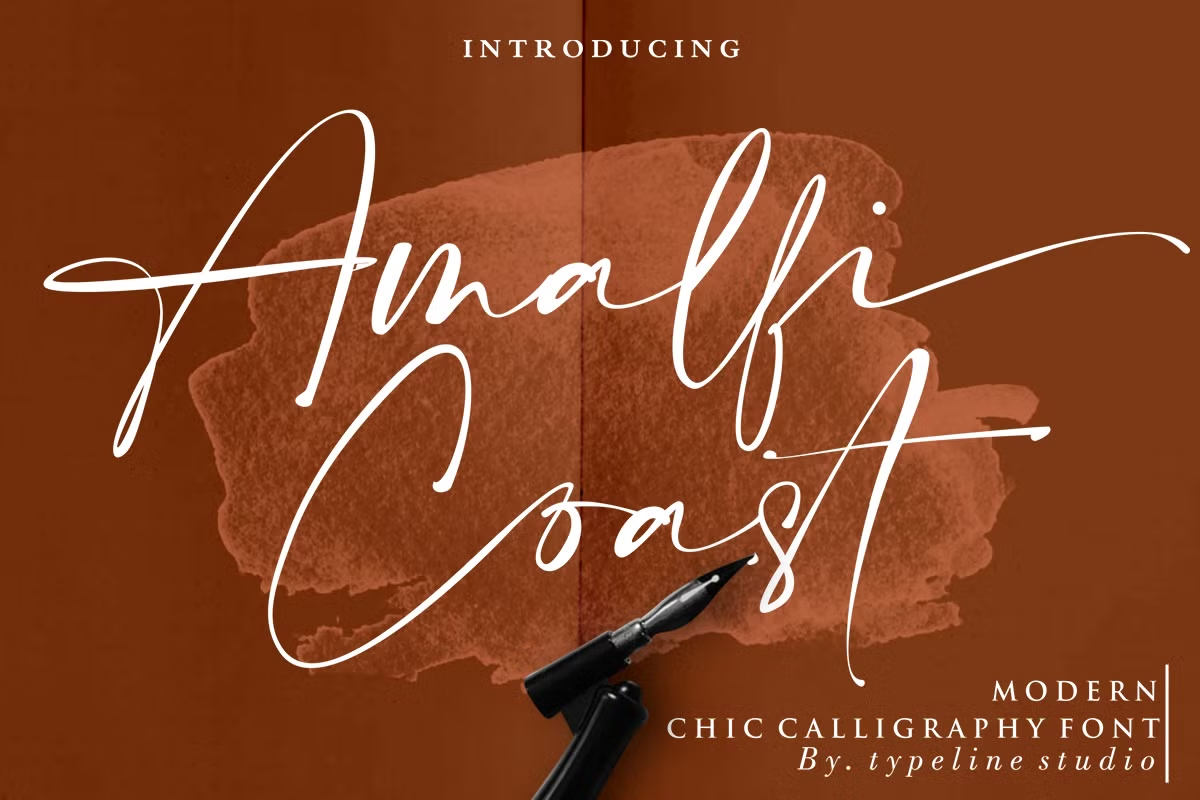
An Amalfi Coast Chic Calligraphy free download does exist, but only in a limited form: the designer, Typeline Studio, posts the main script as a free-for-personal-use font on its own DaFont profile. Anything that earns money, from a client logo to a printed product you sell, needs the paid licence from the Creative Market listing.
Amalfi Coast Chic Calligraphy free download: what’s actually available
The free version is listed on DaFont as “Amalfi Coast” by Typeline Studio, with a single file, Amalfi Coast.ttf. The licence note written by the designer is blunt: the font is “ONLY for PERSONAL USE,” promotional or commercial use requires a licence, and you should contact the designer before any such use. Personal use means a home-made birthday card or a mood board, not a logo for a business or a design you sell.
Free download: official Amalfi Coast Chic Calligraphy demo Free for personal use only. Designer's note: 'This font is ONLY for PERSONAL USE. NO COMMERCIAL USE ALLOWED', a licence
The paid product on Creative Market is broader. According to the listing it adds OTF and WOFF files, the Boowie companion font in upright and italic, and extra swash font files for software without a glyphs panel. When we checked in October 2026, a Desktop licence was $22 per seat, with separate, higher-priced Webfont, E-pub and App licences for websites, e-books and apps.
Get Amalfi Coast Chic Calligraphy — official listing
If a site offers an Amalfi Coast Chic Calligraphy free download of the whole pack, Boowie included, it isn’t the designer’s file, and it comes without a licence, so it can’t be used commercially either.
Free download: Amalfi Coast Chic Calligraphy (Amalfi Coast), personal use One style for personal use, shared with the designer’s permission. Commercial use needs a licence.
Amalfi Coast Chic Calligraphy specimen and verified specs
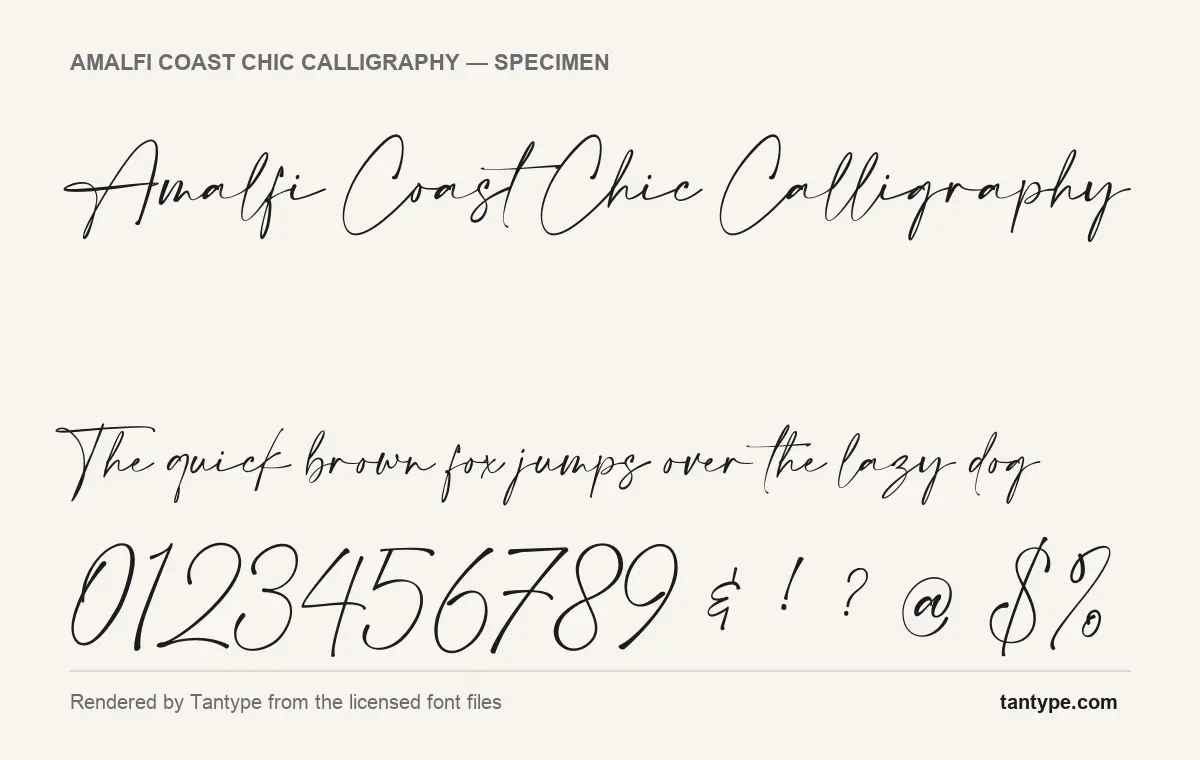
- Styles: 3 (Amalfi Coast, Boowie, BOOWIE italic Italic)
- File formats: OTF, TTF, WOFF
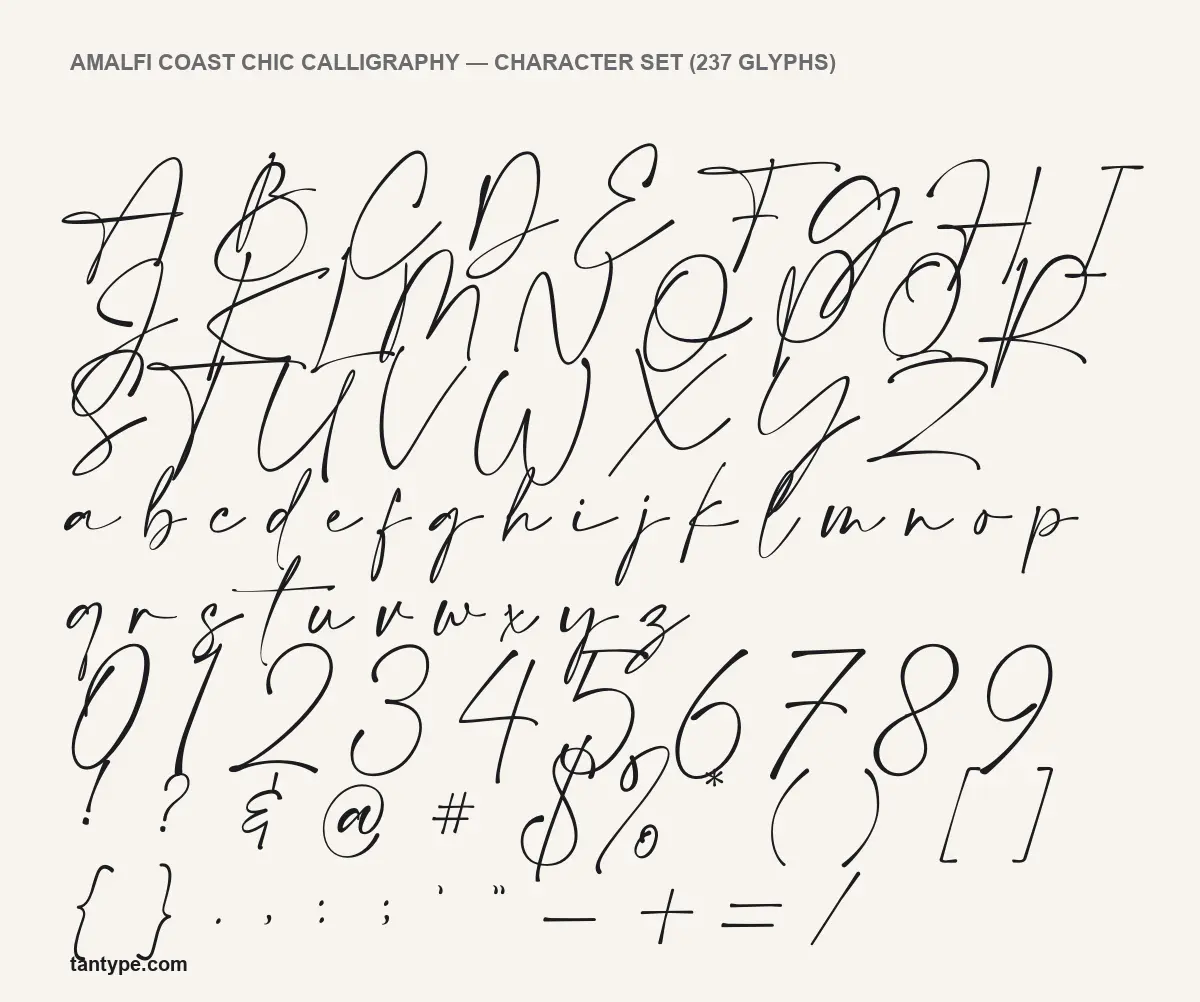
- Glyphs: 237
- Language support: Basic Latin (English), Western European
- OpenType features: standard ligatures, 2 stylistic sets
- PUA-encoded extras: 66 glyphs (usable in Canva and Cricut)
- Designer: typeline 2018
Checked by Tantype from the licensed font files.
Design and character
Amalfi Coast is a fast, slanted pen script. In the specimens rendered from the licensed font files, most strokes are hairline-thin, with slightly heavier downstrokes where a pen would press, which is what the designer means by “magical pressure.” The lowercase is small next to the capitals and ascenders: the l, h and k rise well above the x-height, and the t carries a long, straight crossbar that runs on into the next letter, as you can see in “Coast.”
The capitals do most of the decorating. The A, C and L in the specimen start with long entry strokes, and several caps in the character set, such as the G, J and S, drop loops below the baseline. The numerals are tall and drawn in the same quick hand. Letters touch or nearly touch rather than joining in a continuous chain, which keeps a signature-like look instead of formal copperplate.
The designer describes the font as hand-lettered, with beginning and ending swashes for the lowercase. In the font files, those extras sit in two stylistic sets and 66 private-use slots, covered below. Our specimens show the default letters you get when you simply type.
What’s in the Amalfi Coast Chic Calligraphy package
- Amalfi Coast, the script, in OTF, TTF and WOFF
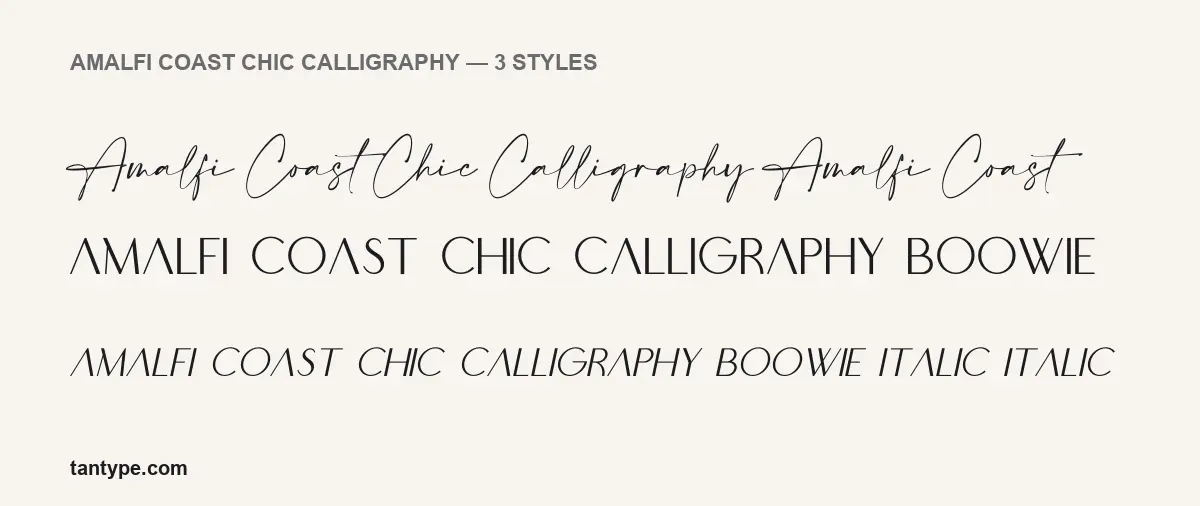
- Boowie and Boowie Italic, a thin display sans included as a bonus
- 237 glyphs in the script: A to Z, a to z, numerals, punctuation, ligatures and alternates
- Version 1.00, dated October 28, 2019 in the font files
- Extra swash font files for apps without a glyphs panel, according to the listing
In our styles image, Boowie renders everything in capitals, with a crossbar-less A, wide round C and O, and thin, even strokes. It makes a ready-made partner for small text under a script headline.
Language support and OpenType features
The font files cover Basic Latin plus the Western European set, which normally includes the accented letters used in French, Spanish, German, Italian and Portuguese.
- Standard ligatures swap certain letter pairs for joined versions automatically. They are on by default in Adobe apps, Affinity and most modern design tools.
- Two stylistic sets switch groups of letters to alternate forms in one step. Turn them on in Illustrator or InDesign through the OpenType panel, or in Photoshop’s Character panel; Affinity Designer shows them in its Typography panel.
The script also has 66 glyphs in the Private Use Area (PUA). That matters for Canva and Cricut Design Space, which can’t switch on stylistic sets. On Windows, open Character Map, choose Amalfi Coast, scroll to the end of the grid, copy an alternate and paste it into your text box. On a Mac, open the Character Viewer (Control-Command-Space), add the Unicode code table under Customise List, and look in the Private Use Area. Uploading your own fonts to Canva needs a paid Canva plan.
Best uses and font pairings
The listing pitches the font at signature logos, wedding stationery, social media graphics and product labels. The specimens suggest it works best where a word or two can be set large: a name, a short headline, a monogram. The hairline strokes will lose detail at small sizes and on busy photo backgrounds, so keep body text in something else.
- Boowie (included) for taglines, dates and small capitals.
- Cormorant Garamond, a high-contrast serif that matches the script’s hairlines on invitations.
- Montserrat in a light weight, tracked out in capitals, for a cleaner fashion or photography brand.
- Lato for body text on websites and menus.
Licensing: personal vs commercial use
The only official Amalfi Coast Chic Calligraphy free download is the DaFont file, and it is personal use only; the designer asks you to get in touch before any promotional or commercial use. For commercial work, buy a Creative Market licence. The listing describes the Desktop licence as covering uses such as logos, print, merchandise and images for websites or social media. Embedding the font on a website needs the Webfont licence, e-books and interactive PDFs need E-pub, and apps need the App licence. This is a general summary, not legal advice; read the licence that comes with your purchase.
How to install Amalfi Coast Chic Calligraphy
- Download Amalfi Coast Chic Calligraphy from your Creative Market purchases and unzip it.
- Windows: right-click the OTF file and choose Install, or “Install for all users”.
- Mac: double-click the OTF file and click Install Font in Font Book.
- Restart your design app so it picks up the new font.
Install the OTF or the TTF, not both. The WOFF file is for websites only.
Free alternatives to Amalfi Coast Chic Calligraphy
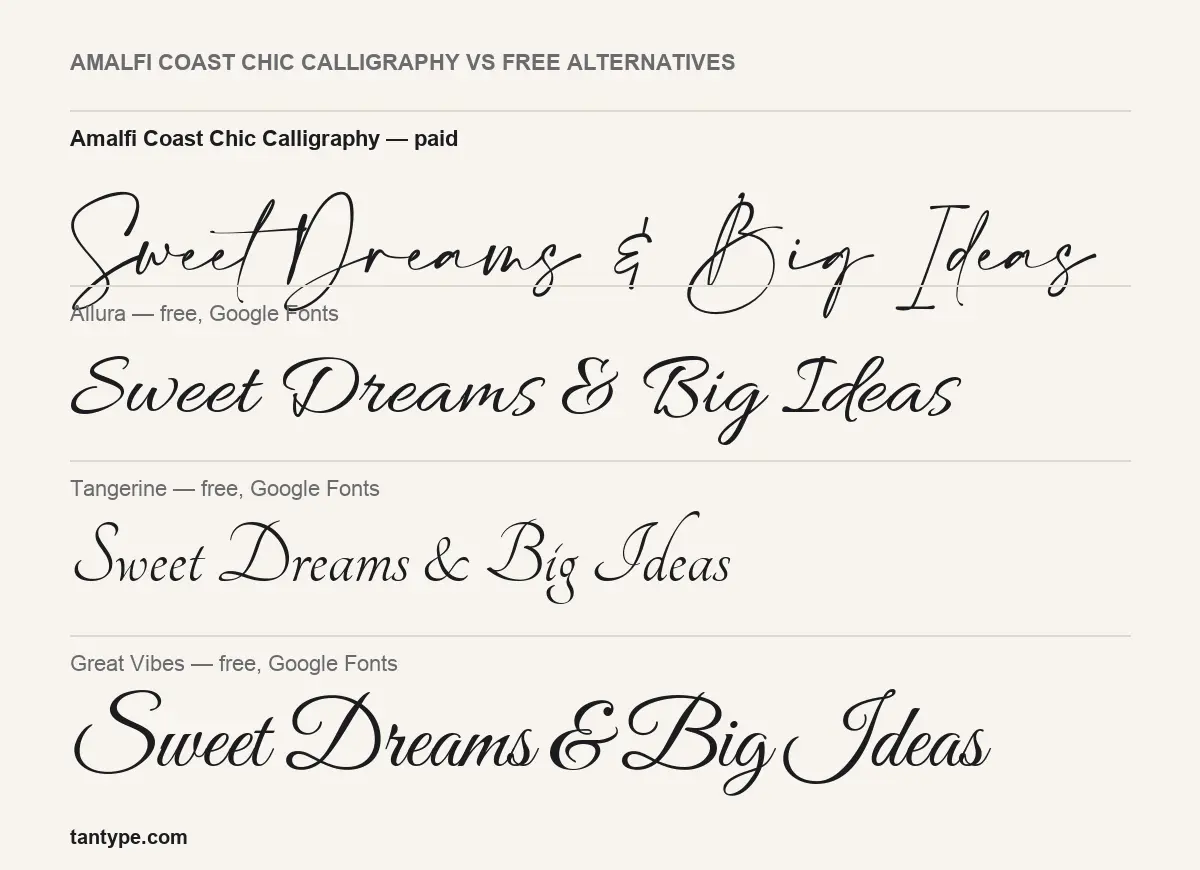
If the project is commercial and the budget is zero, these three Google Fonts are free under the SIL Open Font License. As our comparison image shows, none copies Amalfi Coast’s quick signature look:
- Allura is a heavier, more formal connected script with rounder capitals. Easier to read, less spontaneous.
- Tangerine is narrow and calligraphic with a very small x-height. It’s the closest in lightness, but it looks like traditional pen calligraphy rather than a fast signature.
- Great Vibes is the boldest of the three, with large looped capitals and steady joins. It suits formal invitations better than casual branding.
Amalfi Coast Chic Calligraphy FAQ
Is Amalfi Coast Chic Calligraphy free?
Only for personal use. The designer’s DaFont listing offers the script free for non-commercial projects. The full pack, with Boowie and a commercial licence, is paid.
Can I use the free version for commercial work?
No. The licence note says promotional and commercial use requires a licence. Buy one on Creative Market or contact the designer.
Does it work in Canva and Cricut?
Yes, once uploaded or installed. The stylistic sets won’t switch on there, but the 66 private-use alternates can be pasted in from Character Map or the Mac Character Viewer.
Who designed the Amalfi Coast Chic Calligraphy font?
Typeline Studio. The font files credit “typeline 2018”, and the DaFont page names Yadhie Setiawan of Typeline Studio as the creator.
